Sponsored

Raxiom Unit in the Works?

SVT_N8

@baggedcobra
Joined
Jan 9, 2015
Threads
9
Messages
286
Reaction score
90
Location
WV
First Name
Nate
Vehicle(s)
2015 Oxford White GT
I didn't know I was allowed to post yet because someone, who's name starts with an A and ends with lex, didn't text me and let me know. I'll have some pics and comments posted within the hour.
Sponsored

 

AMAlexLazarus

Well-Known Member
Diamond Sponsor
Joined
Sep 29, 2014
Threads
131
Messages
2,587
Reaction score
775
Location
Malvern, PA
Website
www.americanmuscle.com
First Name
Alex
Vehicle(s)
'14 F150 EcoBoost/'08 Bullitt
I didn't know I was allowed to post yet because someone, who's name starts with an A and ends with lex, didn't text me and let me know. I'll have some pics and comments posted within the hour.

[MENTION=13312]SVT_N8[/MENTION] - Let me just reiterate what everyone else is saying...Maybe post up a picture of your car in the meantime too but...


SVT_N8

@baggedcobra
Joined
Jan 9, 2015
Threads
9
Messages
286
Reaction score
90
Location
WV
First Name
Nate
Vehicle(s)
2015 Oxford White GT
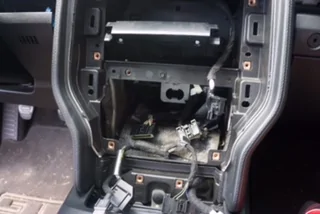
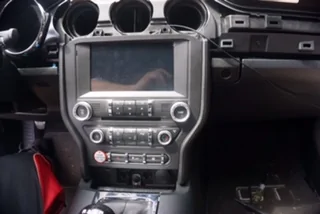
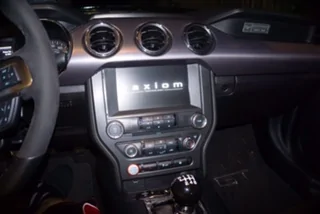
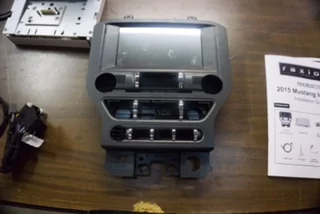
So the long awaited Raxiom Unit has made its debut. Well atleast 3 units have made its way into the world. Alex was very clear upfront that we were not to sugar coat anything and give an honest review (and he wanted 1,000 rounds of 7.62.....jk). The install took about 48oz of beer and required only a few tools; trim removal tools, T-10 torx and 7mm driver. Everything was straight forward, the instructions did skip over a small step or two but Alex will be getting that squared away I'm sure. I invited Alex to help but apparently 3hrs notice isn't enough time and building a vanity for your woman friend takes priority.

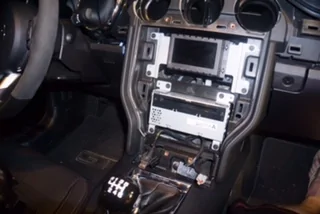
The factory trim pieces come off relatively easy if you have a set of plastic trim removal tools. Harbor Freight has them for like $10. I didn't break any clips. The instructions are fairly detailed and notate where each clip is located.

Untitled by N8 Pix, on Flickr

After 2hrs it was all back together and it fired right up on the first attempt, no starter fluid needed.

Untitled by N8 Pix, on Flickr

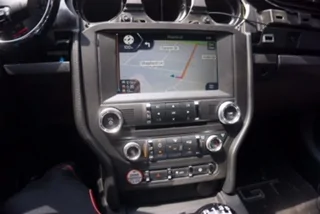
I love the OBDII read outs...

Untitled by N8 Pix, on Flickr


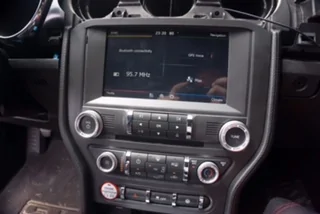
The only issue I've had is the clock. It keeps jumping back an hour every time I shut the car off. I can not figure it out for the life of me. I set it and it goes right back an hour. Time zone is set for Eastern. I'd think the GPS would automatically pickup the time but no.

Things I'd like to see change:
Customization. I just want to add my own background wallpaper. PLEASE!
Include an iPhone cable. You include one for Android.
Add satellite radio capability
Contrast/Brightness settings
Display song titles for radio and album covers for digital library

Things I like:
Susan from the United Kingdom
OBDII display
OEM appearance. Fit and finish.


I'm sure i'll think of some other stuff to add so it may change slightly. Overall i'd give it an 8/10. On functionality alone 10/10, just fix the clock!
I'd have no hesitation on purchasing this unit.

memday17 by N8 Pix, on Flickr
 
Last edited:

zackmd1

Well-Known Member
Joined
Oct 1, 2013
Threads
139
Messages
5,234
Reaction score
3,265
Location
Maryland
First Name
Zack
Vehicle(s)
1970 Mustang, 1965 AC Cobra, 2023 Ford Bronco 2Dr
[MENTION=13312]SVT_N8[/MENTION]

Set your time zone to Atlantic and set the time one hour ahead of current. When you turn the car off and back on again your time will be correct! It is a workaround right now as we wait for an update.
 

SVT_N8

@baggedcobra
Joined
Jan 9, 2015
Threads
9
Messages
286
Reaction score
90
Location
WV
First Name
Nate
Vehicle(s)
2015 Oxford White GT
@SVT_N8

Set your time zone to Atlantic and set the time one hour ahead of current. When you turn the car off and back on again your time will be correct! It is a workaround right now as we wait for an update.
Thanks! I text'd Steve who has the 3rd unit and he said his was working fine so I thought maybe it was just me. I thought it was one hour earlier all Sunday afternoon!!!

 

Sponsored

zackmd1

Well-Known Member
Joined
Oct 1, 2013
Threads
139
Messages
5,234
Reaction score
3,265
Location
Maryland
First Name
Zack
Vehicle(s)
1970 Mustang, 1965 AC Cobra, 2023 Ford Bronco 2Dr
Thanks! I text'd Steve who has the 3rd unit and he said his was working fine so I thought maybe it was just me. I thought it was one hour earlier all Sunday afternoon!!!
It was working fine for me before I changed the time zone manually. My theory is that it initially pulls it's time from the gps clock but then gets confused if you mess with the settings.
 

AMAlexLazarus

Well-Known Member
Diamond Sponsor
Joined
Sep 29, 2014
Threads
131
Messages
2,587
Reaction score
775
Location
Malvern, PA
Website
www.americanmuscle.com
First Name
Alex
Vehicle(s)
'14 F150 EcoBoost/'08 Bullitt
Thanks! I text'd Steve who has the 3rd unit and he said his was working fine so I thought maybe it was just me. I thought it was one hour earlier all Sunday afternoon!!!
[MENTION=13312]SVT_N8[/MENTION]

Be a dear and tag ol Bloomer wont you!?

He fell of the grid.

Alex
 

AMAlexLazarus

Well-Known Member
Diamond Sponsor
Joined
Sep 29, 2014
Threads
131
Messages
2,587
Reaction score
775
Location
Malvern, PA
Website
www.americanmuscle.com
First Name
Alex
Vehicle(s)
'14 F150 EcoBoost/'08 Bullitt
I'm here. man its hard to keep these guys happy when you work a day job haha. Working on the review now.
[MENTION=20202]Sbloom5_0[/MENTION] - Wanna switch for a day? :)

We'll be waiting for ya!
 

Lein

Well-Known Member
Joined
Sep 29, 2015
Threads
2
Messages
74
Reaction score
12
Location
Willow Springs, IL
Vehicle(s)
2015 GT PP
Do these units appear to keep time (albeit an hour fast or slow) to the minute at least, between uses? One issue that came up with some of the pre-release versions of this hardware that I ran in to was that it would jump to seemingly random times if I left the car off overnight, but it would seem to sync back up to my phone after about 20 seconds. Ideally it should keep the time WITHOUT requiring a phone connection.

Also has anyone had the chance to see if the Siri functions work if you hold down the voice command button on the steering wheel? You need the prerequisite software revision for the Sync module first of course, but that was one thing that didn't seem to work on my older revision of the hardware/software (pressing and holding the button would only dump it into the regular voice menu.)

One last thing: does it still change the Sync voice to one with a UK-accent? Not that this is a bad thing, but it confuses the heck out of everyone when it says 'mobile' and 'prepare to exit the motorway' and such. ;)
 

Sponsored

Sbloom5_0

GTFO_0012
Joined
Dec 6, 2015
Threads
5
Messages
58
Reaction score
36
Location
Norristown PA
First Name
Steve
Vehicle(s)
2015 Mustang GT
Alright sorry for the delay guys. I didn't want to post anything until the install was fully completed and I got to test everything for a few days. I'll probably just piggyback of the other guys at this point but here are my thoughts on the Raxiom unit.

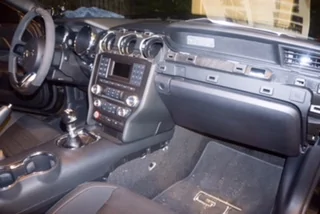
The initial impressions of the unit are exactly what you would expect from Raxiom and AM. The unit is made out of quality materials and looks 100% OEM when installed in the car. If you walked by and poked your head in the car, you would think it came that way from Ford.


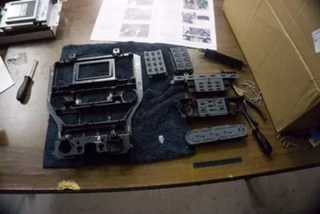
Install itself is super easy. If you can read instructions and use basic hand tools, you can tackle this install yourself not problem. Install should take about 2 hours, depending on how much beer you drink. The only tools you need to get the job done are a T-10 tor driver, 7mm nut driver, and a set of trim removal tools so you don't tear up your dash.

The instructions are very clear but I'll give you a quick summary of how the install goes.

1. remove the ac vent cover
2. remove the lower portion of the center console from the driver and passenger side
3. pry up on the center console, this lets you lift the top portion of the console about an inch. Helps with removing the factory unit
4. unbolt the factory unit
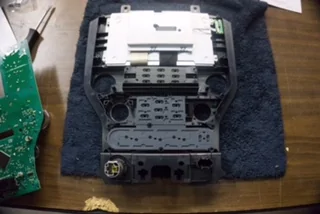
5. swap over the specified circuit board and buttons to the new unit
6. remove the old display unit and cd player
7. plug in the new harness to the back of the cd player and re install the cd player
8. plug in the new nav unit to the harness and connect the rest of the wiring
9. re install the new unit in the dash and put you dash pieces back together
10. enjoy your new nav unit

It really doesn't get much easier, everything is plug and play. The unit fired up perfect the first time with no issues. I haven't had the same clock problem as Nate so I think it just him lol. I've got about 5 hours of seat time in the car since the install and the unit functions perfectly. Nav works great and reroutes just fine, I even tried to confuse it a few times and it had no problems rerouting.

All in all, I am impressed with the unit, easy plug and play install and a product that works great right out of the box. Can't ask for much more that than.

I do wish it offered more customization options, it would be nice to change display colors and wallpapers but its not the end of the world.

Also when the unit turns on, it defaults to the radio. Which kind of sucks since I like to play my music from my phone 99% of the time so it would be nice to change that.

I will get the chance to play with the unit so more over the next few days and update on anything I find. Both good and bad.
image2 copy.webp
image1.webp
image4 copy.webp
image2.webp
image3 copy.webp
image3.webp
image4.webp
image5.webp
image6.webp
image1 copy.webp
 

thet33

Well-Known Member
Joined
Nov 19, 2015
Threads
10
Messages
665
Reaction score
117
Location
Dallas, TX
Vehicle(s)
2016 Magnetic GT/6MT/3.55
Questions for testers whenever you get a chance...

1) Are you able to access Siri hands free when you press the voice recognition button on the steering wheel or does it pull up the Ford voice rec?
2) Are you able seek/scan through music, either by the steering wheel or on screen?

Thanks in advance

 

Sbloom5_0

GTFO_0012
Joined
Dec 6, 2015
Threads
5
Messages
58
Reaction score
36
Location
Norristown PA
First Name
Steve
Vehicle(s)
2015 Mustang GT
Questions for testers whenever you get a chance...

1) Are you able to access Siri hands free when you press the voice recognition button on the steering wheel or does it pull up the Ford voice rec?
2) Are you able seek/scan through music, either by the steering wheel or on screen?

Thanks in advance
1. When you press the voice recognition button it pulls up Ford voice rec not Siri

2. You are able to change tracks/preset stations on the steering wheel and seek/scan from the screen. All other steering wheel controls function as well.
 

Ultimateone

Yes is that's guy /\
Joined
Jun 18, 2015
Threads
26
Messages
833
Reaction score
178
Location
Boston, MA
Vehicle(s)
F32 435i Xdrive
1. When you press the voice recognition button it pulls up Ford voice rec not Siri

2. You are able to change tracks/preset stations on the steering wheel and seek/scan from the screen. All other steering wheel controls function as well.
You can actually fast forward and reverse music?


Top