Mikepol2
Well-Known Member
- Joined
- Jul 17, 2018
- Threads
- 140
- Messages
- 4,016
- Reaction score
- 7,157
- Location
- Pittsburgh, PA
- First Name
- Mike
- Vehicle(s)
- 2021 Mach 1, 2019 Ram 1500
- Thread starter
- #1
https://www.vland-carlamp.com/LED_M...ord_Mustang_Clear_Lens/p4995994_19940473.aspx
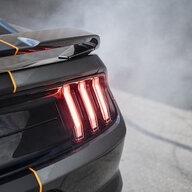
Just installed a set of these clear multi-mode Vland tail lights and wanted to post some install tips because the Chinese instructions suck, and I couldn't find any tips anywhere else on 6G or Youtube.
First lesson that I had to learn was that our U.S. Mustangs are "USDM" (United States Domestic Market I believe). Important because the instructions have steps for USDM cars and for non-USDM cars.
Physically installing the lights is really easy:
1) Open the trunk and unscrew (4) knobs from the back plastic trim piece that surrounds the latch. Lift the trim piece up and out. It has 2 snap tabs and 4 hooks.
2) Remove (1) trim push pin from each side that holds the carpet trim in place. There are magnets (!) holding the rest of the trim to the sides of the car.
3) Remove the carpeted spare tire / inflation tank cover.
4) Unclip the wiring harness connector behind each light.
5) Remove (3) 10mm nuts on each side and slide the lights out of the car. The harness passes through a rubber grommet; just push the whole grommet out from the inside so you can pull out the harness.
6) Remove the black plastic water drain trim piece from the top of each factory light for installation on the new lights. There are two snap tabs that hold it in place, I used a trim removal tool to gently pop them off.
Installation is easy and is the reverse process.
BUT.... there are other wires that come with the kit that make the install a PIA. There are two short (6" long) harnesses with a connector on each end. THESE ARE FOR NON-USDM CARS and are not used. It took me a while to figure this out. There is also a long yellow wire that DOES get used, it gets connected to the high mount 3rd brake light. How, you may ask? EXACTLY. What a pain. The instructions are useless - they basically say "plug it in". Here's what I did (luckily I had recently installed new rear deck speakers or wouldn't have figured this out):
A) Fold down the 2 rear seats.
B) Pull the plastic trim piece that surrounds the top of the seat belt away from the plastic base on each side.
C) Gently pull the two side plastic trim panels away from the car. There are several clips holding them to the side of the car. They are attached at the door sill so don't pull them away that far. Be careful because they will scratch up the plastic C-pillar trim (on each side of the rear window).
D) Remove (1) plastic push pin from each side of the rear carpeted deck, they are hidden behind the two side trim panels.
E) Pull the rear carpeted deck towards you to remove it. There are gray foam pads that are crappily glued to the bottom of the deck, a few fell off when I removed it.
F) Now sit on the folded-down rear seats facing the front of the car and gently bend down the headliner in the middle where it meets the rear window. You will see a small black plastic connector that looks like the connector on the end of the long yellow wire. Unclip the factory connector and clip the ends of the yellow wire into the factory connectors.
G) Gently pull the driver's side C-pillar plastic trim away from the car near the rear window, but don't totally remove it, there is an air bag in there. I ran the yellow wire under the headliner and down the top edge of this trim piece. At the far back driver's side corner of the exposed metal rear deck is a small slot, about 1-1/4" long x 1/8" wide. This slot is where I ran the yellow wire into the trunk. I looped it around the rear-most pointed end of the C-pillar trim and snapped the trim back into place, then reassembled the rear trim panels, rear deck, and seats.
H) Now that the yellow wire is in the trunk, it's super easy to run it to the driver's side tail light connector and then across to the passenger side. There are small push-pin connectors, no wiring or splicing needed, just plug it in.
Reassemble the trunk trim and you're done. TOTAL pain but without that 3rd brake light wire, the tail lights lit up but didn't work right. When you hit the brake, the lights would turn yellow for a second and then turn off.
Programming note: Mode 5 is called "Factory" in the manual but it includes yellow hazards and turn signals so that must mean factory in China or something. I kept thinking I wasn't programming right because I was trying to program to "Factory" but kept seeing yellow lights. Mode 3 is USDM (all red) and acts like our U.S. factory lights.
OK between typing all this and installing the lights my fingers are tired AF. Good luck guys, hope this helps someone out.
Just installed a set of these clear multi-mode Vland tail lights and wanted to post some install tips because the Chinese instructions suck, and I couldn't find any tips anywhere else on 6G or Youtube.
First lesson that I had to learn was that our U.S. Mustangs are "USDM" (United States Domestic Market I believe). Important because the instructions have steps for USDM cars and for non-USDM cars.
Physically installing the lights is really easy:
1) Open the trunk and unscrew (4) knobs from the back plastic trim piece that surrounds the latch. Lift the trim piece up and out. It has 2 snap tabs and 4 hooks.
2) Remove (1) trim push pin from each side that holds the carpet trim in place. There are magnets (!) holding the rest of the trim to the sides of the car.
3) Remove the carpeted spare tire / inflation tank cover.
4) Unclip the wiring harness connector behind each light.
5) Remove (3) 10mm nuts on each side and slide the lights out of the car. The harness passes through a rubber grommet; just push the whole grommet out from the inside so you can pull out the harness.
6) Remove the black plastic water drain trim piece from the top of each factory light for installation on the new lights. There are two snap tabs that hold it in place, I used a trim removal tool to gently pop them off.
Installation is easy and is the reverse process.
BUT.... there are other wires that come with the kit that make the install a PIA. There are two short (6" long) harnesses with a connector on each end. THESE ARE FOR NON-USDM CARS and are not used. It took me a while to figure this out. There is also a long yellow wire that DOES get used, it gets connected to the high mount 3rd brake light. How, you may ask? EXACTLY. What a pain. The instructions are useless - they basically say "plug it in". Here's what I did (luckily I had recently installed new rear deck speakers or wouldn't have figured this out):
A) Fold down the 2 rear seats.
B) Pull the plastic trim piece that surrounds the top of the seat belt away from the plastic base on each side.
C) Gently pull the two side plastic trim panels away from the car. There are several clips holding them to the side of the car. They are attached at the door sill so don't pull them away that far. Be careful because they will scratch up the plastic C-pillar trim (on each side of the rear window).
D) Remove (1) plastic push pin from each side of the rear carpeted deck, they are hidden behind the two side trim panels.
E) Pull the rear carpeted deck towards you to remove it. There are gray foam pads that are crappily glued to the bottom of the deck, a few fell off when I removed it.
F) Now sit on the folded-down rear seats facing the front of the car and gently bend down the headliner in the middle where it meets the rear window. You will see a small black plastic connector that looks like the connector on the end of the long yellow wire. Unclip the factory connector and clip the ends of the yellow wire into the factory connectors.
G) Gently pull the driver's side C-pillar plastic trim away from the car near the rear window, but don't totally remove it, there is an air bag in there. I ran the yellow wire under the headliner and down the top edge of this trim piece. At the far back driver's side corner of the exposed metal rear deck is a small slot, about 1-1/4" long x 1/8" wide. This slot is where I ran the yellow wire into the trunk. I looped it around the rear-most pointed end of the C-pillar trim and snapped the trim back into place, then reassembled the rear trim panels, rear deck, and seats.
H) Now that the yellow wire is in the trunk, it's super easy to run it to the driver's side tail light connector and then across to the passenger side. There are small push-pin connectors, no wiring or splicing needed, just plug it in.
Reassemble the trunk trim and you're done. TOTAL pain but without that 3rd brake light wire, the tail lights lit up but didn't work right. When you hit the brake, the lights would turn yellow for a second and then turn off.
Programming note: Mode 5 is called "Factory" in the manual but it includes yellow hazards and turn signals so that must mean factory in China or something. I kept thinking I wasn't programming right because I was trying to program to "Factory" but kept seeing yellow lights. Mode 3 is USDM (all red) and acts like our U.S. factory lights.
OK between typing all this and installing the lights my fingers are tired AF. Good luck guys, hope this helps someone out.
Sponsored
Last edited: