
Sponsored

Sync 2 crazyness

Enoch

Well-Known Member
Joined
Feb 10, 2015
Threads
83
Messages
2,203
Reaction score
1,105
Location
UK
First Name
Andy
Vehicle(s)
Guard 5.0 (Auto) Fastback, Saddle Leather
Any of the techies out there that can offer any advice on this one:)

Put all my music on a flash drive, all sorted into folders for each artist, album art included....all working fine:D

Except one album..for some reason this album has 4 copies of every song in it...
So song 1 is called under the sky, and this plays 4 times before it gets to song 2, which then also plays 4 times, and so on..... So the 11 song album contains 44 songs...

I removed the flash drive, and checked the content...that particular album only has 11 songs in it......how can this be??
Sponsored


 

Heretian

Well-Known Member
Joined
Dec 27, 2015
Threads
10
Messages
490
Reaction score
186
Location
United Kingdom
Vehicle(s)
Ex GT in TY. Now GT Shadow in RR
Any other files in the folder? Playlists etc? Clear it down to just those 11 files and try again.
 
OP
OP
Enoch

Enoch

Well-Known Member
Joined
Feb 10, 2015
Threads
83
Messages
2,203
Reaction score
1,105
Location
UK
First Name
Andy
Vehicle(s)
Guard 5.0 (Auto) Fastback, Saddle Leather
Any other files in the folder? Playlists etc? Clear it down to just those 11 files and try again.
No...no playlists......the group is THE ANSWER and the album is RISE...it contains 11 tracks.....I've deleted the folder from the flash drive, reloaded the CD into iTunes, created a new folder, and copied and pasted the album from iTunes to a new folder in the flash drive...

If I remove the flash drive now, and put it in my PC, I can see that folder only contains 11 tracks.....put it back in the car, and it has 44 tracks

I've deleted and reloaded the folder a few times, the result is always the same..:lol:

Does the Sync 2 have an internal memory??... It's got me foxed:confused::confused:
 

goldengooner

Well-Known Member
Joined
Mar 1, 2016
Threads
64
Messages
2,049
Reaction score
353
Location
London UK
First Name
Larry
Vehicle(s)
Shadow Black 2016 California Special Convertible
No...no playlists......the group is THE ANSWER and the album is RISE...it contains 11 tracks.....I've deleted the folder from the flash drive, reloaded the CD into iTunes, created a new folder, and copied and pasted the album from iTunes to a new folder in the flash drive...

If I remove the flash drive now, and put it in my PC, I can see that folder only contains 11 tracks.....put it back in the car, and it has 44 tracks

I've deleted and reloaded the folder a few times, the result is always the same..:lol:

Does the Sync 2 have an internal memory??... It's got me foxed:confused::confused:
Must like the group
Have you tried it with no group or song name, just a generic 1 to 11
 

Lone Survivor

Banned
Banned
Banned
Joined
Jun 5, 2015
Threads
46
Messages
2,251
Reaction score
760
Location
Glasgow, Scotland
Vehicle(s)
Priscilla McMustang GT Ruby Team DS
Just keep that cd in the player and delete from the flash drive ;)
 

Sponsored

jord79

Well-Known Member
Joined
Jul 26, 2015
Threads
69
Messages
969
Reaction score
179
Location
West Yorkshire
Vehicle(s)
2016 Mustang GT
Do you have gracenote management set to 'on'? If so, try it 'off'. And then re index the media player in sync. That solved MOST of my issues, but I still have tracks playing in the wrong order when it comes to double CDs
 

PD66

Member
Joined
Apr 4, 2016
Threads
0
Messages
9
Reaction score
1
Location
Manchester, UK
Vehicle(s)
MY17 Race Red Ecoboost
[MENTION=17421]jord79[/MENTION] Does the meta data on the tracks from your double CDs include a disc number as well as a track number? If not you may be getting the two track 1's from each disc first then the two track 2's etc....I came across this in itunes when tagging my music collection and solved it by adding disc numbers.
 
OP
OP
Enoch

Enoch

Well-Known Member
Joined
Feb 10, 2015
Threads
83
Messages
2,203
Reaction score
1,105
Location
UK
First Name
Andy
Vehicle(s)
Guard 5.0 (Auto) Fastback, Saddle Leather
Do you have gracenote management set to 'on'? If so, try it 'off'. And then re index the media player in sync. That solved MOST of my issues, but I still have tracks playing in the wrong order when it comes to double CDs
No gracenote is off........I'm going to load the music to another flash drive from an old Windows PCS and see what that does:)

But first I need to fix my trolley jack:frusty::paddle:
 

jord79

Well-Known Member
Joined
Jul 26, 2015
Threads
69
Messages
969
Reaction score
179
Location
West Yorkshire
Vehicle(s)
2016 Mustang GT
[MENTION=17421]jord79[/MENTION] Does the meta data on the tracks from your double CDs include a disc number as well as a track number? If not you may be getting the two track 1's from each disc first then the two track 2's etc....I came across this in itunes when tagging my music collection and solved it by adding disc numbers.
It is doing exactly that. Plays disc 2, track 1 first then, 1-1, 2-2, 1-2 and so on. However, as far as I can tell, the metadata does include the disc number as well, so in my case this isn't fixed.

What did you use to edit the metadata?
 

Sponsored

Manders Mustang

The Boss
Joined
Dec 3, 2015
Threads
96
Messages
12,999
Reaction score
2,441
Location
Birmingham - United Kingdom
First Name
Steve
Vehicle(s)
2016 Race Red Ecoboost
Vehicle Showcase
1
Spotify, find the songs, put album into a playlist, then next album, then next etc. When you want to change song, just scroll to the new album, press play, if shuffle is off, it'll play down the list in the order put into the playlist...(If you don't manage to sort your cd issue)
 

PD66

Member
Joined
Apr 4, 2016
Threads
0
Messages
9
Reaction score
1
Location
Manchester, UK
Vehicle(s)
MY17 Race Red Ecoboost
[MENTION=17421]jord79[/MENTION] - I use a program called 'Tag & Rename' to keep my music library in order (over 30k songs) and that definitely has a disc number field in it but I think itunes does in the individual track info as well
 
OP
OP
Enoch

Enoch

Well-Known Member
Joined
Feb 10, 2015
Threads
83
Messages
2,203
Reaction score
1,105
Location
UK
First Name
Andy
Vehicle(s)
Guard 5.0 (Auto) Fastback, Saddle Leather
Well I got to the bottom of my issue:thumbsup:.....couldn't understand why a particular album I'd deleted kept playing songs despite the folder not being there..:confused:
Got into command prompt on my PC and there were loads of hidden files on my flash drive..and guess what, they contained the songs from the folder I'd deleted. So I deleted them all....flash drive plays fine now:cheers:
 

jord79

Well-Known Member
Joined
Jul 26, 2015
Threads
69
Messages
969
Reaction score
179
Location
West Yorkshire
Vehicle(s)
2016 Mustang GT
[MENTION=17421]jord79[/MENTION] - I use a program called 'Tag & Rename' to keep my music library in order (over 30k songs) and that definitely has a disc number field in it but I think itunes does in the individual track info as well
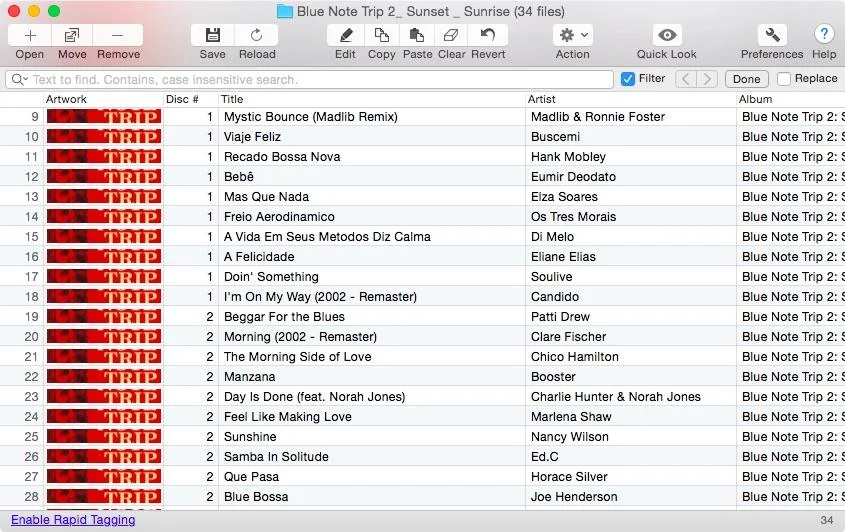
Here's a snapshot of a program I downloaded yesterday (Tag & Edit). It shows one of the offenders and it clearly has a disc number field, but it's still playing 2-1, 1-1, 2-2, 1-2 etc.

Stumped!

Untitled.webp
 

PD66

Member
Joined
Apr 4, 2016
Threads
0
Messages
9
Reaction score
1
Location
Manchester, UK
Vehicle(s)
MY17 Race Red Ecoboost
[MENTION=17421]jord79[/MENTION] - Only other suggestion I have Is looking at the 'sorting' tags to ensure nothing odd going on there?
Sponsored


Top