Sponsored

Spotify Applink Ford sync

Enoch

Well-Known Member
Joined
Feb 10, 2015
Threads
83
Messages
2,203
Reaction score
1,105
Location
UK
First Name
Andy
Vehicle(s)
Guard 5.0 (Auto) Fastback, Saddle Leather
Another weird thing, I have a home made compilation of my favourite music....
As album art I added a pic of my car....and this is what shows when I play from the ipod:thumbsup:

Now that I've transferred everything to a flash drive, I still get all my album art except for the compilation, which shows a generic "pop" picture.....go figure:confused:

Main thing is, I now have 3800 songs all on that tiny flash drive..:D
Sponsored


Entick

Well-Known Member
Joined
Nov 11, 2014
Threads
8
Messages
324
Reaction score
31
Location
UK
Vehicle(s)
Mustang GT Coupe
Equally a slightly quicker way is to hit play on spotify, then hop in your car, plug it into the USB and it'll auto play :).
Will save you all a load of time... this won't work if you don't have any music on your iphone (i.e. outside of the spotify app - on the phone itself).

To make spotify work you will need to have at least one song on your phone.

Strange bug...
 

Manders Mustang

The Boss
Joined
Dec 3, 2015
Threads
96
Messages
12,999
Reaction score
2,441
Location
Birmingham - United Kingdom
First Name
Steve
Vehicle(s)
2016 Race Red Ecoboost
Vehicle Showcase
1
Will save you all a load of time... this won't work if you don't have any music on your iphone (i.e. outside of the spotify app - on the phone itself).

To make spotify work you will need to have at least one song on your phone.

Strange bug...
indeed most phones come with some rubbish preloaded, like U2 on Iphones and "Over the horizon" on Samsungs.... :thumbsup:
 

SteveS

...Bon Scott Land...
Joined
Mar 17, 2015
Threads
16
Messages
4,549
Reaction score
1,232
Location
Bon Scott Land
First Name
Steve
Vehicle(s)
Mustang GT Magnetic
Regarding USB - I was reading the manual last night, cos I'm that much fun, and it seems to suggest that if you put all your songs at the root of the stick it numbers them 1-255 meaning you'd only get 255 songs. If you put them in multiple folders you would get up to 255 folders with 255 songs in each.
Anyone got any experience with this as USB will be the way I'd go?
 

Eclipsar

Well-Known Member
Joined
Feb 9, 2016
Threads
64
Messages
2,068
Reaction score
1,838
Location
UK
Vehicle(s)
NFG Mustang GT
indeed most phones come with some rubbish preloaded, like U2 on Iphones and "Over the horizon" on Samsungs.... :thumbsup:
I was only trying to work out today how I had U2 songs on my iPhone now I know
 

Sponsored

HizliBullet

GT350
Joined
Nov 16, 2015
Threads
76
Messages
2,491
Reaction score
874
Location
Canada
First Name
Mustang
Vehicle(s)
16 GT350, 17 Edge Sport
Vehicle Showcase
1
anyone here got sync 3 android auto update?
 

Actual

Well-Known Member
Joined
Sep 4, 2014
Threads
16
Messages
448
Reaction score
138
Location
Bracknell, UK
First Name
Mark
Vehicle(s)
2015 Mustang 5.0 V8 GT Auto Fastback Black
How do you run Google maps or waze through your sync 2 or did I read it wrong.
I get into my Mustang and turn on the ignition and my Nexus 5X Android phone connects to Sync over Bluetooth and the phone launches Google Maps, Waze, TomTom Speed Cameras and Spotify and all at the same time and simultaneously and they all run through the Sync 2 over Bluetooth to the car speakers. No wires required except a USB charging cable connected to my Brodit drop in cradle.

The current Spotify track info is displayed on the Sync 2 Entertainment screen or in the bottom right hand corner if the Sync 2 Home screen is active and Spotify can be controlled from the Sync 2 Entertainment touchscreen to play, pause and skip forwards and back tracks and the same can be done from the steering wheel controls and ***STOP PRESS*** press the voice control button the steering wheel and say "Bluetooth Audio" and the Spotify stream can be controlled by voice but it is much easer to use the steering wheel controls.

While Spotify tracks are playing over the car speakers...

Telephone calls can be made and received.
Google Maps navigation instructions are played over the car speakers.
TomTom Speed Camera warnings are played over the car speakers.
Waze navigation and speed camera warnings are played over the car speakers.

These apps make announcements using the car speakers and when they do the Spotify stream lowers in volume.

TomTom and Waze use GPS location and real-time databases updated over 3G.

So I have 2 active sources for speed camera warnings from independent sources and I have to say they have saved me more than 3 points and not always when I am deliberately speeding such as in low speed limit urban environments like empty down hill dual carriageways with a 40 mph limit.

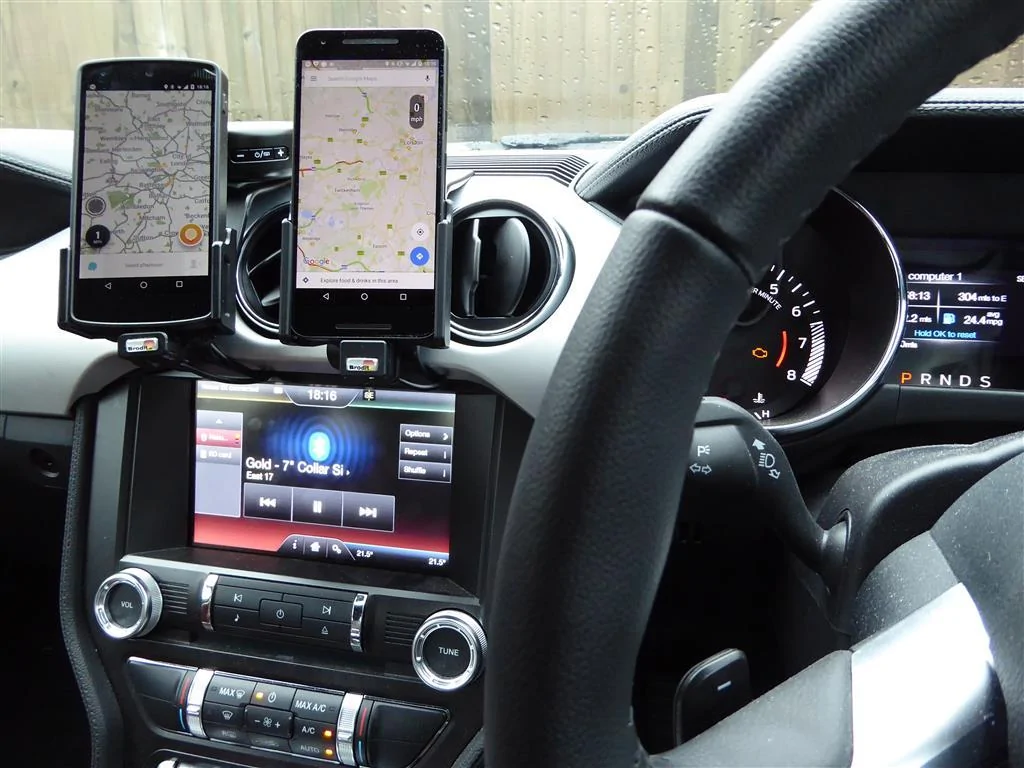
As running Google Maps and Waze on the same device is not very effective I added a second Brodit Cradle which I use for my older Nexus 5 which is dedicated to Waze and as the Mustang Sync 2 can only connect to one audio source I use an external Bluetooth speaker on maximum volume for Waze.

On the Google Maps screen you can just see the TomTom Speed Cameras overlay which shows additional relevant information when actually moving.
Cradles, Phones, Sync 2 P1010869 (Medium).webp
 

Sponsored
OP
OP
stevec

stevec

Well-Known Member
Joined
Apr 28, 2014
Threads
63
Messages
2,772
Reaction score
1,199
Location
hastings
Vehicle(s)
2015 Mustang GT!!
I get into my Mustang and turn on the ignition and my Nexus 5X Android phone connects to Sync over Bluetooth and the phone launches Google Maps, Waze, TomTom Speed Cameras and Spotify and all at the same time and simultaneously and they all run through the Sync 2 over Bluetooth to the car speakers. No wires required except a USB charging cable connected to my Brodit drop in cradle.

The current Spotify track info is displayed on the Sync 2 Entertainment screen or in the bottom right hand corner if the Sync 2 Home screen is active and Spotify can be controlled from the Sync 2 Entertainment touchscreen to play, pause and skip forwards and back tracks and the same can be done from the steering wheel controls and ***STOP PRESS*** press the voice control button the steering wheel and say "Bluetooth Audio" and the Spotify stream can be controlled by voice but it is much easer to use the steering wheel controls.

While Spotify tracks are playing over the car speakers...

Telephone calls can be made and received.
Google Maps navigation instructions are played over the car speakers.
TomTom Speed Camera warnings are played over the car speakers.
Waze navigation and speed camera warnings are played over the car speakers.

These apps make announcements using the car speakers and when they do the Spotify stream lowers in volume.

TomTom and Waze use GPS location and real-time databases updated over 3G.

So I have 2 active sources for speed camera warnings from independent sources and I have to say they have saved me more than 3 points and not always when I am deliberately speeding such as in low speed limit urban environments like empty down hill dual carriageways with a 40 mph limit.

As running Google Maps and Waze on the same device is not very effective I added a second Brodit Cradle which I use for my older Nexus 5 which is dedicated to Waze and as the Mustang Sync 2 can only connect to one audio source I use an external Bluetooth speaker on maximum volume for Waze.

On the Google Maps screen you can just see the TomTom Speed Cameras overlay which shows additional relevant information when actually moving.
Cradles, Phones, Sync 2 P1010869 (Medium).webp
Good stuff, I may grab you if you come to Brands!!
 

Beachfun

Well-Known Member
Joined
Jan 10, 2015
Threads
13
Messages
233
Reaction score
47
Location
UK South Coast
Vehicle(s)
Airbus A380
OK Guys - Help Please?
1st I know nothing about music related tech stuff!

What I would like to do is have around 30 or so songs stored if possible in the car?
I see that Spotify have a deal on at the moment so plan to open an acount to download some music unless there is a better option?

But what is the best way to get it in the car? The car can connect to the home wifi if that helps!
I would prefer to have it permantly stored if possible?
If not what is the next best option .. SD or USB I could use an old iPod but it already has a load of crap music of my daughters on it!
I have an android phone but it may not always be in the car!
Any advice would be appreciated?
 

Manders Mustang

The Boss
Joined
Dec 3, 2015
Threads
96
Messages
12,999
Reaction score
2,441
Location
Birmingham - United Kingdom
First Name
Steve
Vehicle(s)
2016 Race Red Ecoboost
Vehicle Showcase
1
USB Stick will work, download all relevant songs to USB, put USB in one of the car USB spots (Mine would be centre console, as my arm rest one is phone charger) and then when you flick to USB they'll start playin


Spotify wont let you download the songs outside of the App - but then allows you to online stream any music, and offline stream downloaded music. (Through Bluetooth to the car)
 

Beachfun

Well-Known Member
Joined
Jan 10, 2015
Threads
13
Messages
233
Reaction score
47
Location
UK South Coast
Vehicle(s)
Airbus A380
USB Stick will work, download all relevant songs to USB, put USB in one of the car USB spots (Mine would be centre console, as my arm rest one is phone charger) and then when you flick to USB they'll start playin


Spotify wont let you download the songs outside of the App - but then allows you to online stream any music, and offline stream downloaded music. (Through Bluetooth to the car)
If Spotify won't let you download outside of the app how do I get on the USB stick?
Or would it be better to get an iPod or similar - or put on my phone and make sure the phone is in the car when I want music?
Sponsored


Top