Sponsored

Lane Keep Assist icon

Tin O' Spam

Well-Known Member
Joined
Jun 11, 2019
Threads
3
Messages
105
Reaction score
207
Location
Kent
First Name
Sam
Vehicle(s)
2019 Ford Mustang GT
Vehicle Showcase
1
Forgive me if I'm being a little dim here (it shouldn't be a surprise at this point), but I have the most minor of gripes with the LCD cluster. In the centre of the speedo is the lane keep assist icon, which is grey when inactive and puts in the white "bowling bumpers" when activated by the button. I'm not really a user of LKA, so I spend my time with it deactivated, but it still sits there, greyed out, in the speedo. How do you get rid of the large icon, so I can get my big speedo numbers to make the cluster look a little more 'clean'? I've had a nosey at the manual, but to no avail thus far...

Cheers!
Sponsored


SteveS

...Bon Scott Land...
Joined
Mar 17, 2015
Threads
16
Messages
4,549
Reaction score
1,232
Location
Bon Scott Land
First Name
Steve
Vehicle(s)
Mustang GT Magnetic
Always sits there in my Mondeo and the same graphic does the ACC.
 

Gregs24

Well-Known Member
Joined
Aug 31, 2018
Threads
23
Messages
4,759
Reaction score
3,038
Location
Wiltshire UK & Charente FR
First Name
Greg
Vehicle(s)
Mustang V8 GT, Ford Kuga PHEV
Not there on mine and turned off in the Mondeo as well. There is a setting in the Mondeo to hide it so it only shows up with the ACC
 

SteveS

...Bon Scott Land...
Joined
Mar 17, 2015
Threads
16
Messages
4,549
Reaction score
1,232
Location
Bon Scott Land
First Name
Steve
Vehicle(s)
Mustang GT Magnetic
Not there on mine and turned off in the Mondeo as well. There is a setting in the Mondeo to hide it so it only shows up with the ACC
Will look for that thanks.
 
OP
OP
Tin O' Spam

Tin O' Spam

Well-Known Member
Joined
Jun 11, 2019
Threads
3
Messages
105
Reaction score
207
Location
Kent
First Name
Sam
Vehicle(s)
2019 Ford Mustang GT
Vehicle Showcase
1
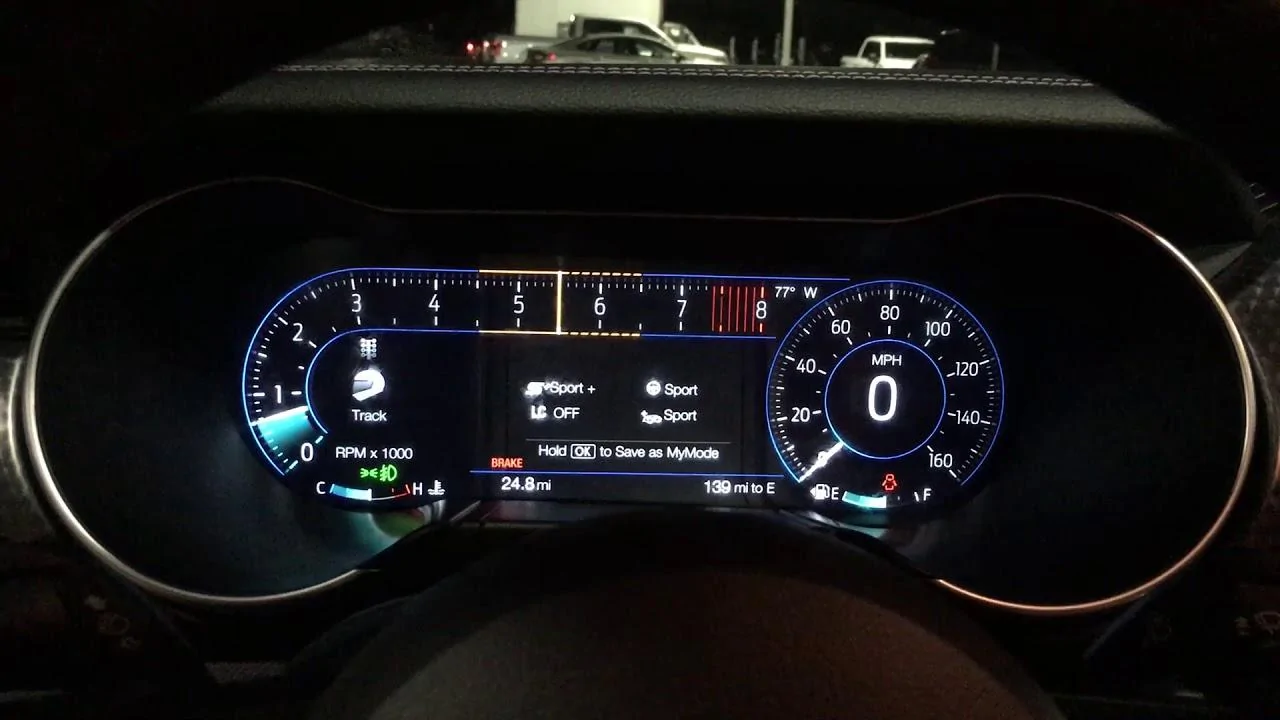
For reference, this is the current situation. It's by no means the end of the world, but it doesn't look as tidy as the big speed number seen on the second (example) picture


WP_20190623_09_13_53_Pro[1].webp


This is one I nabbed off Google, with the larger numbers and no LKA indicator
maxresdefault.webp
 

Sponsored

CraigJ

Well-Known Member
Joined
Oct 28, 2018
Threads
19
Messages
337
Reaction score
327
Location
Wakefield, UK
Vehicle(s)
2016 Mustang GT, 97 Westfield SEW
You could turn it off with FORScan but it will be off permanently.
 

Damo66

Well-Known Member
Joined
Mar 22, 2019
Threads
10
Messages
116
Reaction score
51
Location
United Kingdom
Vehicle(s)
Ford Mustang GT
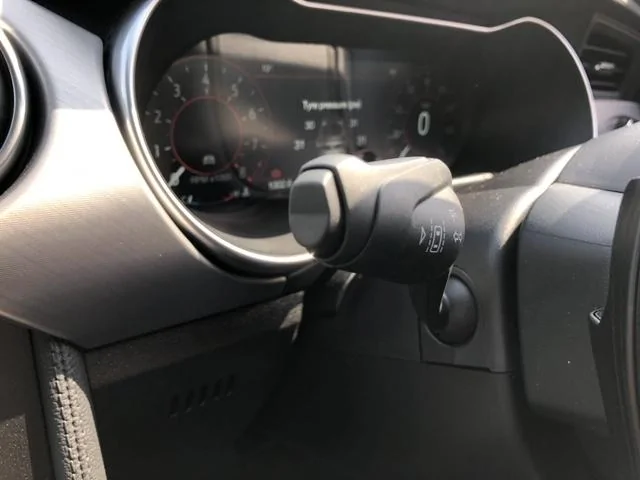
You can switch it off and on by using the left hand stalk push the button on the end see below.

IMG_3015.webp
 
OP
OP
Tin O' Spam

Tin O' Spam

Well-Known Member
Joined
Jun 11, 2019
Threads
3
Messages
105
Reaction score
207
Location
Kent
First Name
Sam
Vehicle(s)
2019 Ford Mustang GT
Vehicle Showcase
1
You can switch it off and on by using the left hand stalk push the button on the end see below.
Doing that seems to turn the system from on (large icon in white) to off, but the large icon remains in grey.

 
Last edited:

Damo66

Well-Known Member
Joined
Mar 22, 2019
Threads
10
Messages
116
Reaction score
51
Location
United Kingdom
Vehicle(s)
Ford Mustang GT
Just been out to check mine and i cannot get it to replicate yours, i have been into the lane keeping assist options and no matter how i set it i can still turn the icon in the display off an on, anyone else able to assist with this issue??
 

Damo66

Well-Known Member
Joined
Mar 22, 2019
Threads
10
Messages
116
Reaction score
51
Location
United Kingdom
Vehicle(s)
Ford Mustang GT
Right I think I have figured it out you must have the cruise control set to on, when i tried this on my car i got the same screen as you so if you switch it off and then press the button on the left control stalk it should turn the display off.
 

Spider

Well-Known Member
Joined
Jul 3, 2016
Threads
23
Messages
958
Reaction score
251
Location
Yorkshire
Vehicle(s)
MY17 GT MY19 Bullitt
Cruise on/off lane assist on/off


Difference is in ā€˜driver assistance’ then ā€˜pre-collision assist’ I think you have ā€˜distance indication’ switched on. The default is off.
Sponsored

 
Last edited:


Top