
Sponsored
IN STOCK!!! New Sync3 theme navigation from Moddiction!
- Thread starter Moddiction
- Start date
- Watchers 162
- Status
- Not open for further replies.

15RRGT
I am teh liquor
I'll ask again, does this unit have rca outputs or no?We have more in stock, ready to ship out.
OP
OP

Moddiction
Well-Known Member
- Joined
- Oct 20, 2015
- Threads
- 82
- Messages
- 1,806
- Reaction score
- 341
- Location
- Mooresville, NC
- Vehicle(s)
- 2016 Mustang GT PP
- Thread starter
- #1,473
No it does not.
15RRGT
I am teh liquor
Ok thank you, I was ready to buy, looks like a great unit anyway! :cheers:No it does not.
OP
OP
Moddiction
Well-Known Member
- Joined
- Oct 20, 2015
- Threads
- 82
- Messages
- 1,806
- Reaction score
- 341
- Location
- Mooresville, NC
- Vehicle(s)
- 2016 Mustang GT PP
- Thread starter
- #1,475
Yeah unfortunately adding that makes things much more difficult to do! That is why none of the units out there have that option.
Sponsored

Coconut
Poptart
- Joined
- May 26, 2016
- Threads
- 64
- Messages
- 757
- Reaction score
- 262
- Location
- San Jose, CA
- First Name
- Aaron
- Vehicle(s)
- 2016 Mustang GT Magnetic manual
Techinically yes, you can add a front camera to the unit. A few different ways to do this. The OEM backup camera will plug right into the included harness, but what's interesting is their is another input for an aftermarket backup camera. There is an option to switch between the oem and aftermarket backup cameras in the UI. Of course this will only work when you go into reverse so you'll need to do some creative wiring to bypass it. The unit also has a composite video/audio input so you can hook up a camera to that and just select "AUX" on the menu to go to it.Can I add a front camera to the unit
Coconut
Poptart
- Joined
- May 26, 2016
- Threads
- 64
- Messages
- 757
- Reaction score
- 262
- Location
- San Jose, CA
- First Name
- Aaron
- Vehicle(s)
- 2016 Mustang GT Magnetic manual
The system is picky with video formats, it seems to play MP4's perfectly though.Really frustrating that whenever I play videos I get random freezes and I have to shut the car off and let the system reboot so it will unfreeze
SpeedLu
Well-Known Member
- Joined
- Feb 13, 2016
- Threads
- 11
- Messages
- 1,972
- Reaction score
- 972
- Location
- some swamp
- Vehicle(s)
- 2020 Premium PP1 Mustang GT, 2017 F-150 Platinum FX4
Reading through this topic it seems as if people are still having problems with these units. That's disappointing.

Redraven571
Well-Known Member
- Joined
- Apr 21, 2016
- Threads
- 9
- Messages
- 583
- Reaction score
- 135
- Location
- South East PA
- First Name
- Joe
- Vehicle(s)
- 2015 Mustang V6 Convertible Triple Yellow
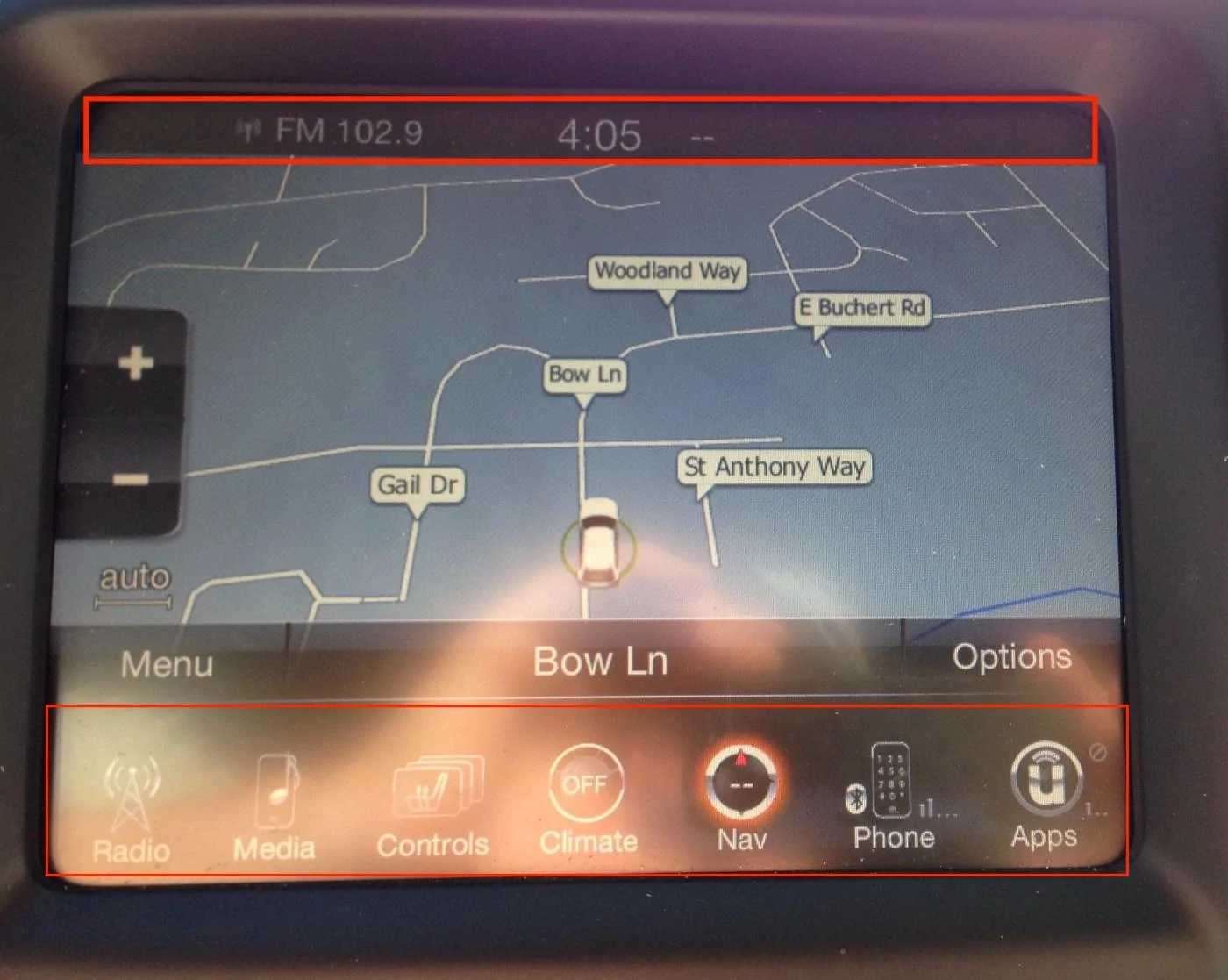
[MENTION=19254]Moddiction[/MENTION] I'm wondering if the manufacturer takes suggestions? In looking at my wife's Jeep Cherokee system, when running the nav, the icons to select other menus are still available at the bottom of the screen; as well as, at the top, it displays the time and radio station, etc.

OP
OP
Moddiction
Well-Known Member
- Joined
- Oct 20, 2015
- Threads
- 82
- Messages
- 1,806
- Reaction score
- 341
- Location
- Mooresville, NC
- Vehicle(s)
- 2016 Mustang GT PP
- Thread starter
- #1,480
That is not something that can be done unfortunately. Way too complicated to implement all of that I believe. Who software would have to be redone.
Sponsored
MustangEcoboosted
Member
I see that this only replaces the factory 4 inch screen. Why will this not work if we have the 8 inch? I have the 8 inch without NAV. I would love to get this to get the new UI and have NAV and screen mirroring. Thanks.

soldier989
Well-Known Member
- Joined
- Mar 26, 2016
- Threads
- 29
- Messages
- 1,129
- Reaction score
- 233
- Location
- Columbus OH
- Vehicle(s)
- 2017 GTPP Premium
I'd love to trade youI see that this only replaces the factory 4 inch screen. Why will this not work if we have the 8 inch? I have the 8 inch without NAV. I would love to get this to get the new UI and have NAV and screen mirroring. Thanks.
Rabid74
Well-Known Member
- Joined
- Feb 7, 2016
- Threads
- 9
- Messages
- 194
- Reaction score
- 30
- Location
- South Florida
- First Name
- Arnold
- Vehicle(s)
- 2015 DIB Premium PP Mustang GT
I would trade plus cash on top for someone with sync 3
Redraven571
Well-Known Member
- Joined
- Apr 21, 2016
- Threads
- 9
- Messages
- 583
- Reaction score
- 135
- Location
- South East PA
- First Name
- Joe
- Vehicle(s)
- 2015 Mustang V6 Convertible Triple Yellow
Try looking through this thread, I THINK I remember seeing a setting that can be changed to enable nav: Modifying As-Built Data GuideI see that this only replaces the factory 4 inch screen. Why will this not work if we have the 8 inch? I have the 8 inch without NAV. I would love to get this to get the new UI and have NAV and screen mirroring. Thanks.
EddieGT
Well-Known Member
- Joined
- Jan 17, 2016
- Threads
- 0
- Messages
- 408
- Reaction score
- 89
- Location
- San Diego, CA
- First Name
- Eddie
- Vehicle(s)
- 2016 Mustang GT, 2012 Challenger SRT8, 67 Fastback
Would that not require programming? I saw some pull-out units on eBay. One from a Sync3 unit and another with Sync2. I inquired with OEMRadio and he simply said he "no longer offers just programming and a harness." That leads me to believe that requires programming and a lot of movement of wires without his harness.I would trade plus cash on top for someone with sync 3
Sponsored
- Status
- Not open for further replies.
Similar threads

- Locked
- Replies
- 14
- Views
- 3,234


- Replies
- 29
- Views
- 5,586


- Replies
- 6
- Views
- 1,462

