Sponsored

IN STOCK!!! New Sync3 theme navigation from Moddiction!

Status
Not open for further replies.

Rabid74

Well-Known Member
Joined
Feb 7, 2016
Threads
9
Messages
194
Reaction score
30
Location
South Florida
First Name
Arnold
Vehicle(s)
2015 DIB Premium PP Mustang GT
No one else is having the nav freezing and getting the memory error ? Has anyone else played a video through the usb and then gone to the navigation screen while the video is playing ?
Sponsored
 

EddieGT

Well-Known Member
Joined
Jan 17, 2016
Threads
0
Messages
408
Reaction score
89
Location
San Diego, CA
First Name
Eddie
Vehicle(s)
2016 Mustang GT, 2012 Challenger SRT8, 67 Fastback
IMG_1703.webp


IMG_1704.webp


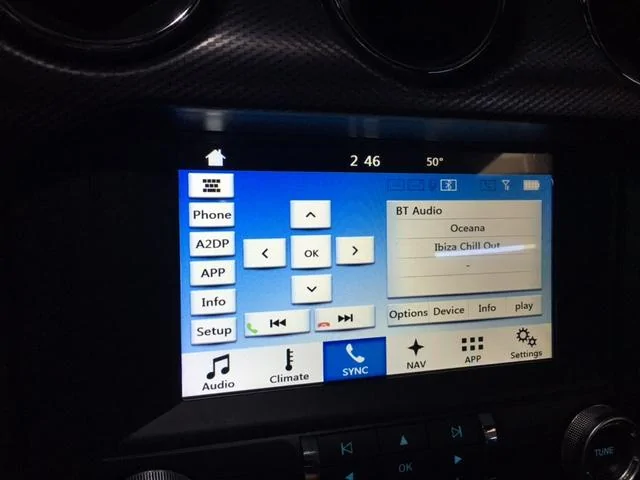
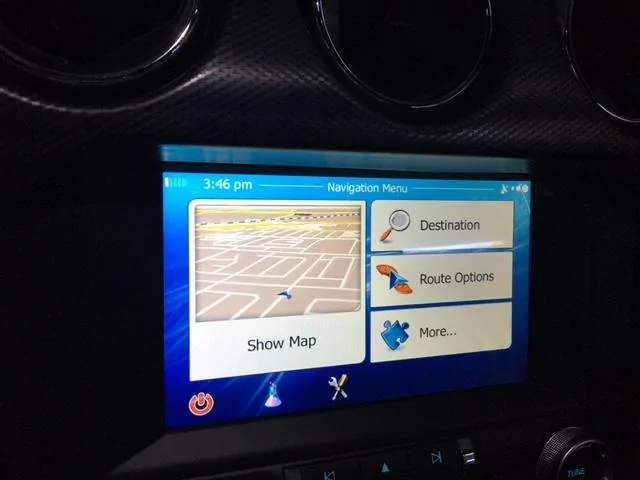
The hour on the NAV is correct. The moment I go back to to the radio or sync, it drops back an hour. No matter what time zone. And the temperature is off as well.
 
Last edited:

abie915

Well-Known Member
Joined
Jan 22, 2014
Threads
45
Messages
236
Reaction score
144
Location
Kansas City
Vehicle(s)
'15 GT PP, '16 EB PP
So I finally got this thing installed after about 5 hours of work. I followed the Rosen installation video from youtube (which is great BTW. I however did not remove the center console like they did) For the most part installation went smoothly (except for the part where I called my Dad mid install to wish him happy father's day, left the phone on the roof of my car and had it subsequently fall to the ground and break the screen, but I digress) Only real issue I had was that the back cover of the bezel wouldn't fit flush with the front bezel - It was fine at the top, but there was about 1/8" gap at the bottom. It doesn't seem to have affected anything else, but thought I'd mention it.

Pros:
For the most part everything works great! The system is very responsive and works well. HDMI mirroring is awesome as I can mirror Google maps/Waze directly to the screen (more on that below) It doesn't go right up to the edges, it's like 95% of the screen, but I can live with it.


Cons:
  • Built in navigation is okay, but kind of clunky to use. I found that voice guidance instructions are abruptly clipped: it starts to say something, then cuts off mid sentence
  • Screen is very hard to read while wearing polarized sunglasses
  • Screen is SUPER reflective. From my driving position, there is a persistent bit of reflection in the right of the screen that you can see. It is like that all the time, screen on or off. I'll install an anti glare screen protector that'll hopefully alleviate this problem.

My main reason for getting this was so that I could have Google maps in a convenient, easy to see place. For this, the system works particularly well with my iPhone 6. Here's how I set this up:

  1. I plugged in a regular 3 foot HDMI cable to the HDMI port in the glove box.
  2. I ran the cable from behind the glove box to the center console, and tucked it under the passenger side floor mat so that it would be out the way.
  3. I plugged in a lightning charger into the 12v port in the center console, and hooked up the HDMI cable and lightning charger to an Apple Digital AV adapter (I bought this at the Apple store for $50) This adapter lets you mirror the contents of your iphone or ipad to the screen 1:1. You don't technically need to plug in a charger, but it's nice to have the phone charge while streaming.


  4. To use, just launch google maps on the phone, plug in the cable, turn on HDMI mirroring, leave the phone with the screen on in the cupholder and Bob's your uncle.
 

Redraven571

Well-Known Member
Joined
Apr 21, 2016
Threads
9
Messages
583
Reaction score
135
Location
South East PA
First Name
Joe
Vehicle(s)
2015 Mustang V6 Convertible Triple Yellow
My main reason for getting this was so that I could have Google maps in a convenient, easy to see place. For this, the system works particularly well with my iPhone 6. Here's how I set this up:

  1. I plugged in a regular 3 foot HDMI cable to the HDMI port in the glove box.
  2. I ran the cable from behind the glove box to the center console, and tucked it under the passenger side floor mat so that it would be out the way.
  3. I plugged in a lightning charger into the 12v port in the center console, and hooked up the HDMI cable and lightning charger to an Apple Digital AV adapter (I bought this at the Apple store for $50) This adapter lets you mirror the contents of your iphone or ipad to the screen 1:1. You don't technically need to plug in a charger, but it's nice to have the phone charge while streaming.
  4. To use, just launch google maps on the phone, plug in the cable, turn on HDMI mirroring, leave the phone with the screen on in the cupholder and Bob's your uncle.
Thanks! Glad to hear this works so well. Didn't get to do my install yet [I spent about 5 hours yesterday installing a new soft top on my daughter's Wrangler] but, when I do, I'm planning on pulling the center console and [hopefully] running the HDMI cable to the inside of the center console then, basically, doing what you did with lighting to HDMI connector. I think I mentioned in a previous post, I don't even care about the Nav system, as I primarily use Apple/Google/Waze for directions.

Question to anyone who has done install yet: Have you tried relocating the micro SD card with the maps to the front slot?
 
OP
OP
Moddiction

Moddiction

Well-Known Member
Joined
Oct 20, 2015
Threads
82
Messages
1,806
Reaction score
341
Location
Mooresville, NC
Vehicle(s)
2016 Mustang GT PP
You cannot relocate sd card to front unfortunately.
 

Sponsored

thet33

Well-Known Member
Joined
Nov 19, 2015
Threads
10
Messages
665
Reaction score
117
Location
Dallas, TX
Vehicle(s)
2016 Magnetic GT/6MT/3.55
Thanks! Glad to hear this works so well. Didn't get to do my install yet [I spent about 5 hours yesterday installing a new soft top on my daughter's Wrangler] but, when I do, I'm planning on pulling the center console and [hopefully] running the HDMI cable to the inside of the center console then, basically, doing what you did with lighting to HDMI connector. I think I mentioned in a previous post, I don't even care about the Nav system, as I primarily use Apple/Google/Waze for directions.

Question to anyone who has done install yet: Have you tried relocating the micro SD card with the maps to the front slot?
Interesting... where would the opening be in the center console to run the wire through?
I didn't mess with the SD card, didn't even notice where the back or front slot was now that I think about it. What I did do was use OEMRadio's tip and take off the top of the dash and run my GPS antennae to where the stock ones are located so that I wouldn't have any wire visible and another wire running to my glove compartment. Very happy I did that instead of mounting visibly on the dash or in glove compartment.
 

..::Ryan::..

Well-Known Member
Joined
Jan 16, 2015
Threads
7
Messages
120
Reaction score
18
Location
United States
Vehicle(s)
2015 Mustang GT - Magnetic
Interesting reviews. That screen looks super reflective - any plans to integrate an anti-glare screen? What's the cause of time being off between navigation and radio?
 
OP
OP
Moddiction

Moddiction

Well-Known Member
Joined
Oct 20, 2015
Threads
82
Messages
1,806
Reaction score
341
Location
Mooresville, NC
Vehicle(s)
2016 Mustang GT PP
I haven't had any issues with time on our test units. Seems some are though which is weird. We will be checking software and releasing an update that will fix any issues with that asap!
 

E.jaba

Well-Known Member
Joined
Dec 23, 2014
Threads
26
Messages
239
Reaction score
35
Location
Madrid, before in Chicago
Vehicle(s)
DIB V6 AT51a 3.55 ... Bullitt ordered
You cannot relocate sd card to front unfortunately.
Actually this is not true.

My unit has a front working SD, if I use that back one it disables the front one.
One of the best things of the unit is the potential it has. Relocating the SD card is just the first step.

Other steps are having access with tools such as Total Commander, and then at some point we will be able to design personalized UI unlocking all the OBD data. But that will happen down the road.
 

Redraven571

Well-Known Member
Joined
Apr 21, 2016
Threads
9
Messages
583
Reaction score
135
Location
South East PA
First Name
Joe
Vehicle(s)
2015 Mustang V6 Convertible Triple Yellow
Interesting... where would the opening be in the center console to run the wire through?
I didn't mess with the SD card, didn't even notice where the back or front slot was now that I think about it. What I did do was use OEMRadio's tip and take off the top of the dash and run my GPS antennae to where the stock ones are located so that I wouldn't have any wire visible and another wire running to my glove compartment. Very happy I did that instead of mounting visibly on the dash or in glove compartment.
I'll need to look a bit closer before I start but, since there currently isn't one [as far as I know], I was planning on drilling a hole large enough to pass thru the end of the HDMI cable.

@able915, Sounds like you did similar but fed the wire under the carpet; did you drill a hole inside the center console compartment?

[MENTION=19869]thet33[/MENTION], how difficult was removing top of dash, is there video/pics somewhere? I know OEMRadio has an install video [but I haven't watched whole thing yet].
 

Sponsored
OP
OP
Moddiction

Moddiction

Well-Known Member
Joined
Oct 20, 2015
Threads
82
Messages
1,806
Reaction score
341
Location
Mooresville, NC
Vehicle(s)
2016 Mustang GT PP
Actually this is not true.

My unit has a front working SD, if I use that back one it disables the front one.
One of the best things of the unit is the potential it has. Relocating the SD card is just the first step.

Other steps are having access with tools such as Total Commander, and then at some point we will be able to design personalized UI unlocking all the OBD data. But that will happen down the road.
With our unit it is true actually.
 

Redraven571

Well-Known Member
Joined
Apr 21, 2016
Threads
9
Messages
583
Reaction score
135
Location
South East PA
First Name
Joe
Vehicle(s)
2015 Mustang V6 Convertible Triple Yellow
You cannot relocate sd card to front unfortunately.

E.jaba said:
Actually this is not true.

My unit has a front working SD, if I use that back one it disables the front one.
One of the best things of the unit is the potential it has. Relocating the SD card is just the first step.
I thought I understood that the presence of a card in one of the slots (front or back) inactivated the other. Moddiction originally stated that the micro SD card with maps was originally in the front slot but was moved to the back slot to enhance performance; if you can still put in front slot and have maps function, that gives greater flexibility to the unit (i.e. - I can pop the maps out and use the front slot for music/video, etc, and simply drop the maps back in when/if I need them).

And, since, from what I've read here, you need to search for the presence of the maps file the first time, I'm wondering why you can't drop the maps in the front slot.

@Moddiction, was there some programming change that makes the system ONLY recognize the maps in the rear slot?
 

Ultimateone

Yes is that's guy /\
Joined
Jun 18, 2015
Threads
26
Messages
833
Reaction score
178
Location
Boston, MA
Vehicle(s)
F32 435i Xdrive
Can you explain why? I have the same unit.
Did you buy the HU from the Moddiction store? if no then maybe things are different, especially if it's been updated.
Sponsored

 
Status
Not open for further replies.


Top