Sponsored

Finished my display

Snoopy49

Well-Known Member
Joined
Jul 24, 2019
Threads
55
Messages
4,020
Reaction score
6,042
Location
California
First Name
Earl
Vehicle(s)
2013 GT500 - SOLD and 2020 GT500 - SOLD
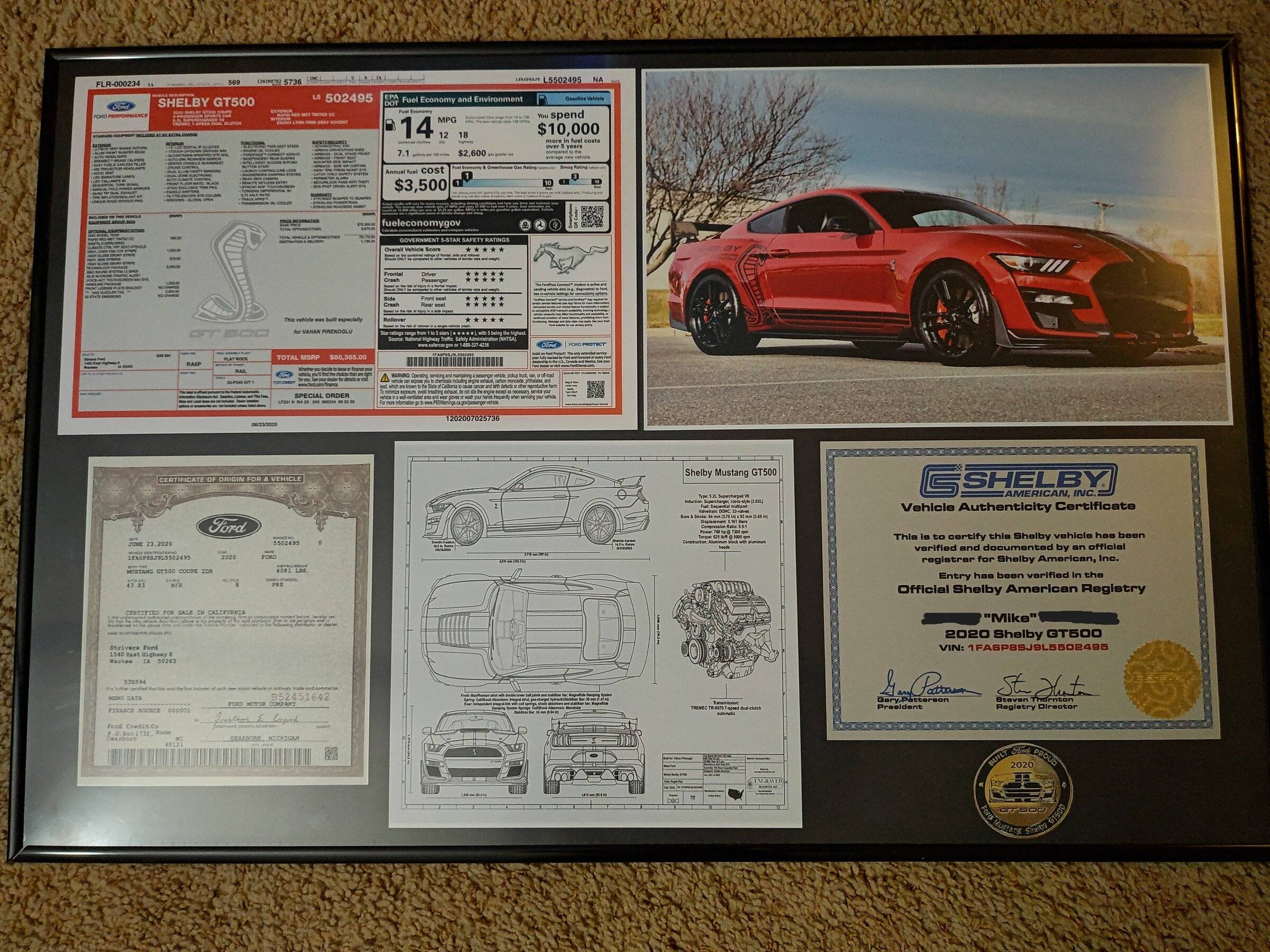
Welp finished my Display. Thanks to @Jmeo for taking a pic of his C.O so I could add my info from the fax/copy my dealership had made and sent me. Challenge coin didnt work in the display cause it made docs slide down since they aren't taped or glued, so I took a pic and added it in. Thought I'd share.
Where did you buy your challenge coin?
Sponsored

 
OP
OP
AngelDeath

AngelDeath

Well-Known Member
Joined
May 5, 2016
Threads
58
Messages
1,528
Reaction score
1,272
Location
CH, New Jersey
First Name
Mike
Vehicle(s)
'20 Shelby GT500 Rapid Red / '01 Metallic Red C5 / '17 White Overland
Where did you buy your challenge coin?
I got it on Ebay back in the beginning of last year. Apparently me and another forum member were bidding on the same coin and I won which I found out after he mentioned he lost the auction.
 

MMXX500

Member
Joined
Sep 17, 2021
Threads
0
Messages
21
Reaction score
37
Location
NorCal
First Name
Pedro
Vehicle(s)
20 GT500 21 Mach-E GT PE 22 Expd Stealth/F150 KR
@AngelDeath

Looks great!

So, I don't know what your backer board inside the display is - cardboard, poster board?

If so, I just completed a project for a display of original Classic Mustang magazine ads - put into a 24"x36" poster display. I had the same issue with the layout of the ads sliding around even after being compressed by the clear layer and framing.

A trick offered by my wife to try for my project display:
3M Post-It notes, everyone usually has these in the home or office. The top edge of the Post-It, cut the "sticky" portion into X-length needed. Once cut, fold it in half so that it makes (2) sticky sides - one that will adhere to the back of whatever docs you're trying to display and the other side that will adhere to the backer board. Place them strategically on the back side of the docs, then place doc onto the backer board into desired position, and just press lightly across the doc. The docs will now "stick" to the backer board and won't slide. The 3M Post-It note adhesion will not soil or stain the documents - AND it will not damage the docs if removing to reposition or if removing at a later date.

As for your coin:
Go to Dollar Tree >> Craft/Stationary isle
Look for this product:
https://www.dollartree.com/crafters-square-adhesive-dots-72ct-packs/296741
Take 2 or 3 of those clear sticky dots and place them on the backside of the coin. Those should hold your metal coin to the backer board. They are sticky - too sticky for docs (already tried on a test paper and it will damage/tear a doc like certificates, ads, printed paper, etc.). They won't damage a metal coin.

Again, your display looks great. Try the tricks above it should help to resolve the "slide". Once I used the Post-It note trick on the back of the ads for my 24x36 display, they did not slide at all, even after lifting it several times.
Excellent idea! The 3M command strips work great also, I use the smaller lighter strips for more delicate items and the larger heavier ones to create space between things like speakers and speaker stands - they are excellent for reducing vibrations.
 

Prefo20

Active Member
Joined
Oct 5, 2021
Threads
1
Messages
41
Reaction score
30
Location
Naples, Florida
First Name
Steve
Vehicle(s)
2020 and 2022 Mustang GT Premium Convertible
Welp finished my Display. Thanks to @Jmeo for taking a pic of his C.O so I could add my info from the fax/copy my dealership had made and sent me. Challenge coin didnt work in the display cause it made docs slide down since they aren't taped or glued, so I took a pic and added it in. Thought I'd share.

2022-02-21 23.18.22.jpg
That's awesome. Nicely done.
Sponsored


Top