
Sponsored
Cathul
Well-Known Member
You have to ask Ford on how to do that, or demand that they change both CarPlay and Android Auto implementation in SYNC3 to allow for the SYNC3 navigation to run beside CarPlay and AndroidAuto.
Superspirit
Well-Known Member
Hit the little white button in the corner, it will bring up a menu. Select either ford or sync whichever option is available. It will return to the sync 3 screen. Took me a while to find that.
Cathul
Well-Known Member
Yes, and as soon as you click on Navigation in the SYNC3 menu while your phone is connected it brings you right back to Apple CarPlay or AndroidAuto for navigation. Great, isn't it? (Answer to this question: it's not!)Hit the little white button in the corner, it will bring up a menu. Select either ford or sync whichever option is available. It will return to the sync 3 screen. Took me a while to find that.
Come on Ford... Kenwood can do that (don't know if Pioneer, Alpine and Sony behave the same as Kenwood). You can absolutely use the Kenwood navigation while having CarPlay active and a phone connected.

Vlad Soare
Well-Known Member
- Joined
- Jan 21, 2020
- Threads
- 67
- Messages
- 3,675
- Reaction score
- 4,514
- Location
- Bucharest, Romania
- First Name
- Vlad
- Vehicle(s)
- 2020 Mustang GT 6MT
You can't. That's how Android Auto and CarPlay support is implemented in Sync 3. It's not just the navigation; the native audio system gets disabled, too. I mean, you can't listen to FM radio or the USB stick while AA/CP is active. It's phone or nothing.
That's why I hate CarPlay. That, and the idiotic way in which it deals with text messages. Once every few months I forget how horrible CarPlay is, and I turn it on, only to turn it off in disgust half a day later.
That's why I hate CarPlay. That, and the idiotic way in which it deals with text messages. Once every few months I forget how horrible CarPlay is, and I turn it on, only to turn it off in disgust half a day later.
Last edited:
Sponsored
Superspirit
Well-Known Member
That's not correct I listen to the usb constantlyYou can't. That's how Android Auto and CarPlay support is implemented in Sync 3. It's not just the navigation; the native audio system gets disabled, too. I mean, you can't listen to FM radio or the USB stick while AA/CP is active. It's phone or nothing.
No big loss. AA and CP cannot hold a candle to the native Sync 3 interface anyway. Once every few months I forget how horrible CarPlay is, and I turn it on, only to turn it off in disgust half a day later.
Vlad Soare
Well-Known Member
- Joined
- Jan 21, 2020
- Threads
- 67
- Messages
- 3,675
- Reaction score
- 4,514
- Location
- Bucharest, Romania
- First Name
- Vlad
- Vehicle(s)
- 2020 Mustang GT 6MT
How do you do that? When I'm in CarPlay and go back to the Sync 3 main menu, as soon as I touch the audio card it takes me to the "now playing" page in CarPlay. I can't change the audio source in Sync.That's not correct I listen to the usb constantly
Granted, I never tried to switch to USB audio before plugging in the phone. Maybe that would work? Maybe CarPlay would open and the music would continue playing unabated from the USB stick? I don't know. I may try that sometime.
Last edited:
Superspirit
Well-Known Member
Not sure on car play, I use Android auto and I posted the instruction earlier in this thread. Post 4How do you do that? When I'm in CarPlay and go back to the Sync 3 main menu, as soon as I touch the audio card it takes me to the "now playing" page in CarPlay. I can't change the audio source in Sync.
Granted, I never tried to switch to USB audio before plugging in the phone. Maybe that would work? Maybe CarPlay would open and the music would continue playing unabated from the USB stick? I don't know. I may try that sometime.
Vlad Soare
Well-Known Member
- Joined
- Jan 21, 2020
- Threads
- 67
- Messages
- 3,675
- Reaction score
- 4,514
- Location
- Bucharest, Romania
- First Name
- Vlad
- Vehicle(s)
- 2020 Mustang GT 6MT
The instructions in post #4 work with CarPlay, too. It will go back to the Sync home screen, except with a white, non-functional map. The other two cards (audio and phone) seem to work fine, but if I touch the audio card it doesn't open the Sync audio screen, but goes back to CarPlay.
Maybe it works differently in AA.
But no matter, the thing is, Sync itself gets seriously crippled when you use AA or CP. And sadly it's not a bug, it's a feature, so it won't ever change.
Maybe it works differently in AA.
But no matter, the thing is, Sync itself gets seriously crippled when you use AA or CP. And sadly it's not a bug, it's a feature, so it won't ever change.
Sponsored
Vlad Soare
Well-Known Member
- Joined
- Jan 21, 2020
- Threads
- 67
- Messages
- 3,675
- Reaction score
- 4,514
- Location
- Bucharest, Romania
- First Name
- Vlad
- Vehicle(s)
- 2020 Mustang GT 6MT
You're right. I tried again, and it does indeed work.
I use to switch between home/audio/phone/navi screens by touching the corresponding cards on the home menu. And if I do that with the audio card while CarPlay is connected, it will go to CarPlay.
However, if I touch the Audio button on the lower command panel instead of the card, then it does indeed work. I hadn't tried that before.
I use to switch between home/audio/phone/navi screens by touching the corresponding cards on the home menu. And if I do that with the audio card while CarPlay is connected, it will go to CarPlay.
However, if I touch the Audio button on the lower command panel instead of the card, then it does indeed work. I hadn't tried that before.

StangTime
Well-Known Member
- Joined
- Apr 16, 2019
- Threads
- 81
- Messages
- 3,594
- Reaction score
- 4,093
- Location
- Ontario 🇨🇦
- First Name
- Todd
- Vehicle(s)
- 19' GT PP1 Manual
Since I don't have a CD player, that physical button with the music note is Play/Pause on my car and the Eject button is replaced with the "settings" button.

Pressing "settings" will take me out of whatever AA app is running and to the audio settings page of the main menu. From there I can use the Ford touch screen system features. It's not as elegant as pressing the music note button but it does kick you back into the main Ford Sync menu system.
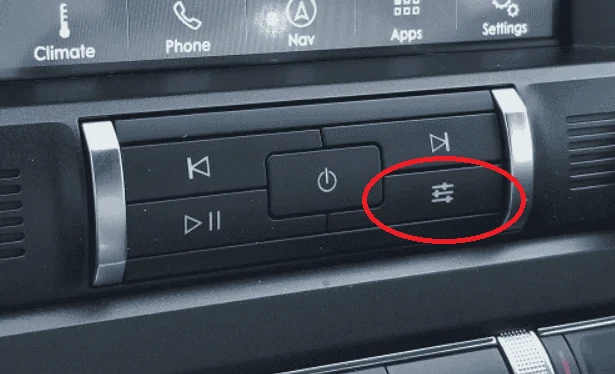
Pressing "settings" will take me out of whatever AA app is running and to the audio settings page of the main menu. From there I can use the Ford touch screen system features. It's not as elegant as pressing the music note button but it does kick you back into the main Ford Sync menu system.
StangTime
Well-Known Member
- Joined
- Apr 16, 2019
- Threads
- 81
- Messages
- 3,594
- Reaction score
- 4,093
- Location
- Ontario 🇨🇦
- First Name
- Todd
- Vehicle(s)
- 19' GT PP1 Manual
That's odd. It always works for me. I should have clarified that this does not let you use the OEM navigation. Pressing NAV on the menu bar takes you back to AA Google maps.Never mind. the settings button doesn't work either, anymore.
Sponsored


