Sponsored

Backup Cam Lines Missing

Souldriver

Well-Known Member
Joined
Jun 4, 2015
Threads
34
Messages
771
Reaction score
94
Location
NY
Vehicle(s)
2016 - Guard GT Prem. PP
I bought my car in to have the brakes, back decklid and puddle lamps repaired/replaced. I picked it up for the weekend after the brakes were done and the backup cam guide lines were there.

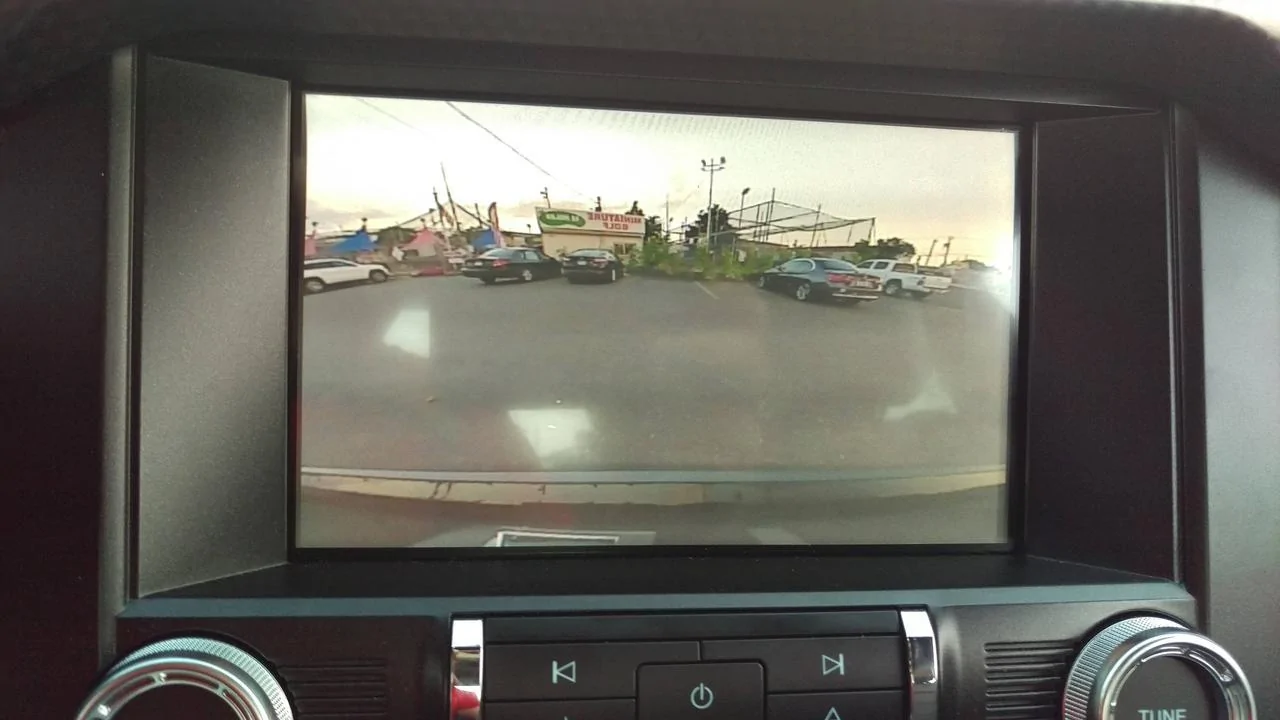
It went back to the body shop for the decklid and the dealer did the puddle lamps. When i picked it up i noticed the camera was lower looking, and the guidelines where 100% gone. The cameras angle has the bumber and the gt logo taking up the bottom 1/4 of the frame but looking around it seems this is normal for most people.

As for the lines i see no options in the menus to bring them back. I tried a bunch of things to try to fix it with no luck. I tried starting and shutting off the car, keeping it in different gears, starting in neutral then waiting, master restart etc. I read in the manual that after the battery is unhooked they may go away until you drive a bit. I drove ~20 miles and no luck. This morning i unplugged it for about a half hour but havent had time to drive it . So far no luck.

Any suggestions to bring the guide lines back are appreciated. It been at the service center for most of the month of august and im not keen on just bringing it back asap. I also dropped it off clean and picked it up cover in filth (legit wiped my hand on its side and it was cover in thick black debris, as if i dipped my hand in ash), a big chip on the side they denied, and they ran the car sitting with the ac on and burnt through my gas.
Sponsored
 

SVT Wylde

Well-Known Member
Joined
Jul 6, 2016
Threads
1
Messages
159
Reaction score
36
Location
Cleveland, Tennessee
First Name
Randall
Vehicle(s)
2016 Mustang GT Premium
Is the camera in zoom mode? Look at the top of the screen and press the zoom icon and see if the screen changes.
 
OP
OP
Souldriver

Souldriver

Well-Known Member
Joined
Jun 4, 2015
Threads
34
Messages
771
Reaction score
94
Location
NY
Vehicle(s)
2016 - Guard GT Prem. PP
Im going to be honest, i didnt even know my camera had a zoom. I dont remember it having an icon even back when it was working correctly. I also dont think it had an icon this time. I did tap on the screen in different places to see if it was something else but nothing.
 

Bazzie

Well-Known Member
Joined
Feb 19, 2016
Threads
12
Messages
117
Reaction score
49
Location
Belgium (Limburg)
Vehicle(s)
Mustang ecoboost
I had the same when changing the EU deckled for a US deckled.
Unplugging the battery for 15 minutes and the problem was solved....
 
OP
OP
Souldriver

Souldriver

Well-Known Member
Joined
Jun 4, 2015
Threads
34
Messages
771
Reaction score
94
Location
NY
Vehicle(s)
2016 - Guard GT Prem. PP
I had the same when changing the EU deckled for a US deckled.
Unplugging the battery for 15 minutes and the problem was solved....

Did it take a while for the lines to come back? I unhooked my battery, cleaned the engine bay a little, realised that i was out of those circle battery terminal corrosion protectors, went to and from the auto store (in a different car) came back and reassembled. This was most likely more than 15 minutes but i did not time it. If it does not come back after some driving ill try again for 30 minutes.

I also dont think its in zoom, i have the text saying to still look around on top but there is no zoom icon and all input does nothing. For some reason i feel like there never was a zoom.

Looking at an older forum post there was a EU, i think german owner who had this issue and had to bring it to the dealer to relink something.
 

Sponsored

Bazzie

Well-Known Member
Joined
Feb 19, 2016
Threads
12
Messages
117
Reaction score
49
Location
Belgium (Limburg)
Vehicle(s)
Mustang ecoboost
Strange...
Is the connector fitted correctly in the camera?
Zoom also did not worked on my car when the lines were missing.
Try turning your steeringwheel fully left and right to align the lines.
No friend with Ford Ids to search for Trouble-codes?
 

Bobsp12

Super Moderator
Moderator
Joined
Apr 10, 2015
Threads
22
Messages
1,198
Reaction score
1,282
Location
Adelaide, South Australia
Vehicle(s)
lots of Fords
The manual says that if you disconnect the battery, you then need to drive the car a short distance and exceed at least 20kmph for the lines to start working on the camera. It also says there are camera settings in the system....go main menu, settings, vehicle, camera settings..not sure what you can adjust there.
 
OP
OP
Souldriver

Souldriver

Well-Known Member
Joined
Jun 4, 2015
Threads
34
Messages
771
Reaction score
94
Location
NY
Vehicle(s)
2016 - Guard GT Prem. PP
I honestly never seen a zoom option. I tried playing with it and nothing changes zoom wise and there are no onscreen buttons for it.

I did disconnect the battery for 20-30 min and drove 60mph plus for about 20 minutes on my way to softball. The manual is vague on how much you need to drive it or how long the battery needs to be disconnected.

Im guessing the cam was hooked back up correctly but that may be the next thing i check. The body shop lined it up really well so im not jumping to pop it off right away.

I cant try turning the wheel fully left and right. In car menus only give an option for the camera delay which affects nothing but has a static"preview pic" that shows lines.
 
OP
OP
Souldriver

Souldriver

Well-Known Member
Joined
Jun 4, 2015
Threads
34
Messages
771
Reaction score
94
Location
NY
Vehicle(s)
2016 - Guard GT Prem. PP
Here is my view, most of the time it shows the warning text up top.

picture.webp
 

Sponsored

woofer196

Well-Known Member
Joined
Sep 28, 2014
Threads
6
Messages
72
Reaction score
5
Location
Winter Garden, FL
First Name
Daren
Vehicle(s)
2017 Mustang Ecoboost Premium Convertible
Backup camera lines

Hi guys - I just had my backup camera replaced because it was going out intermittently and now the guidelines won't show up either. Let me know if there is a fix.
 

Stangnut

Well-Known Member
Joined
Jul 24, 2013
Threads
46
Messages
1,512
Reaction score
379
Location
S.E. Alabama
First Name
Jason
Vehicle(s)
2019 Bullitt BHG
Here is my view, most of the time it shows the warning text up top.
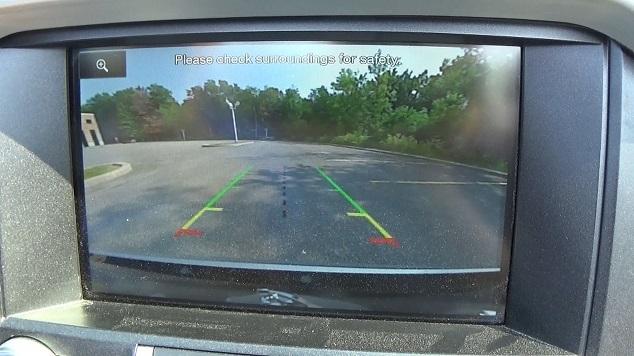
Found this pic on google. You can see the zoom icon in the upper left corner. Looks like you need to take it back to the dealership. Have you tried driving above 12 mph as mentioned above? I looked, but didn't see that actually mentioned in the manual.
mustang-reverse-feed.jpg
 
OP
OP
Souldriver

Souldriver

Well-Known Member
Joined
Jun 4, 2015
Threads
34
Messages
771
Reaction score
94
Location
NY
Vehicle(s)
2016 - Guard GT Prem. PP
Found this pic on google. You can see the zoom icon in the upper left corner. Looks like you need to take it back to the dealership. Have you tried driving above 12 mph as mentioned above? I looked, but didn't see that actually mentioned in the manual.
yes, and i dont think mine ever had that icon or i just never noticed it. I unplugged the battery and drove it for ~20 minutes after on the highway doing 60mph plus.

I can try this again and time the battery being unplugged for 30+ minutes and drive it again. The manual is vague in that it does not say how long it needs to be driven.
Sponsored


Top