Sponsored

17 touchscreen not responding

its_me_walt

Well-Known Member
Joined
Jul 19, 2021
Threads
17
Messages
82
Reaction score
38
Location
CNY
First Name
Walt
Vehicle(s)
17 GT PP Vert
Hey folks, my touchscreen will not respond at all. I can use applecarplay and change songs/volume with physical controls. The time and outside temp all display correctly. Basically, i have full functionality other than the touchscreen itself.

Recent changes -
I enabled automatic updates on sync yesterday (should have known better)
I left lights on and had to jump start car this morning

Things ive tried-
turning car on and off
soft reset (power and seek button)

still no touchscreen. thoughts?
Sponsored

 

StangTime

Well-Known Member
Joined
Apr 16, 2019
Threads
81
Messages
3,594
Reaction score
4,091
Location
Ontario 🇨🇦
First Name
Todd
Vehicle(s)
19' GT PP1 Manual
Pull one of the battery terminals for 30 - 60 seconds. This will do a hard reset.
 
OP
OP
its_me_walt

its_me_walt

Well-Known Member
Joined
Jul 19, 2021
Threads
17
Messages
82
Reaction score
38
Location
CNY
First Name
Walt
Vehicle(s)
17 GT PP Vert
Pull one of the battery terminals for 30 - 60 seconds. This will do a hard reset.
figures im at work now, ill give this a go at home later

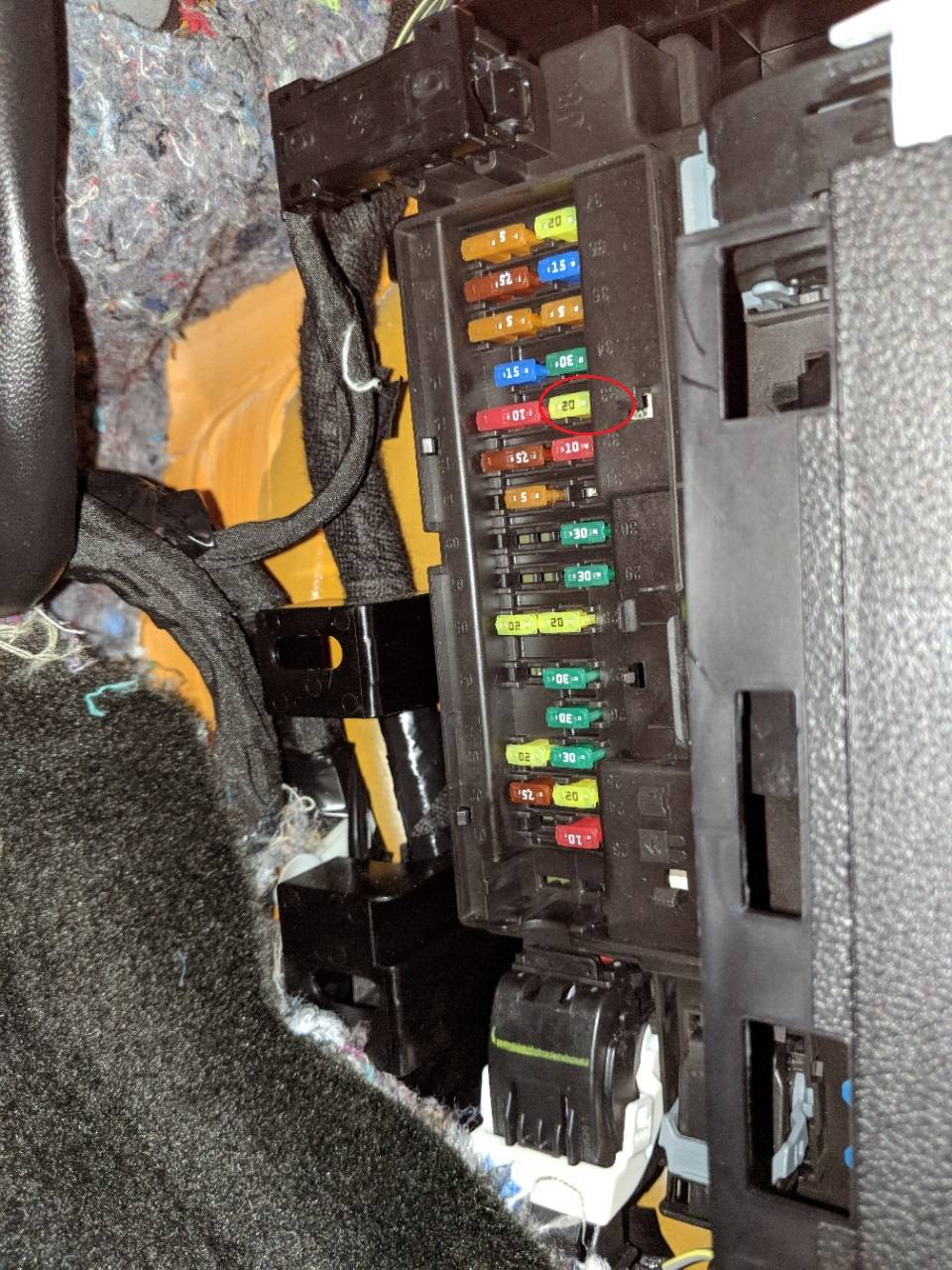
is there a fuse i could pull here rather than finding ratchet to disco battery? (audio head unit : 33?)
 

StangTime

Well-Known Member
Joined
Apr 16, 2019
Threads
81
Messages
3,594
Reaction score
4,091
Location
Ontario 🇨🇦
First Name
Todd
Vehicle(s)
19' GT PP1 Manual
You could do that too. Fuse 33 in the passenger kick panel. FYI the printing on the fuse panel is upside down.
Fuse.jpg
 
OP
OP
its_me_walt

its_me_walt

Well-Known Member
Joined
Jul 19, 2021
Threads
17
Messages
82
Reaction score
38
Location
CNY
First Name
Walt
Vehicle(s)
17 GT PP Vert
thanks, i pulled 32 and 33 for a couple minutes.

no bueno still. hmmmmm
 

Sponsored

StangTime

Well-Known Member
Joined
Apr 16, 2019
Threads
81
Messages
3,594
Reaction score
4,091
Location
Ontario 🇨🇦
First Name
Todd
Vehicle(s)
19' GT PP1 Manual
Try pulling the battery cable as a final attempt. Leave it off for at least 5 minutes to ensure a proper power reset.
It's possible the battery died while the system was updating because of the headlights being on and got bricked.
You'll need to see the dealer if the battery disconnect doesn't fix it. I don't know what else you can do.
 
OP
OP
its_me_walt

its_me_walt

Well-Known Member
Joined
Jul 19, 2021
Threads
17
Messages
82
Reaction score
38
Location
CNY
First Name
Walt
Vehicle(s)
17 GT PP Vert
left battery disconnected for 15min. to no avail. everything functions as it should but the touchscreen wont respond. which does limit me and is inconvenient.

Im out of warranty so dealer wont help.

Id love to do a master reset but there is no way without the touchscreen apparently?
 

StangTime

Well-Known Member
Joined
Apr 16, 2019
Threads
81
Messages
3,594
Reaction score
4,091
Location
Ontario 🇨🇦
First Name
Todd
Vehicle(s)
19' GT PP1 Manual
Do you know what version of Sync you had previously? Some F150 users have reported the same problem as yours and doing the re-format and upgrade to Sync3 v3.4 fixed this issue. You have to use the Cyanlabs website for this upgrade info. Otherwise you will have to pay the stealership to reprogram your APIM.
 
OP
OP
its_me_walt

its_me_walt

Well-Known Member
Joined
Jul 19, 2021
Threads
17
Messages
82
Reaction score
38
Location
CNY
First Name
Walt
Vehicle(s)
17 GT PP Vert
Do you know what version of Sync you had previously? Some F150 users have reported the same problem as yours and doing the re-format and upgrade to Sync3 v3.4 fixed this issue. You have to use the Cyanlabs website for this upgrade info. Otherwise you will have to pay the stealership to reprogram your APIM.
So i thought of this as well, is this basically reprogramming the firmware of the sync3 via usb drive?

i have no clue what version i was on. what version can i flash it to? I dont care how updated it is i just want functionality back
 

StangTime

Well-Known Member
Joined
Apr 16, 2019
Threads
81
Messages
3,594
Reaction score
4,091
Location
Ontario 🇨🇦
First Name
Todd
Vehicle(s)
19' GT PP1 Manual
So i thought of this as well, is this basically reprogramming the firmware of the sync3 via usb drive?

i have no clue what version i was on. what version can i flash it to? I dont care how updated it is i just want functionality back
Yes. You would create a USB that would do the whole upgrade package. I'm not familiar on how to upgrade the older models (2017). All I know is they require a re-format prior to installing and that many people have had success getting the older versions to run the latest Sync. Worth a shot at this point. Cyanlabs has all the info.
 

Sponsored
OP
OP
its_me_walt

its_me_walt

Well-Known Member
Joined
Jul 19, 2021
Threads
17
Messages
82
Reaction score
38
Location
CNY
First Name
Walt
Vehicle(s)
17 GT PP Vert
thx, appreciate the help
 

StangTime

Well-Known Member
Joined
Apr 16, 2019
Threads
81
Messages
3,594
Reaction score
4,091
Location
Ontario 🇨🇦
First Name
Todd
Vehicle(s)
19' GT PP1 Manual
Good luck!
 

Bikeman315

Well-Known Member
Joined
Apr 12, 2015
Threads
581
Messages
16,183
Reaction score
21,909
Location
Myrtle Beach, SC
First Name
Ira
Vehicle(s)
2019 Mustang GT/CS, 2021 Volvo XC60
So i thought of this as well, is this basically reprogramming the firmware of the sync3 via usb drive?

i have no clue what version i was on. what version can i flash it to? I dont care how updated it is i just want functionality back
No, Full Stop. Do not change your Sync software when there is a problem. You need to find the issue and fix it first, then do an upgrade if you want. Doing the upgrade first could brick your entire system. That will get expensive.

Edit: How long did you hold the buttons during the soft reset?

 
OP
OP
its_me_walt

its_me_walt

Well-Known Member
Joined
Jul 19, 2021
Threads
17
Messages
82
Reaction score
38
Location
CNY
First Name
Walt
Vehicle(s)
17 GT PP Vert
No, Full Stop. Do not change your Sync software when there is a problem. You need to find the issue and fix it first, then do an upgrade if you want. Doing the upgrade first could brick your entire system. That will get expensive.

Edit: How long did you hold the buttons during the soft reset?

soft reset? few seconds until it "rebooted" , also held it longer for what appeared to be 2 reboots so maybe 10 seconds?
 

Bikeman315

Well-Known Member
Joined
Apr 12, 2015
Threads
581
Messages
16,183
Reaction score
21,909
Location
Myrtle Beach, SC
First Name
Ira
Vehicle(s)
2019 Mustang GT/CS, 2021 Volvo XC60
soft reset? few seconds until it "rebooted" , also held it longer for what appeared to be 2 reboots so maybe 10 seconds?
OK, thought maybe you didn't hold it long enough.

So another reason not to do a software update is that you do not know what you're updating from. In a 2017 one has to presume that you have version 3.0. Ford never officially made the current version, 3.4, available for your car because of a change to the APIM (the brains of the Sync system). The Cyanlabs version changes the APIM so that it works. The issue is that your problem may be a bad APIM. If this is the case updating the software could only make things worse. Like it or not if the simple fixes do not work you may have to bite the bullet and bring it into the dealer.
Sponsored


Top