blackfire12
Active Member
- Thread starter
- #1
Yes this will be long and wordy but it's pretty in depth and if you're interested in learning of Cobb's AP and my tuning experience then proceed!
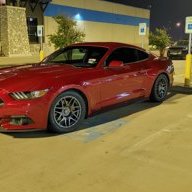
To first start off my review, I'd like to point a few things out. First of all when it comes to tuning or doing any kind of work on my cars I'm a total noob. Having come from a world of a 2003 Mazda 6i (Auto), a 2013 Ford Focus (Manual), and a 1993 Chevrolet 1500 Extended Cab (Auto), I'm not too well versed when it comes to squeezing out more power. Especially with what I was dealt with and on top of not having the money to put down on something where my returns would be extremely limited... So on to my new ride! A 2015 Ecoboost Premium Mustang + Performance Package in Magnetic (Manual, of course).
Being in Austin, somewhat of a car enthusiast and eager to get down into learning more about what I can achieve with this beast, Cobb was the logical choice for me. Sure, there are the other tuners out there but being so close to home and having a good reputation when it comes to tuning turbocharged platforms helped my decision. The features and numbers to expect also had me hooked on their AP. So I went down to the Austin location, handed them the money and took home my new AP! I was a little enthusiastic on that drive back but it wouldn't have prepared me with what was to come.
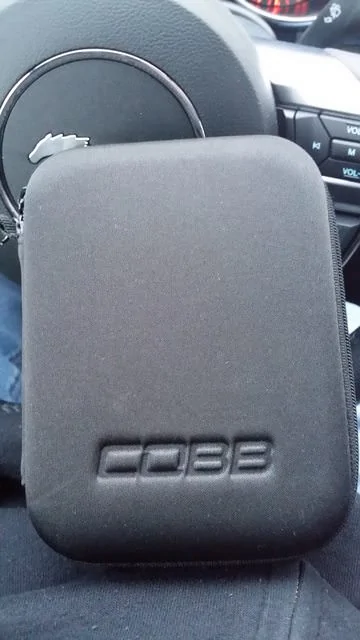
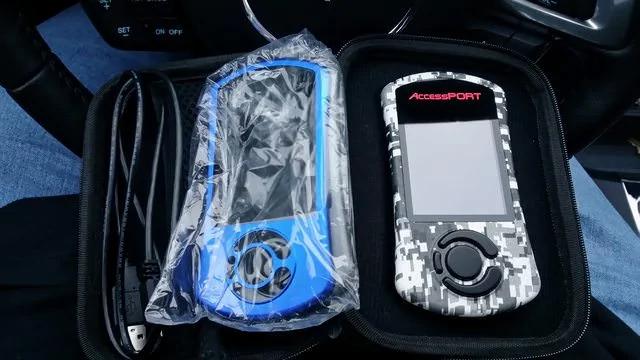
After opening up the small little box I was presented with a very nice, padded black little travel case with Cobb stamped right on the side. Unzipping this travel case reveals the Accessport, cable that connects to the OBD2 port, a mounting bracket that's easily assembled and has a sticky pad for mounting on the side of the center console or elsewhere and various cables - OBD2 and USB, and instructions. There's also some Cobb stickers and faceplates should you want to customize the look of your AP.
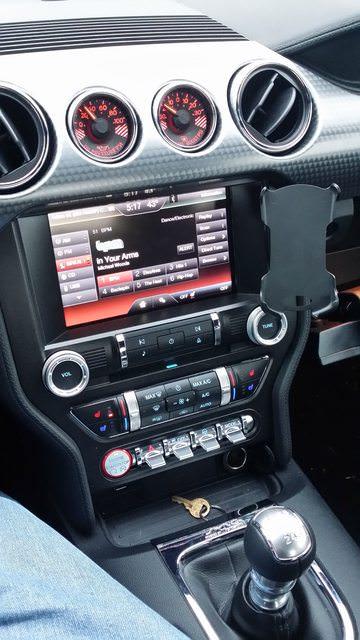
The OBD2 cable is pretty sturdy and long. It's easily looped underneath the console where the carpet meets the plastic panels in the foot wells for easy hiding! However I did have to make sure the cable was firmly pushed into the OBD2 socket because at first it didn't seem like it until I really pushed on the thing and it slowly connected. This is also how the AP gets power so I didn't want to lose that in the middle of the flash! What's really nice is the AP and bracket are magnetic (haha!) so you can easily remove it yet it firmly stays in place while driving. Following the instructions on screen prompts you to connect your car to a battery charger. I didn't have one on hand, and my car is still pretty new so that was the only risk I took when I began the flashing process. The AP backs up the stock ROM in case you want to flash it back.
The flashing process was a little weird... Once it starts flashing the new map, all of the lights in the console were going on and off, sync started to install as if it had a new update occurring. The entire thing was going on and off like a disco ball and it was very bizarre! It was a very interesting process but in the end I managed to walk away and start it up unharmed! The entire flash process is also quite long, about 30 minutes which is why they require you to hook it up to a battery charger. The time also got reset but other than that everything was back to normal.
Now on to the fun parts . The car was already fantastic in my eyes and hands. It's extremely responsive, turbo lag was hardly noticeable but once it picked up it was extremely satisfying to feel that jolt of power. The handling was superb, especially important where I live where there are a lot of back roads and winding turns. Starting out it didn't seem like anything was really that different. My first thoughts were, "Is this it? I spent how much on this thing??" But little did I know what would happen later... After spending a few more hours which turned into days with it and reading over Cobb's map notes on their website, I saw a section that mentions the Octane Adjust Ratio. After emailing and PMing some guys at Cobb I learned I was able to monitor this on the AP! Basically the car needs to learn what fuel it's using by reading -1.0 through the Octane Adjust Ratio. Once it did read it... holy crap the torque. I felt like I was in a rocket! It was absolutely insane :eyebulge: Planting my foot down and gunning it from 1st and shifting into 2nd was a mind blowing experience having come from cars with less than 200 horsepower. I was thrown into my seat and pinned. I almost forgot to shift when it happened too! And the process repeated all the way up through 4th till I was going 100mph and realized this was a bad decision. Having 300HP and 400TQ at the touch of my foot is crazy to think about. Even in 5th I can step on it and it'll go. The only downside is you can really sense the breathlessness above 5000RPM's now. Low end torque everywhere but now it's left me really wanting to upgrade more!
One of the features mentioned on the website is the ability to datalog. I've used this feature a few times already and like it a lot. It's as simple as pushing the center button on the AP once it's booted up. Drive around a bit and stop it or start a new one. Once you're done just connect it to a computer (Cobb is also Mac friendly!) and download the logs. They're easily opened up in excel and displayed column by column for each field. Every little detail is here and if you're really into tuning you can find all of the info you need from these simple logs.
Another feature mentioned is the 5 way map switching. I'll be honest and say I haven't dove into this area yet but I have tinkered with it. Basically you just hold down the Cruise Control Cancel and hit the + or - cruise control buttons to switch profiles. You can do this on-the-fly and it's amusing to hear the sound symposer in action. The Eco mode is probably the one setting I'd use the most with my day to day commute but I still need to properly test it out once I'm done having my fun.
Cobb, you guys are awesome!! Absolutely loving my AP and can't wait to see what else you guys put out!! :hail:
To first start off my review, I'd like to point a few things out. First of all when it comes to tuning or doing any kind of work on my cars I'm a total noob. Having come from a world of a 2003 Mazda 6i (Auto), a 2013 Ford Focus (Manual), and a 1993 Chevrolet 1500 Extended Cab (Auto), I'm not too well versed when it comes to squeezing out more power. Especially with what I was dealt with and on top of not having the money to put down on something where my returns would be extremely limited... So on to my new ride! A 2015 Ecoboost Premium Mustang + Performance Package in Magnetic (Manual, of course).
Being in Austin, somewhat of a car enthusiast and eager to get down into learning more about what I can achieve with this beast, Cobb was the logical choice for me. Sure, there are the other tuners out there but being so close to home and having a good reputation when it comes to tuning turbocharged platforms helped my decision. The features and numbers to expect also had me hooked on their AP. So I went down to the Austin location, handed them the money and took home my new AP! I was a little enthusiastic on that drive back but it wouldn't have prepared me with what was to come.
After opening up the small little box I was presented with a very nice, padded black little travel case with Cobb stamped right on the side. Unzipping this travel case reveals the Accessport, cable that connects to the OBD2 port, a mounting bracket that's easily assembled and has a sticky pad for mounting on the side of the center console or elsewhere and various cables - OBD2 and USB, and instructions. There's also some Cobb stickers and faceplates should you want to customize the look of your AP.
The OBD2 cable is pretty sturdy and long. It's easily looped underneath the console where the carpet meets the plastic panels in the foot wells for easy hiding! However I did have to make sure the cable was firmly pushed into the OBD2 socket because at first it didn't seem like it until I really pushed on the thing and it slowly connected. This is also how the AP gets power so I didn't want to lose that in the middle of the flash! What's really nice is the AP and bracket are magnetic (haha!) so you can easily remove it yet it firmly stays in place while driving. Following the instructions on screen prompts you to connect your car to a battery charger. I didn't have one on hand, and my car is still pretty new so that was the only risk I took when I began the flashing process. The AP backs up the stock ROM in case you want to flash it back.
The flashing process was a little weird... Once it starts flashing the new map, all of the lights in the console were going on and off, sync started to install as if it had a new update occurring. The entire thing was going on and off like a disco ball and it was very bizarre! It was a very interesting process but in the end I managed to walk away and start it up unharmed! The entire flash process is also quite long, about 30 minutes which is why they require you to hook it up to a battery charger. The time also got reset but other than that everything was back to normal.
Now on to the fun parts
. The car was already fantastic in my eyes and hands. It's extremely responsive, turbo lag was hardly noticeable but once it picked up it was extremely satisfying to feel that jolt of power. The handling was superb, especially important where I live where there are a lot of back roads and winding turns. Starting out it didn't seem like anything was really that different. My first thoughts were, "Is this it? I spent how much on this thing??" But little did I know what would happen later... After spending a few more hours which turned into days with it and reading over Cobb's map notes on their website, I saw a section that mentions the Octane Adjust Ratio. After emailing and PMing some guys at Cobb I learned I was able to monitor this on the AP! Basically the car needs to learn what fuel it's using by reading -1.0 through the Octane Adjust Ratio. Once it did read it... holy crap the torque. I felt like I was in a rocket! It was absolutely insane :eyebulge: Planting my foot down and gunning it from 1st and shifting into 2nd was a mind blowing experience having come from cars with less than 200 horsepower. I was thrown into my seat and pinned. I almost forgot to shift when it happened too! And the process repeated all the way up through 4th till I was going 100mph and realized this was a bad decision. Having 300HP and 400TQ at the touch of my foot is crazy to think about. Even in 5th I can step on it and it'll go. The only downside is you can really sense the breathlessness above 5000RPM's now. Low end torque everywhere but now it's left me really wanting to upgrade more!One of the features mentioned on the website is the ability to datalog. I've used this feature a few times already and like it a lot. It's as simple as pushing the center button on the AP once it's booted up. Drive around a bit and stop it or start a new one. Once you're done just connect it to a computer (Cobb is also Mac friendly!) and download the logs. They're easily opened up in excel and displayed column by column for each field. Every little detail is here and if you're really into tuning you can find all of the info you need from these simple logs.
Another feature mentioned is the 5 way map switching. I'll be honest and say I haven't dove into this area yet but I have tinkered with it. Basically you just hold down the Cruise Control Cancel and hit the + or - cruise control buttons to switch profiles. You can do this on-the-fly and it's amusing to hear the sound symposer in action. The Eco mode is probably the one setting I'd use the most with my day to day commute but I still need to properly test it out once I'm done having my fun.
Cobb, you guys are awesome!! Absolutely loving my AP and can't wait to see what else you guys put out!! :hail:
Sponsored