Sponsored

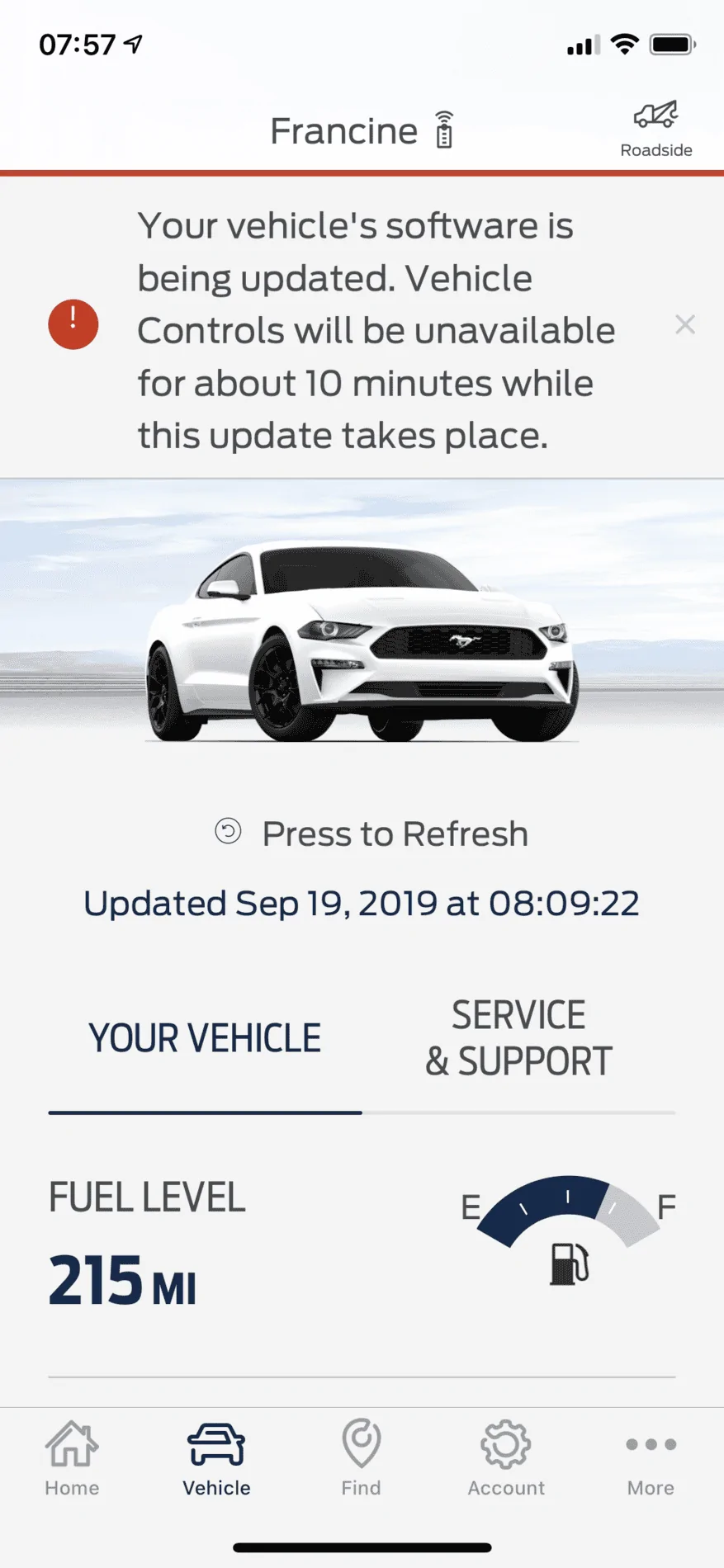
“Your vehicles software is being updated

TicTocTach

Well-Known Member
Joined
Mar 15, 2018
Threads
25
Messages
983
Reaction score
1,004
Location
DFWTX
First Name
Clair
Vehicle(s)
2018 EBPP
I get this message every time I open FordPass, and their chat help has not been able to resolve anything. I found something short of a recall notice on the NHTSA site: https://static.nhtsa.gov/odi/tsbs/2019/MC-10167210-0001.pdf

has anyone tried this or managed to solve this on their own? Mine hasn’t updated since September 2019, and the local dealership sucks.
E6569E8B-009A-4299-86DD-ACC4E46A323F.webp
Sponsored


Chef jpd

Well-Known Member
Joined
Apr 1, 2016
Threads
63
Messages
2,989
Reaction score
3,121
Location
Brooklyn, NY
First Name
John
Vehicle(s)
2020 GT PP1 6M, Grab ass lime. Ex: 2016 EB PPP CO
Vehicle Showcase
1
Turn off automatic updates in the general settings on your main screen.
 

Bikeman315

Well-Known Member
Joined
Apr 12, 2015
Threads
581
Messages
16,183
Reaction score
21,909
Location
Myrtle Beach, SC
First Name
Ira
Vehicle(s)
2019 Mustang GT/CS, 2021 Volvo XC60
Check to see if your WiFi is on. Separate from auto updates. That you can turn off.

FordPass will not update without WiFi being turned on.
 
OP
OP
TicTocTach

TicTocTach

Well-Known Member
Joined
Mar 15, 2018
Threads
25
Messages
983
Reaction score
1,004
Location
DFWTX
First Name
Clair
Vehicle(s)
2018 EBPP
What build of Sync are you on? The car is probably trying to update to the newest build over Wifi which never works right. Try manually updating with a USB, look here for info as to how. https://www.mustang6g.com/forums/threads/official-ford-sync3-3-4-release.145436/page-35#post-3006775
FordOwner says: "Your SYNC system (SYNC3 v3.0.19205) is up to date." I did the USB update back in January hoping it would help with this.

Turn off automatic updates in the general settings on your main screen.
Automatic updates are now off, and I have deleted / reinstalled the app. So far it behaves the same...
 

Sponsored

OP
OP
TicTocTach

TicTocTach

Well-Known Member
Joined
Mar 15, 2018
Threads
25
Messages
983
Reaction score
1,004
Location
DFWTX
First Name
Clair
Vehicle(s)
2018 EBPP
Check to see if your WiFi is on. Separate from auto updates. That you can turn off.

FordPass will not update without WiFi being turned on.
WiFi is on, and I have a repeater for the garage that gives pretty decent signal strength.
 
OP
OP
TicTocTach

TicTocTach

Well-Known Member
Joined
Mar 15, 2018
Threads
25
Messages
983
Reaction score
1,004
Location
DFWTX
First Name
Clair
Vehicle(s)
2018 EBPP
OK, so that’s not it. Did you try a master reset? This fixes a lot of issues.
I have not, but I think it's next on the list. I've been worried about what might get lost or have to be replaced, but at this point it's worth a shot.
 
OP
OP
TicTocTach

TicTocTach

Well-Known Member
Joined
Mar 15, 2018
Threads
25
Messages
983
Reaction score
1,004
Location
DFWTX
First Name
Clair
Vehicle(s)
2018 EBPP


Top