Juben
Well-Known Member
- Joined
- Jan 29, 2015
- Threads
- 35
- Messages
- 2,519
- Reaction score
- 812
- Location
- Chattanooga, TN
- First Name
- Justin
- Vehicle(s)
- 2015 EcoBoost Mustang (AT) w/PP
- Thread starter
- #1
There seems to have been a lot of interest in virtual dyno figures lately, so I figured that I'd make a post about a tool that I've used for a few years now. It's called Virtual Dyno or VD.
It's a great program, and when it's dialed in right with your specific car's attributes and you can record consistent logs, it can be a fairly accurate and useful tool.
So, let's get started. You can download VD from here.
Once you start the software, you're going to want to select File > Car Editor. Once the Car Editor window opens, scroll down and select Ford > Mustang > 2015-2016 Mustang Ecoboost [Manual].
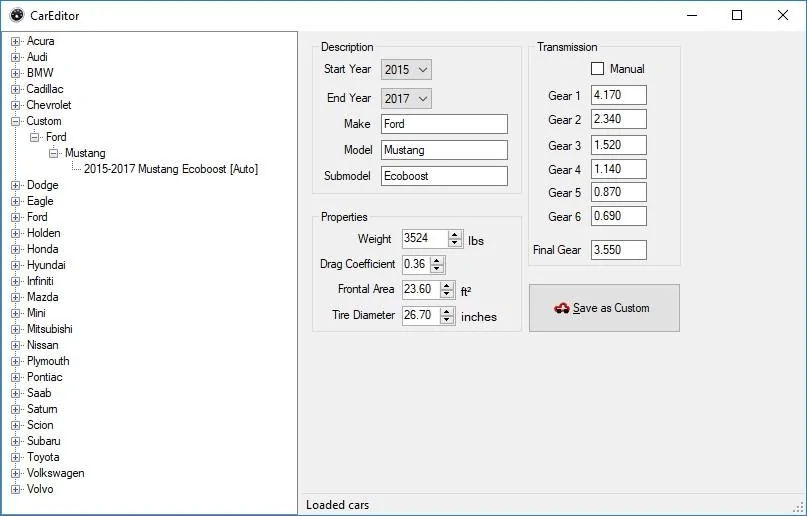
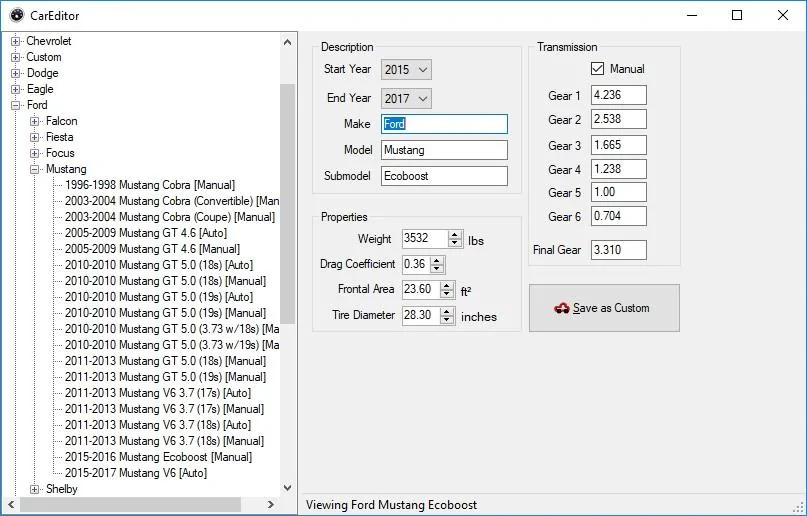
From there, you need to enter the following information depending on whether you have an automagic or manual transmission:
Automagic:

Manual:
Now, I want to note a few important details:
(1) First, you want to make sure your gear ratio is the same as your cars. They're different depending on what transmission you have.
Automagic: 3.15 (base) 3.31 (optional) 3.55 (Performance Package)
Manual: 3.31 (base) 3.55 (Performance Package)
(2) Second, you want to make sure your tire size is accurate, especially if you've changed wheels. Google something like 'tire size calculator' and input your tire size on the rear tires. It'll give you a measurement and you'll need to input that value to the 'Tire Diameter' box.
(3) Third, leave Drag Coefficient and Frontal Area alone. They're correct.
(4) Fourth, if you can get an accurate weight on your car, it'll be more accurate. Pro-tip on that: Most counties have landfill areas where you can take your trash. Go somewhere like that or to a quarry and ask them if they mind to tell you the weight of your car. You'll have to subtract your body weight (of course) but their scales are usually much more accurate than a weigh station at a truck stop.
After you've made sure that everything is correct and matches your car, select 'Save as Custom'. Give the file a name and save it. Now your custom settings can be used for a log, so close the Car Editor and go back to the main screen.
Go to 'Load Runs' and select your custom settings from the list that you saved earlier and it will plot the dyno graph. You can play with the settings, like SAE and Smoothing, from there.
You want to find a long, smooth road with little to no bumps on it. And you want it to be a place where you can go back and record more logs after tune revisions, additional parts, etc. The more consistent you can be, the more accurate your results will be.
I know people are probably going to say it's not to take the place of a dyno, and it's not, but what it will do is provide you with a pretty good estimation of power, and most importantly, show you gains/losses from tuning or mods.
I know I've probably left things out because it's very late and I'm tired, but if I have, I'll try to update this post accordingly.
Have fun everything and let's see some results!
It's a great program, and when it's dialed in right with your specific car's attributes and you can record consistent logs, it can be a fairly accurate and useful tool.
So, let's get started. You can download VD from here.
Once you start the software, you're going to want to select File > Car Editor. Once the Car Editor window opens, scroll down and select Ford > Mustang > 2015-2016 Mustang Ecoboost [Manual].
From there, you need to enter the following information depending on whether you have an automagic or manual transmission:
Automagic:
Manual:
Now, I want to note a few important details:
(1) First, you want to make sure your gear ratio is the same as your cars. They're different depending on what transmission you have.
Automagic: 3.15 (base) 3.31 (optional) 3.55 (Performance Package)
Manual: 3.31 (base) 3.55 (Performance Package)
(2) Second, you want to make sure your tire size is accurate, especially if you've changed wheels. Google something like 'tire size calculator' and input your tire size on the rear tires. It'll give you a measurement and you'll need to input that value to the 'Tire Diameter' box.
(3) Third, leave Drag Coefficient and Frontal Area alone. They're correct.
(4) Fourth, if you can get an accurate weight on your car, it'll be more accurate. Pro-tip on that: Most counties have landfill areas where you can take your trash. Go somewhere like that or to a quarry and ask them if they mind to tell you the weight of your car. You'll have to subtract your body weight (of course) but their scales are usually much more accurate than a weigh station at a truck stop.
After you've made sure that everything is correct and matches your car, select 'Save as Custom'. Give the file a name and save it. Now your custom settings can be used for a log, so close the Car Editor and go back to the main screen.
Go to 'Load Runs' and select your custom settings from the list that you saved earlier and it will plot the dyno graph. You can play with the settings, like SAE and Smoothing, from there.
You want to find a long, smooth road with little to no bumps on it. And you want it to be a place where you can go back and record more logs after tune revisions, additional parts, etc. The more consistent you can be, the more accurate your results will be.
I know people are probably going to say it's not to take the place of a dyno, and it's not, but what it will do is provide you with a pretty good estimation of power, and most importantly, show you gains/losses from tuning or mods.
I know I've probably left things out because it's very late and I'm tired, but if I have, I'll try to update this post accordingly.
Have fun everything and let's see some results!
Sponsored