Sponsored

Tomtop Unit Fixes

RedfireV8

Well-Known Member
Joined
Sep 25, 2016
Threads
6
Messages
274
Reaction score
256
Location
Louisiana
First Name
Mike
Vehicle(s)
2019 GT PP1 A10
Don't mean to get off the current topic especially since this is a small thing I was just wondering...but is anyone else's phone battery icon not accurate? My phone will be at 46% or something and it shows full battery on the unit. Just curious..
Sponsored

 

StangATX

Project Corrupted Cyclone
Joined
Dec 7, 2015
Threads
28
Messages
1,197
Reaction score
309
Location
Austin, TX
Vehicle(s)
2016 S550 White Corrupted Cyclone
Well guy I have a Xmas gift for y'all (kinda lol)! Firstly I hope y'all will have wonderful holidays.

The manufacturer I worked with shipped my test dongle last week. I just got it! I tested my drivers and the dongle. Guess what happened next....?

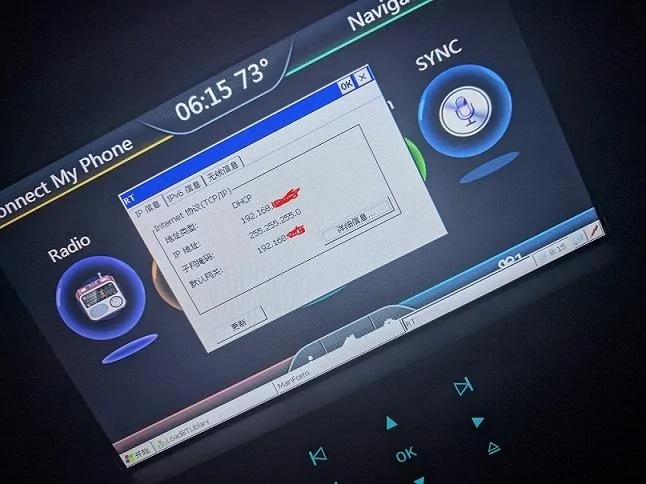
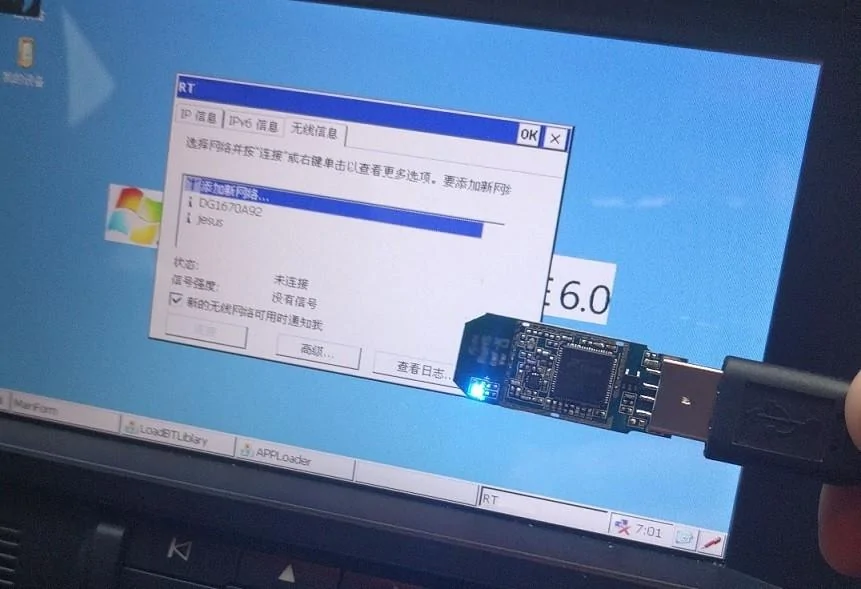
It works! I got WiFi on our Tomtop unit guys!

Here's 2 pictures:

IMG-20161223-WA0002.webp


IMG_20161223_181555.webp


Enjoy!
 

StangATX

Project Corrupted Cyclone
Joined
Dec 7, 2015
Threads
28
Messages
1,197
Reaction score
309
Location
Austin, TX
Vehicle(s)
2016 S550 White Corrupted Cyclone
Website updated!
 

StangATX

Project Corrupted Cyclone
Joined
Dec 7, 2015
Threads
28
Messages
1,197
Reaction score
309
Location
Austin, TX
Vehicle(s)
2016 S550 White Corrupted Cyclone
Don't mean to get off the current topic especially since this is a small thing I was just wondering...but is anyone else's phone battery icon not accurate? My phone will be at 46% or something and it shows full battery on the unit. Just curious..
I have this issue from time to time...
 

RedfireV8

Well-Known Member
Joined
Sep 25, 2016
Threads
6
Messages
274
Reaction score
256
Location
Louisiana
First Name
Mike
Vehicle(s)
2019 GT PP1 A10
Remind me again, what can we do with WiFi on our units? Google Maps, Waze, etc. Any other benefits?

Thank you again for all your hard work! :thumbsup:
 

Sponsored

StangATX

Project Corrupted Cyclone
Joined
Dec 7, 2015
Threads
28
Messages
1,197
Reaction score
309
Location
Austin, TX
Vehicle(s)
2016 S550 White Corrupted Cyclone
Remind me again, what can we do with WiFi on our units? Google Maps, Waze, etc. Any other benefits?

Thank you again for all your hard work! :thumbsup:
Everything you want as long as you have the platform... GPS, YouTube, WebBrowsing (Working on making one). etc...
 

Drugdealr

LOLKBYE
Joined
Jun 14, 2015
Threads
29
Messages
668
Reaction score
227
Location
Houston, TX
First Name
Sal
Vehicle(s)
2021 Ford Mustang GT
[MENTION=20219]StangATX[/MENTION] I love youuuuuuu!

So please tell me that Waze is going to be full featured now, because if it is, most likely it alone will beat out the entire Sync 3 system.

*i love you* :p
 

StangATX

Project Corrupted Cyclone
Joined
Dec 7, 2015
Threads
28
Messages
1,197
Reaction score
309
Location
Austin, TX
Vehicle(s)
2016 S550 White Corrupted Cyclone
@StangATX I love youuuuuuu!

So please tell me that Waze is going to be full featured now, because if it is, most likely it alone will beat out the entire Sync 3 system.

*i love you* :p
hahaha :lol:Waze works half way. I was able to get the sign in screen and stuff but I still need to modify some settings files to make it work properly with WinCE 6. I uploaded a short video to show y'all that the WiFi is actually working properly. I downloaded a third-party web browser. It takes forever to load Google but that's because I passed my data limit and I'm throttled... :frusty:. Anyways... Here's the video:

[ame]https://www.youtube.com/edit?o=U&video_id=1s00037HE5k

I'll post another video whenever I'm not throttled anymore. The WiFi dongle support 150Mbps. I didn't really care to go for 300Mbps... My goal was to make the WiFi working on our unit and it is now accomplished!
I'll go more into details after the holidays.

Merry Xmas!:thumbsup:
 
Last edited:

Drugdealr

LOLKBYE
Joined
Jun 14, 2015
Threads
29
Messages
668
Reaction score
227
Location
Houston, TX
First Name
Sal
Vehicle(s)
2021 Ford Mustang GT
Question! Anyway we can break up the floating circles, which i am assuming is the home screen and make it more into a Sync 2 home screen?
 

HrDrift

Well-Known Member
Joined
May 22, 2015
Threads
17
Messages
82
Reaction score
11
Location
Torrance
Vehicle(s)
2015 mustang gt
Question! Anyway we can break up the floating circles, which i am assuming is the home screen and make it more into a Sync 2 home screen?
i believe stangATX may have that changed because hes working on the Sync 3 skin.
 

Sponsored

PatrickHenninger

Banned
Banned
Banned
Joined
Jan 20, 2016
Threads
7
Messages
1,185
Reaction score
645
Location
Richlands, NC
Vehicle(s)
2015 Mustang GT - Oxford White
I actually filed for an RMA to return my unit today. It's nifty if you have time and resources to tinker, but it's still just unreliable IMHO. The temperature goes from 0-188 degrees randomly (when it's 35 degrees out) and the fact that it won't play any videos, no matter what format or resolution I try. Just not worth it.
 

StangATX

Project Corrupted Cyclone
Joined
Dec 7, 2015
Threads
28
Messages
1,197
Reaction score
309
Location
Austin, TX
Vehicle(s)
2016 S550 White Corrupted Cyclone
Question! Anyway we can break up the floating circles, which i am assuming is the home screen and make it more into a Sync 2 home screen?
It could be possible. I just need to work on it lol. Everything is possible haha.

i believe stangATX may have that changed because hes working on the Sync 3 skin.
Right Sync 3 skin is on hold. I'm working on a lot of stuff and that WiFi dongle.

I actually filed for an RMA to return my unit today. It's nifty if you have time and resources to tinker, but it's still just unreliable IMHO. The temperature goes from 0-188 degrees randomly (when it's 35 degrees out) and the fact that it won't play any videos, no matter what format or resolution I try. Just not worth it.
You might have a bad unit... My temperature goes to 0 from time to time but never went 188 even in hot days. For the videos it is strange... Have you to re-flash the unit...? Also, as you said this unit is a lot of time consuming I'm just lucky enough to have a little free time to play on it. However I'm gonna be able to work on it for about a week or 2. I just dropped off my car this morning at the dealership for some repairs under warranty. (Stupid Tranny :frusty: )
 

Jdenkevitz

Well-Known Member
Joined
May 3, 2016
Threads
22
Messages
411
Reaction score
132
Location
Maryland
Vehicle(s)
2016 Ruby GT PP. Former 2016 Ecoboost owner.
I am able to play video files. There were a few that did not play, and it probably has to do with the resolution they were encoded. I recommend trying different resolution/codecs/formats.
 

dimaslon84

Member
Joined
Jul 31, 2016
Threads
0
Messages
5
Reaction score
2
Location
NY
Vehicle(s)
2015 convertible V6
Here we go guys! It's happening!!! Check out the video I made this morning:


Don't get too excited though. I still need to figure out why the f**k they made it that way... :shrug: But hey at least it's possible now!
So this is what i have noticed today about backlight issue!!
I bet the backlight level works fine for everyone here at night time, right! And there is a reason why they have made it this way. The level it goes back to is night time mode!
IF YOU SET YOUR LOGHT SWITCH TO 0. Unit gets back to the backlight level set by User. And it REMEMBERS it after car restarts. As soon as you switch your light switch to any other position- it goes into preset by factory night mode. Unfortunately even if its a day time and your switch being in AUTO does not switch any of your lights on Unit still thinks its a nighttime because the position of light switch is not 0. This is where tomtop guys screwed it up. Obviously no-one bothers switching lights to 0, cuz whats the point of having AUTO mode then, right? I believe its not a software issue (i may be wrong there of course) and it could be fixed by rewiring the Unit a bit (it'd be pain to take it apart again though just for this).
But imagine how cool would that be if it actually worked properly on lights switched to AUTO. It would work like its supposed to i guess:)
 

StangATX

Project Corrupted Cyclone
Joined
Dec 7, 2015
Threads
28
Messages
1,197
Reaction score
309
Location
Austin, TX
Vehicle(s)
2016 S550 White Corrupted Cyclone
So this is what i have noticed today about backlight issue!!
I bet the backlight level works fine for everyone here at night time, right! And there is a reason why they have made it this way. The level it goes back to is night time mode!
IF YOU SET YOUR LOGHT SWITCH TO 0. Unit gets back to the backlight level set by User. And it REMEMBERS it after car restarts. As soon as you switch your light switch to any other position- it goes into preset by factory night mode. Unfortunately even if its a day time and your switch being in AUTO does not switch any of your lights on Unit still thinks its a nighttime because the position of light switch is not 0. This is where tomtop guys screwed it up. Obviously no-one bothers switching lights to 0, cuz whats the point of having AUTO mode then, right? I believe its not a software issue (i may be wrong there of course) and it could be fixed by rewiring the Unit a bit (it'd be pain to take it apart again though just for this).
But imagine how cool would that be if it actually worked properly on lights switched to AUTO. It would work like its supposed to i guess:)
You're right. Mike and I and other member talked about it on the website. However it is still mixed up in software and hardware. you can find the post on this site: http://www.stangatx.tk/ If we could find which wire on the unit is doing that you can just tape it directly to the sensor in front of the windshield to have the auto mode working. the sensor works just as a contact (kinda...lol)
Sponsored


Top