Sponsored

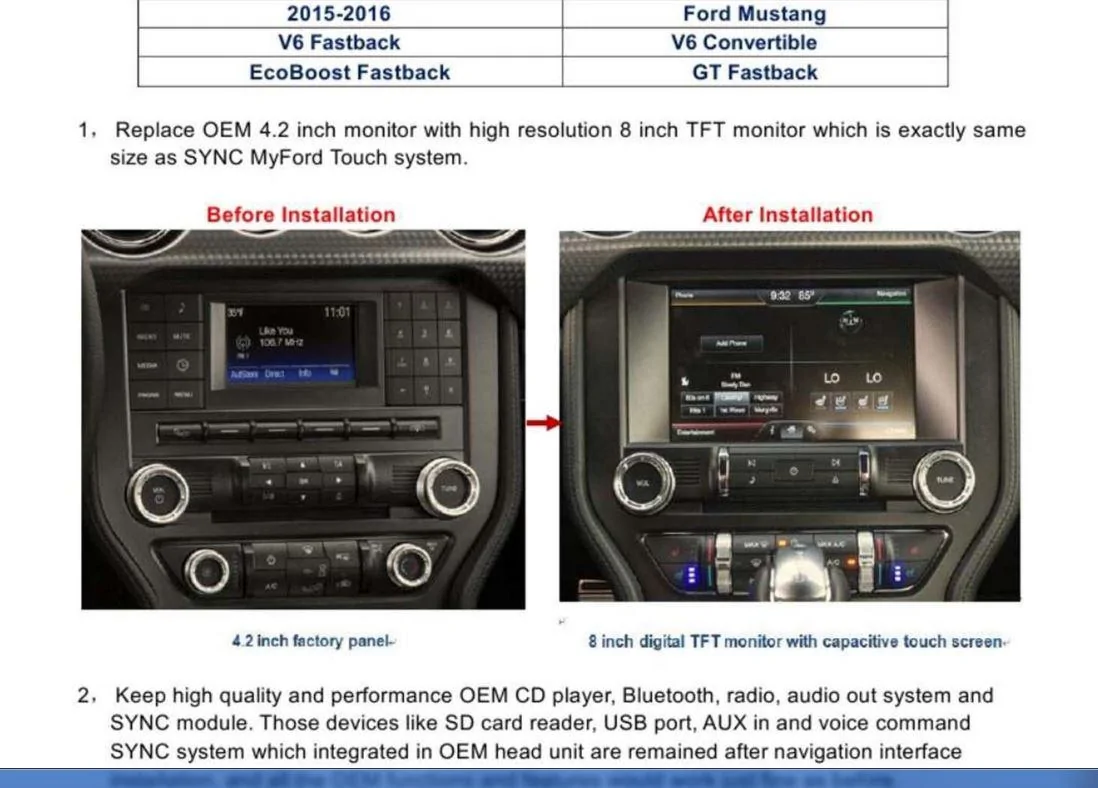
TOMTOP 8" Touchscreen Upgrade: Post-Install Issues & Help Thread

Cjenne25

Member
Joined
Nov 26, 2015
Threads
2
Messages
17
Reaction score
11
Location
KCMO
First Name
Chris
Vehicle(s)
2015 S550 magnetic
Well after playing around with the engineering code and searching the different files within, I managed to change the start up symbol from the mustang to the PRIMO NAV symbol and can't find the mustang to change it back. Lol I was able to disable the PRIMO NAV then enable it again from the settings. So I wonder if we are to load a different navigation down the road if we wanted or does anyone know if we can take the SD card out and add images to that card to load as a start up image?
Sponsored
 

Mulestang

Well-Known Member
Joined
Oct 26, 2015
Threads
8
Messages
191
Reaction score
18
Location
Jacksonville, FL
Vehicle(s)
2015 Mustang
TOMTOP 8" Touchscreen Upgrade: Post-Install Issues & Help Thread

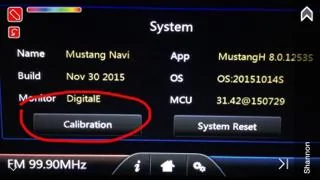
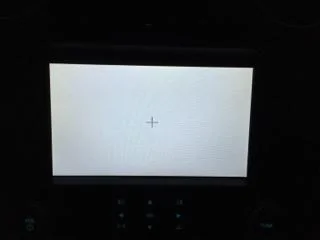
For those that may not have tinkered with the display 'calibration' touchpoint, I just found that it works ok. I launched it hoping I could address the cropping of the 'Phone Connected' touchpoint in the upper left corner. I didn't correct it. However, the return arrow in the upper left corner of most menus was a little off on my unit. You had to touch to the right of the arrow slightly to get it to select. Running through the screen calibration corrected it. If you find yourself having to hit a particular button numerous times, the cal may be off like it was on mine.
Just select 'calibration', touch the 5 plus (+) signs that display is series in the corners and center of the screen, then finally 'ok'. You're done.
a3e411a4b9d40ee5e535d0db1e37792a.webp

c85f11584cdfd8c3264b32a2750e5ecb.webp


Sent from my iPhone using Tapatalk
 
Last edited:

psoff

Well-Known Member
Joined
Apr 15, 2015
Threads
8
Messages
129
Reaction score
33
Location
Detroit
Vehicle(s)
2015 GT pp
I done some researching and found some interesting things in regard to a software update that may or may not be a solution. I started a new thread detailing out what I found, in hopes there is a member on here with some good software experience that can help with what I found. I dont know enough about software to answer my own questions so.
Here is a link to the thread I just started....

http://www.mustang6g.com/forums/showthread.php?p=1037908#post1037908
 

OEMRadio

Well-Known Member
Joined
Jan 13, 2016
Threads
6
Messages
710
Reaction score
269
Location
Dallas
Vehicle(s)
Shelby GT500
I done some researching and found some interesting things in regard to a software update that may or may not be a solution. I started a new thread detailing out what I found, in hopes there is a member on here with some good software experience that can help with what I found. I dont know enough about software to answer my own questions so.
Here is a link to the thread I just started....

http://www.mustang6g.com/forums/showthread.php?p=1037908#post1037908
This is an entirely different system made by Audiovox. Although the appearance is the same the intent is different. It is a unit for cars that have the factory 8 inch touch screen but no navigation. It places itself between the factory monitor and the factory APIM(sync module)

I do not recommend you try and load anything from that as it is entirely different .
 

Moddiction

Well-Known Member
Joined
Oct 20, 2015
Threads
82
Messages
1,806
Reaction score
341
Location
Mooresville, NC
Vehicle(s)
2016 Mustang GT PP
Is this the same unit?

It shows the screen mirroring which I thought people said didn't work with this one.

[ame]
 

Sponsored

psoff

Well-Known Member
Joined
Apr 15, 2015
Threads
8
Messages
129
Reaction score
33
Location
Detroit
Vehicle(s)
2015 GT pp
This is an entirely different system made by Audiovox. Although the appearance is the same the intent is different. It is a unit for cars that have the factory 8 inch touch screen but no navigation. It places itself between the factory monitor and the factory APIM(sync module)

I do not recommend you try and load anything from that as it is entirely different .
You are not correct....Check out this like.... scroll down and read...
http://www.sielectronic.com/index.php?m=Products&a=show&id=21

This is a pic from that linked page...
update_radio2.webp
 

OEMRadio

Well-Known Member
Joined
Jan 13, 2016
Threads
6
Messages
710
Reaction score
269
Location
Dallas
Vehicle(s)
Shelby GT500

DuhKodak

Member
Joined
Jan 9, 2016
Threads
1
Messages
21
Reaction score
0
Location
TN
Vehicle(s)
2015 Mustang GT
Well I finally installed the Tomtop unit. Everything works except FM & AM radio. Nothing but static. Any ideas?
 
OP
OP
Melekith

Melekith

Well-Known Member
Joined
Dec 1, 2014
Threads
6
Messages
215
Reaction score
45
Location
Wisconsin
First Name
Luke
Vehicle(s)
2015 Mustang GT
Is this the same unit?

It shows the screen mirroring which I thought people said didn't work with this one.

The one in this YouTube video was the original solution, selling for closer to $700 if I remember. The TomTop unit that we're all using is believed to be based off of this original unit, we are not sure but suspect it's the same technology...just stolen and watered down to do less (so they can sell it for cheaper).

Well I finally installed the Tomtop unit. Everything works except FM & AM radio. Nothing but static. Any ideas?
The first thing I can think of is to make sure that you re-attached your antennae to the back of the stock CD Player. Generally full static means a faulty or un-connected antennae.
 

Sponsored

DuhKodak

Member
Joined
Jan 9, 2016
Threads
1
Messages
21
Reaction score
0
Location
TN
Vehicle(s)
2015 Mustang GT
The one in this YouTube video was the original solution, selling for closer to $700 if I remember. The TomTop unit that we're all using is believed to be based off of this original unit, we are not sure but suspect it's the same technology...just stolen and watered down to do less (so they can sell it for cheaper).


The first thing I can think of is to make sure that you re-attached your antennae to the back of the stock CD Player. Generally full static means a faulty or un-connected antennae.

Do you happen to know which cable is the antenna? And is there possibly a fuse that I could also check?
 

Mulestang

Well-Known Member
Joined
Oct 26, 2015
Threads
8
Messages
191
Reaction score
18
Location
Jacksonville, FL
Vehicle(s)
2015 Mustang
Do you happen to know which cable is the antenna? And is there possibly a fuse that I could also check?
In my car, the cable is a small, single wire with a red connector. If you're looking at the back of the CD player, it plugs into the port on the far left. With the CD player installed and looking at the front, it's on the lower right rear of the unit. Removing the SNYC box will give you more room to access it.
 

DuhKodak

Member
Joined
Jan 9, 2016
Threads
1
Messages
21
Reaction score
0
Location
TN
Vehicle(s)
2015 Mustang GT
That explains it. That cable must of got lost in the 400 foot of wiring behind the radio.
 

Mulestang

Well-Known Member
Joined
Oct 26, 2015
Threads
8
Messages
191
Reaction score
18
Location
Jacksonville, FL
Vehicle(s)
2015 Mustang
There certainly isn't much room to work back there. Having installed my Tomtop, I can see now why aftermarket solutions from the big names (Pioneer, Kenwood, Alpine, etc.) aren't popping up everywhere.
 

Mulestang

Well-Known Member
Joined
Oct 26, 2015
Threads
8
Messages
191
Reaction score
18
Location
Jacksonville, FL
Vehicle(s)
2015 Mustang
No.. I don't.. I would do it during route guidance.. I had this experience with a different brand of radio.. but most all aftermarket companies use iGo navigation for their radios.. so it should operate the same.. and my recommendation solved it in that model.. so try it.. and let me know..
Followed your tip. We set in a destination and hit the road. When the voice came on, I turned up the volume to a useable level. The radio volume in the background increased as well and was too loud. So, that tells me the adjustment affected both radio and Nav volume collectively. I ended up going into the radio settings (not Primo nav settings) and turned the navi voice off (very counter intuitive). Once that was done, the radio was silenced when the voice prompt came on, and you could hear the voice prompt clearly. When the voice prompt was over, the radio came back on. My wife actually likes it that way, so it's all good. Now, if I could only kill that @#$% BEEP when the unit powers on and off!!!
Sponsored


Top