Sponsored

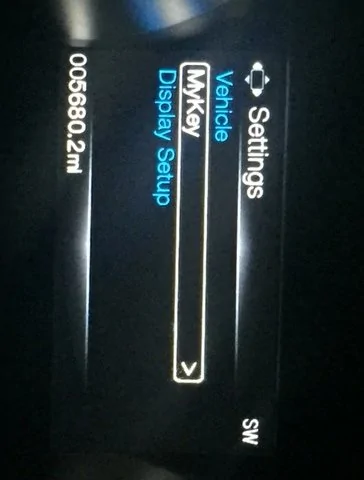
My display settings? How to exit out?? Pic inside

Nomadic

King of Europe
Joined
Oct 11, 2015
Threads
35
Messages
1,153
Reaction score
479
Location
Stay classy San Diego
Vehicle(s)
Current: '19 Mustang GT base 6spd (SOLD),'19 Camaro 1SS A10, '14 VW Jetta SE 1.8
Picked up my '15 GT a couple weeks ago. This is as far back as I can get to the display settings. Holding down the left arrow takes to the long list of settings.

Is there a way to exit out of this? Like to see a digital speedometer or something.

This is least I'm able to see on this screen.

Thanks for any help.
IMG_1463.webp
Sponsored


jasonstang

Well-Known Member
Joined
Oct 23, 2015
Threads
23
Messages
5,571
Reaction score
1,307
Location
Denver, CO
Vehicle(s)
2017 GB GT/CS 6MT
There is no digital speedometer.
The gauges are under vehicle information.
Is your back button broken? Is that key programmed under MyKey which disables other functions?
 
OP
OP
Nomadic

Nomadic

King of Europe
Joined
Oct 11, 2015
Threads
35
Messages
1,153
Reaction score
479
Location
Stay classy San Diego
Vehicle(s)
Current: '19 Mustang GT base 6spd (SOLD),'19 Camaro 1SS A10, '14 VW Jetta SE 1.8
I don't about MyKey. It said none programmed. I think my back feature is broken maybe. I just want a blank screen or a "default' screen. Whatever that looks like?
 

JackBauer

Well-Known Member
Joined
May 28, 2016
Threads
3
Messages
152
Reaction score
32
Location
Arlington, TX
Vehicle(s)
2015 Magnetic base GT 6SP
ur left arrow (back) button must be broken. there's supposed to be a main screen that has all the options like gauges, trip and what not.
 

DickR

Well-Known Member
Joined
Dec 10, 2014
Threads
3
Messages
1,400
Reaction score
512
Location
Raleigh
Vehicle(s)
2018 Ruby Red GTPP MagneRide 301A 10A and 1997 GT
There is no "blank" screen in the center display between the tach and speedometer when the engine is running.

The long list of "settings" is where you chose what you want to be the "default" after the car starts. I typically leave mine in "gauges" and then scroll up to tire pressures. Then I'll scroll down to check whatever else I want under gauges and/or go back all the way to the left and scroll to other choices such as trip.

The hollow rectangle at the top left of the screen has triangles on each side, top, and bottom. Think of the hollow rectangle as the "OK" button and eliminated triangles as "activated" scroll buttons for which direction arrows can be used to get you to a different level or choice option. Also in the various "levels" a ">" indicates another level.

Take some time to study the owner guide book or the online version. The manual isn't totally clear but it combined with practice will help. If your 15 has the base (small screen) center stack it will make the instrument panel screen seem like a piece of cake to learn. :-)

EDIT to add: The temperature display in the base center stack does not update unless the car has been moving for awhile. It normally will NOT update with the car sitting in a parking lot even if you check hours later after the temps have changed significantly. In my 15 "moving for awhile" requires more movement than even a few autocross runs late in a day after arriving in the morning.
 
OP
OP
Nomadic

Nomadic

King of Europe
Joined
Oct 11, 2015
Threads
35
Messages
1,153
Reaction score
479
Location
Stay classy San Diego
Vehicle(s)
Current: '19 Mustang GT base 6spd (SOLD),'19 Camaro 1SS A10, '14 VW Jetta SE 1.8
There is no "blank" screen in the center display between the tach and speedometer when the engine is running.

The long list of "settings" is where you chose what you want to be the "default" after the car starts. I typically leave mine in "gauges" and then scroll up to tire pressures. Then I'll scroll down to check whatever else I want under gauges and/or go back all the way to the left and scroll to other choices such as trip.

The hollow rectangle at the top left of the screen has triangles on each side, top, and bottom. Think of the hollow rectangle as the "OK" button and eliminated triangles as "activated" scroll buttons for which direction arrows can be used to get you to a different level or choice option. Also in the various "levels" a ">" indicates another level.

Take some time to study the owner guide book or the online version. The manual isn't totally clear but it combined with practice will help. If your 15 has the base (small screen) center stack it will make the instrument panel screen seem like a piece of cake to learn. :-)

EDIT to add: The temperature display in the base center stack does not update unless the car has been moving for awhile. It normally will NOT update with the car sitting in a parking lot even if you check hours later after the temps have changed significantly. In my 15 "moving for awhile" requires more movement than even a few autocross runs late in a day after arriving in the morning.

Ok thanks for the info. I don't want to see anything really so thought that was an option. I've gone through all the settings with guages ...etc. Just though like my Focus ST, I could just see a digital speedometer. Oh well, I'll just leave it the way it is. Thanks again.
Sponsored


Top