Sponsored

Digital cluster on "song name" bar, SYNC issues

Bit_the_Bullitt

Well-Known Member
Joined
Apr 22, 2020
Threads
12
Messages
1,270
Reaction score
1,281
Location
Ohio, US
First Name
Richard
Vehicle(s)
2019 Bullitt
Hello all,

I've gotten my 2019 Bullitt in Feb 2020. So far so good, just the occasional annoying bug, mostly electric.
There are two main ones that are driving me nuts:
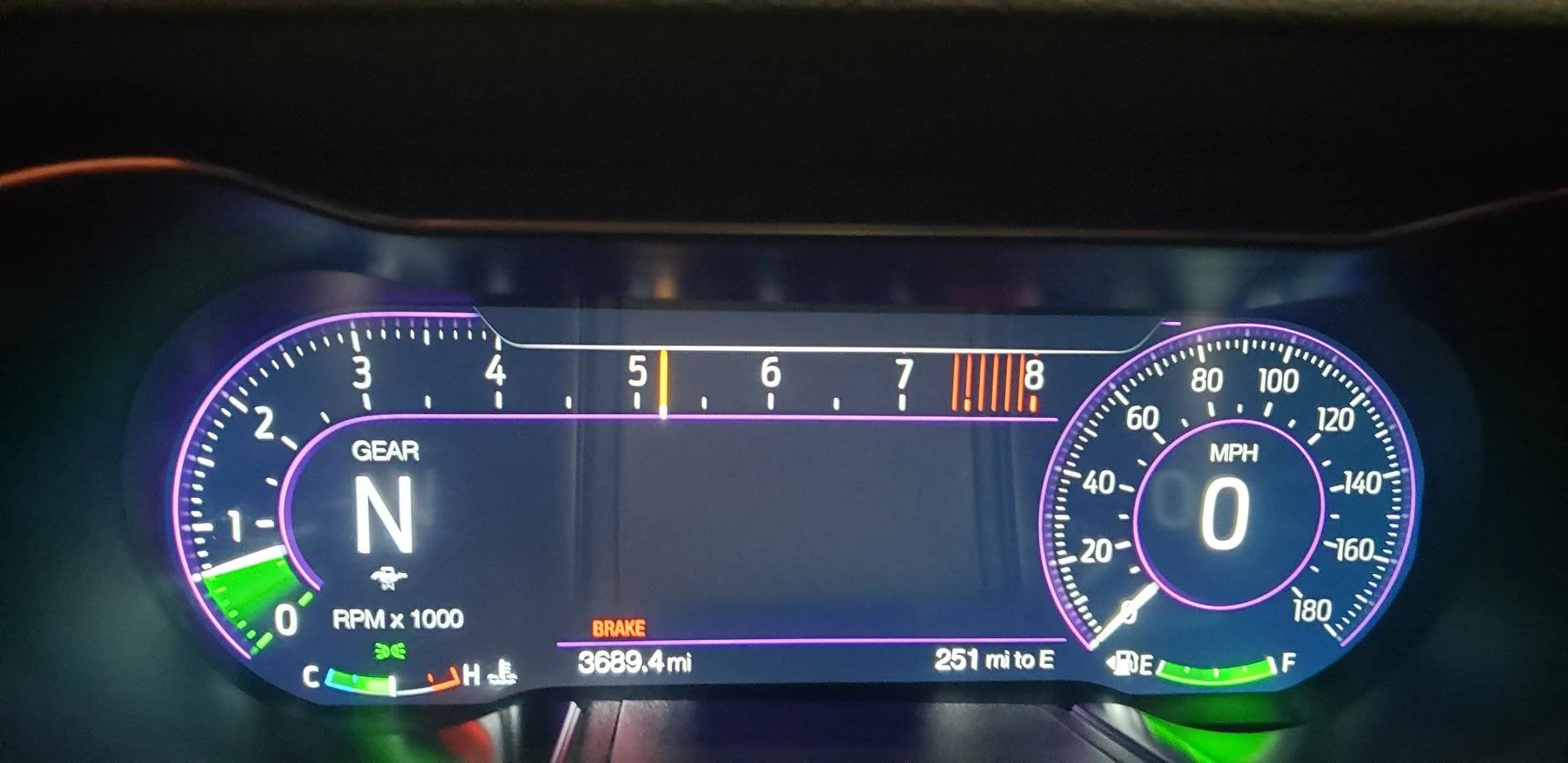
1) On the digital cluster, no matter the mode, for about a week now I've had that little grey bar stuck on top that shows the name of the song/station when you change stations (or sometimes it gives you the update on random basis). Has anyone ever seen this? I've tried to change cluster styles (from normal to sport, drag, etc.), doesn't help. Short of removing the battery cable, not sure how to fix this, any ideas? See my picture for that.

2) Recently my SYNC has been spotty to say the least. There's been drives and days when the screen is either black or stuck on the shiny pony logo, I can't change stations/songs/input from the steering wheel nor the unit itself, essentially all commands (with the exception of volume) are non-responsive, even the power button doesn't work. I've gotten it to restart by holding power+skip, but it's rather inconvenient. I've ran updates.

If anyone has ran into these issues, please let me know, gets frustrating...
20200602_204058.webp
Sponsored


Ecoboosted

Well-Known Member
Joined
Feb 8, 2015
Threads
39
Messages
1,675
Reaction score
703
Location
A state in the South East of the US
Vehicle(s)
18' Mustang GT, 19' Road Glide
Have you disconnected the battery and let it sit for a while then reconnect it? Sometimes it will fix these types of issues.
 
OP
OP
Bit_the_Bullitt

Bit_the_Bullitt

Well-Known Member
Joined
Apr 22, 2020
Threads
12
Messages
1,270
Reaction score
1,281
Location
Ohio, US
First Name
Richard
Vehicle(s)
2019 Bullitt
Have you disconnected the battery and let it sit for a while then reconnect it? Sometimes it will fix these types of issues.
That's my plan to do when I get home today, I kind of always forget before the drive and after the drive the engine bay is really hot to be fiddling with stuff under the hood...
 

Dadillac

Well-Known Member
Joined
Sep 7, 2019
Threads
34
Messages
290
Reaction score
170
Location
Iselin NJ
First Name
Don
Vehicle(s)
2018 Ecoboost Premium manual
I think I remember reading that the song title only shows up on the normal screen.

Don
 

opengl

Well-Known Member
Joined
Jan 26, 2018
Threads
5
Messages
447
Reaction score
488
Location
PA
Vehicle(s)
2018 GT PP1 400A 6MT
I think I remember reading that the song title only shows up on the normal screen.

Don
Its only there persistently on Normal, but will drop down briefly in Sport or Track when the song changes. You can see the blank bar where the song name would normally appear in OP's picture.
 

Sponsored

Temovic55

Well-Known Member
Joined
May 29, 2019
Threads
6
Messages
290
Reaction score
144
Location
Saudia Arabia
Vehicle(s)
GT500 2014, ROUSH II 2018
Vehicle Showcase
1
Any idea how to change the whole speedometer into KM/H ?? I'm talking about the speed gauges and not just the one displayed on the middle of it! I've looked everywhere on the Youtube but failed to point one!
 

Elp_jc

Well-Known Member
Joined
May 2, 2020
Threads
48
Messages
3,527
Reaction score
805
Location
USA
Vehicle(s)
None
The option to change to KPH is right on the first page when you click on settings (the 2 gears on the steering wheel). And on advanced settings you can also change language, tire pressure units, and temperature units.

The bar that shows songs and other stuff is supposed to retract after a second or so. Did you play with FORScan by any chance? You might have inadvertently changed a setting while changing something else. If not, then remove the battery, or reset the IPC module with FORScan.

Finally, removing the battery is supposed to clear issues, but in my case, it created them. Ha ha. Car was functioning perfectly, and when I replaced the battery, the gremlins began. I was going to order another V1 mirror power cable, since it stopped working. I connected it to the 12V cable today, and disconnected it at my destination to put the sunshield in place. When returning home, just for the heck of it reconnected the 'bad' cable, and it freaking worked now, and didn't do anything. And messing with the wires doesn't even cause a hiccup in power. My digital dash also stays black until two or three seconds after starting the car (or turning ignition on), and the Mustang picture only shows up for a fraction of a second. Is that the way other Bullitts start up? Don't remember how it was before, since I never paid attention. Ha ha. The reverse light being on turned out to be the stupid LED bulb, which is not CANbus compatible. Put back the stock, and no light. And when engaging R, it lights up, so that wasn't an issue with the car.
 

opengl

Well-Known Member
Joined
Jan 26, 2018
Threads
5
Messages
447
Reaction score
488
Location
PA
Vehicle(s)
2018 GT PP1 400A 6MT
The option to change to KPH is right on the first page when you click on settings (the 2 gears on the steering wheel). And on advanced settings you can also change language, tire pressure units, and temperature units.
That just adds a smaller KPH readout below the current MPH one.

Any idea how to change the whole speedometer into KM/H ?? I'm talking about the speed gauges and not just the one displayed on the middle of it! I've looked everywhere on the Youtube but failed to point one!
There's no way to change the whole scale to KPH, thats determined by the firmware on your cluster.
 

Temovic55

Well-Known Member
Joined
May 29, 2019
Threads
6
Messages
290
Reaction score
144
Location
Saudia Arabia
Vehicle(s)
GT500 2014, ROUSH II 2018
Vehicle Showcase
1
That just adds a smaller KPH readout below the current MPH one.


There's no way to change the whole scale to KPH, thats determined by the firmware on your cluster.
That is exactly what I figured! I've read somewhere a software would do the trick but it's not going to be cheap almost 500-700 US for reprogramming the whole cluster and the only odometer of 300KPH top speed you will get is the Bullitt!
 

AceS550

Well-Known Member
Joined
Dec 12, 2018
Threads
28
Messages
196
Reaction score
356
Location
Houston,TX
First Name
Ace
Vehicle(s)
2019 Bullitt
Hello all,

I've gotten my 2019 Bullitt in Feb 2020. So far so good, just the occasional annoying bug, mostly electric.
There are two main ones that are driving me nuts:
1) On the digital cluster, no matter the mode, for about a week now I've had that little grey bar stuck on top that shows the name of the song/station when you change stations (or sometimes it gives you the update on random basis). Has anyone ever seen this? I've tried to change cluster styles (from normal to sport, drag, etc.), doesn't help. Short of removing the battery cable, not sure how to fix this, any ideas? See my picture for that.

2) Recently my SYNC has been spotty to say the least. There's been drives and days when the screen is either black or stuck on the shiny pony logo, I can't change stations/songs/input from the steering wheel nor the unit itself, essentially all commands (with the exception of volume) are non-responsive, even the power button doesn't work. I've gotten it to restart by holding power+skip, but it's rather inconvenient. I've ran updates.

If anyone has ran into these issues, please let me know, gets frustrating...
20200602_204058.webp
Do you have the shift light setting on track mode? If so the gray bar stays displayed all the time and will not show song titles. Try changing the shift light settings.
 

Sponsored

Elp_jc

Well-Known Member
Joined
May 2, 2020
Threads
48
Messages
3,527
Reaction score
805
Location
USA
Vehicle(s)
None
Hey, good catch. Just saw his shift light yellow line at 5,200, so he has it obviously activated, and probably in track mode indeed. I use the dash in sport and track modes, but lately left it at sport. I hated having those yellow lines, so deactivated the shift light; now it's nice and clean all the way to redline :). I'm not going to redline it often anyway. For track it must be great, but I'm not going to do that. Hopefully that's the end of the 'problem' for the OP :D.
 
OP
OP
Bit_the_Bullitt

Bit_the_Bullitt

Well-Known Member
Joined
Apr 22, 2020
Threads
12
Messages
1,270
Reaction score
1,281
Location
Ohio, US
First Name
Richard
Vehicle(s)
2019 Bullitt
I did have shift lights on and those "shine through" the stuck grey bar.
I ended up taking off negative battery cable for about 15min, that fixed it.

In Normal gauge setting (not necessarily Normal mode as you can have gauges and actual car/steering/exhaust in different mode), the song stays.

I do wish there was a setting to show constantly the song, title, artist, or let you scroll through your list, like most modern cars have :(
I feel like it should be in the Fuel/Trip setting, make it Fuel/Trip/Audio and you could then toggle on it instead of the tire pressure etc.
 

Emilbadal

Well-Known Member
Joined
Apr 14, 2017
Threads
18
Messages
425
Reaction score
173
Location
Socal
First Name
Emil
Vehicle(s)
2016 V6 Auto DIB
I’d suggest to turn off the Wifi in the settings of your Sync3 and also turn off the automatic updates. My sync3 was choppy and audio would even cutoff on bluetooth. As soon as I turned wifi off all problems were resolved. Seems like wifi occupies major bandwidth in the apim.
Sponsored


Top