Sponsored

How to add factory remote start to your AU/EU/UK Mustang

Crispy

Member
Joined
Jul 29, 2025
Threads
2
Messages
13
Reaction score
24
Location
Australia
First Name
Jarrod
Vehicle(s)
2019 Mustang GT
Your old keys will still work after this. so you only really need to buy 1 new key and keep the rest spare.
I wont go over how to use Forscan but its pretty straight forward. you can find some guides online that go over how to programme modules/modify AS-BUILT data with it.

What you will need
You need at least 2 keys to programme a new key your self. If you only have 1 key then you need to buy another factory key from the dealership and get them to pair it. If you have 4 Keys programmed then i don't think you can programme anymore keys and the dealership will need to wipe and re-pair 2 of your keys.

Forscan programming
Backup the AS-BUILT data from any module you are about to modify (do this for all the following steps)
you can use the search bar at the top to find any of the following settings quickly.

  1. Inside the bdyCM change "Remote Start" to Enabled*
  2. Inside the IPC change "Remote Start" to Enabled. Also change "Remote Start - Climate Settings" to Enabled
  3. Inside the FCIM change "Remote Start" to Enabled
*edit 04/08/2026
In the bdyCM i also enabled Remote Starter Parking Lights so the lights turn on with remote start. not required for this mod to work.
also enabling Remote start settings in the APIM didnt seem to do anything. so thats up to you if you want to enabled it. it might help with how the climate control works? not sure though.


go double check the other modules for any remote start settings as well because i may have missed something while writing this.

Pair your new key fob
  1. Take off the rubber base of the cup holder and then put the first programmed key in the backup slot at the bottom. Then press the start button.
  2. Wait 5 seconds and then press the start button again.
  3. Take out the key. Then put the second programmed key in the backup slot. Then press the start button. (do this quickly. in about 10 seconds)
  4. Wait 5 seconds and then press the start button again.
  5. Take out the key. Then put the unprogrammed key in the backup slot. Then press the start button.
  • Make sure you WAIT 10 seconds or so after pressing the start button on the unprogrammed key. Your car will likely show no signs of ignition, Don't touch the start button again. Just keep waiting until an indicator flash and a pop-up on the instrument panel saying the key has been programmed.
Test it out
Try locking/unlocking with the new key while you are still in the car (you don't want to get locked out if its a junk key)
then to remote start the car needs to be locked and in Park. Press Lock once then Press Remote Start twice. I don't know why you have to press lock first but that seems to work best for me.
you old keys will still work after this.

Is this the "correct" way?
so this is factory remote start but the catch is the key fob you need isn't a factory key. It broadcasts the remote start command over 433MHz not 868/902MHz.
The "correct" way to do this is to replace the Radio Transceiver Module (RTM) with a high frequency version. I tried this but couldn't get one that worked so i don't have any part numbers for you. but i THINK for the 433MHz cars you would need the 868MHz RTM. I see people in the US adding remote start to other base model fords by going from 315MHz to 902MHz but i don't think those modules will work with our cars.

You can try getting a 868MHz RTM and 2 868MHz Keys to go with it. but this will cause your old keys to stop working (except in the backup slot) and you will need to get a dealership to pair the 2 new keys. If they are willing to even do that because even if you have factory remote start keys, they were never sold like that here so they might not want to deal with it.
Sponsored

 
Last edited:
PKs

PK's
Joined
Aug 20, 2016
Threads
25
Messages
1,347
Reaction score
1,595
Location
Gold Coast, Australia
First Name
Peter
Vehicle(s)
2018 GT Fastback
Your old keys will still work after this. so you only really need to buy 1 new key and keep the rest spare.
I wont go over how to use Forscan but its pretty straight forward. you can find some guides online that go over how to programme modules/modify AS-BUILT data with it.

What you will need
You need at least 2 keys to programme a new key your self. If you only have 1 key then you need to buy another factory key from the dealership and get them to pair it. If you have 4 Keys programmed then i don't think you can programme anymore keys and the dealership will need to wipe and re-pair 2 of your keys.

Forscan programming
Backup the AS-BUILT data from any module you are about to modify (do this for all the following steps)
you can use the search bar at the top to find any of the following settings quickly.

  1. Inside the BCM change "Remote Start" to Enabled
  2. Inside the IPC change "Remote Start" to Enabled. Also change "Remote Start - Climate Settings" to Enabled
  3. Inside the FCIM change "Remote Start" to Enabled
go double check the other modules for any remote start settings as well because i may have missed something while writing this.

Pair your new key fob
  1. Take off the rubber base of the cup holder and then put the first programmed key in the backup slot at the bottom. Then press the start button.
  2. Wait 5 seconds and then press the start button again.
  3. Take out the key. Then put the second programmed key in the backup slot. Then press the start button. (do this quickly. in about 10 seconds)
  4. Wait 5 seconds and then press the start button again.
  5. Take out the key. Then put the unprogrammed key in the backup slot. Then press the start button.
  • Make sure you WAIT 10 seconds or so after pressing the start button on the unprogrammed key. Your car will likely show no signs of ignition, Don't touch the start button again. Just keep waiting until an indicator flash and a pop-up on the instrument panel saying the key has been programmed.
Test it out
Try locking/unlocking with the new key while you are still in the car (you don't want to get locked out if its a junk key)
then to remote start the car needs to be locked and in Park. Press Lock once then Press Remote Start twice. I don't know why you have to press lock first but that seems to work best for me.
you old keys will still work after this.

Is this the "correct" way?
so this is factory remote start but the catch is the key fob you need isn't a factory key. It broadcasts the remote start command over 433MHz not 868/902MHz.
The "correct" way to do this is to replace the Radio Transceiver Module (RTM) with a high frequency version. I tried this but couldn't get one that worked so i don't have any part numbers for you. but i THINK for the 433MHz cars you would need the 868MHz RTM. I see people in the US adding remote start to other base model fords by going from 315MHz to 902MHz but i don't think those modules will work with our cars.

You can try getting a 868MHz RTM and 2 868MHz Keys to go with it. but this will cause your old keys to stop working (except in the backup slot) and you will need to get a dealership to pair the 2 new keys. If they are willing to even do that because even if you have factory remote start keys, they were never sold like that here so they might not want to deal with it.
Good information. I had my 18 done by a fellow forum member maybe 6 years ago. I don't use it often but when I do I love hearing the start up at a distance from the car.
I can start it at about 100m away.

You are the first person that I have seen publish this how to guide. I remember seeing some parts suppliers offering to do the remote start for an extraordinary fee. From memory I think mine was around $380 including 2 new fobs. It may have been less even.
 
OP
OP
Crispy

Crispy

Member
Joined
Jul 29, 2025
Threads
2
Messages
13
Reaction score
24
Location
Australia
First Name
Jarrod
Vehicle(s)
2019 Mustang GT
I reached out to some places in AUS that were previously offering kits for $1300+ but they were no longer selling them. i tired reaching out to people over seas offering similar kits but they didnt seem interested in dealing with someone over seas.

so i made it my mission to figure it out and publish a guide so other people dont have to be stuck like i was.
 

Randhawa_KS

Well-Known Member
Joined
Oct 18, 2018
Threads
0
Messages
72
Reaction score
23
Location
Melbourne
First Name
KS
Vehicle(s)
2019 Mustang GT OF vert, FG XR6, Lexus RX 350
Thanks @Crispy, great info, will it work on 2019 GT models by just getting the new keys and programming via Forscan and no other hardware needed?
 
Last edited:
OP
OP
Crispy

Crispy

Member
Joined
Jul 29, 2025
Threads
2
Messages
13
Reaction score
24
Location
Australia
First Name
Jarrod
Vehicle(s)
2019 Mustang GT
Thanks @Crispy, great info, will it work on 2019 GT models by just getting the new keys and programming via Forscan and no other hardware needed?
Yep. I have a 2019 GT and this is exactly what I did. New key + Forscan and that's it.
It's low risk because even if it doesn't work your old keys will still work just fine.
 

Sponsored

Randhawa_KS

Well-Known Member
Joined
Oct 18, 2018
Threads
0
Messages
72
Reaction score
23
Location
Melbourne
First Name
KS
Vehicle(s)
2019 Mustang GT OF vert, FG XR6, Lexus RX 350
Thanks for the info mate. I've been wanting to do this for a long time but don't see the worth in spending $1300. I'm ordering 2 keys now from your link and see how I go and will update here.
 

AUSCHRIS

New Member
Joined
Dec 8, 2025
Threads
0
Messages
1
Reaction score
2
Location
perth
First Name
chris
Vehicle(s)
mustang 2018
Thanks mate just did this today after ordering the key. Had a few troubles programming the key and after ChatGPT saying instead of 5 seconds do 3 it worked lol
A charm.

killed my battery half way through the forscan stuff lol quick jump start finished off and works great.

thanks mate killer tutorial
 

AnointedBeard

New Member
Joined
Nov 30, 2025
Threads
0
Messages
1
Reaction score
3
Location
Australia
Vehicle(s)
2018 Mustang GT
Edit: just needed to turn it on in the cluster, I’m an idiot. It works!!! Thanks so much mate, saved me a bucketload. Will be sharing this with anyone and everyone.


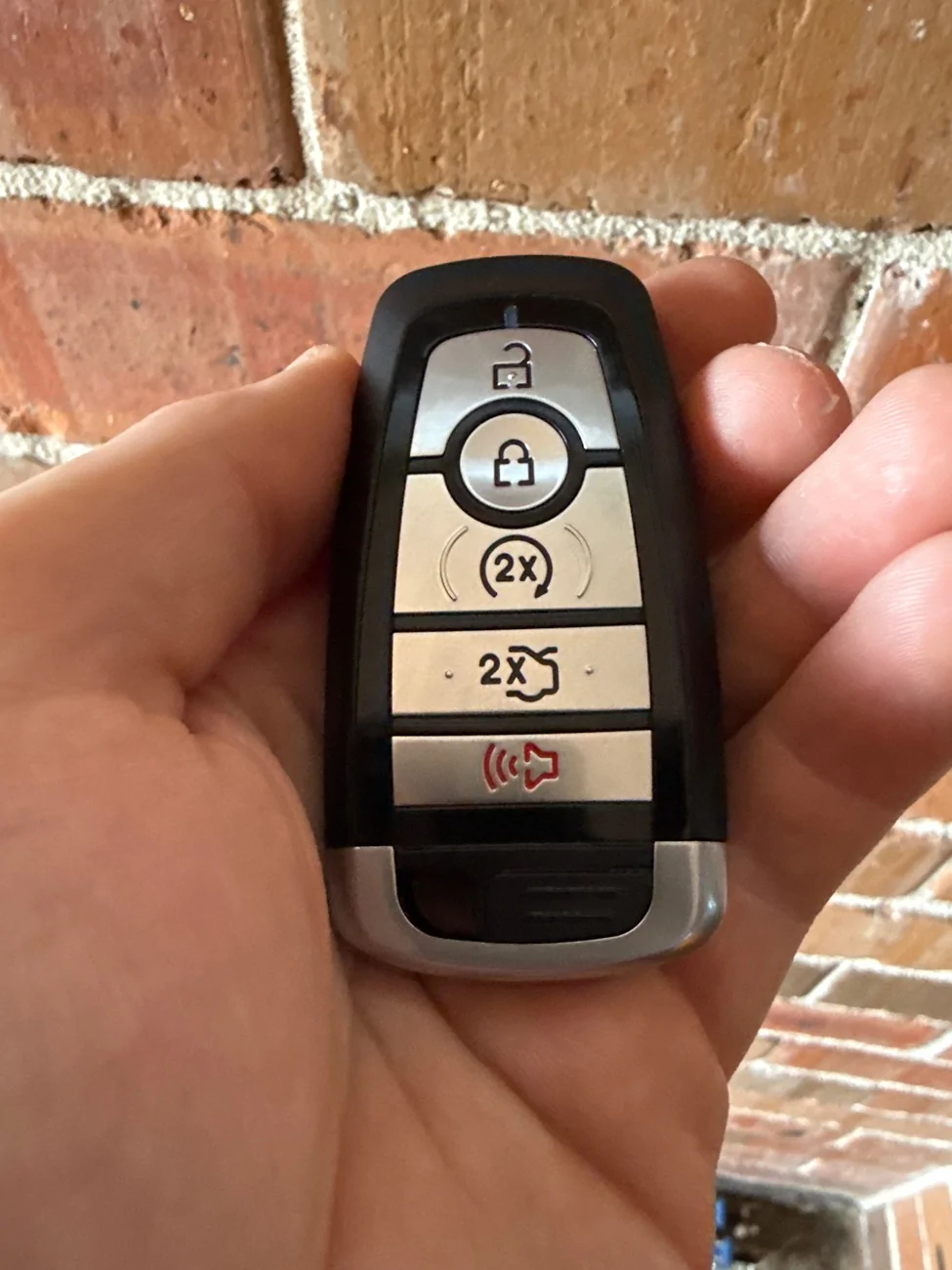
Ordered the key from the aliexpress link and have turned on every remote start setting I can find with ForScan, but no luck here. Any ideas? 2018 10spd GT. Photo of key for reference.

image.webp
 
Last edited:

Randhawa_KS

Well-Known Member
Joined
Oct 18, 2018
Threads
0
Messages
72
Reaction score
23
Location
Melbourne
First Name
KS
Vehicle(s)
2019 Mustang GT OF vert, FG XR6, Lexus RX 350
Your old keys will still work after this. so you only really need to buy 1 new key and keep the rest spare.
I wont go over how to use Forscan but its pretty straight forward. you can find some guides online that go over how to programme modules/modify AS-BUILT data with it.

What you will need
You need at least 2 keys to programme a new key your self. If you only have 1 key then you need to buy another factory key from the dealership and get them to pair it. If you have 4 Keys programmed then i don't think you can programme anymore keys and the dealership will need to wipe and re-pair 2 of your keys.

Forscan programming
Backup the AS-BUILT data from any module you are about to modify (do this for all the following steps)
you can use the search bar at the top to find any of the following settings quickly.

  1. Inside the BCM change "Remote Start" to Enabled
  2. Inside the IPC change "Remote Start" to Enabled. Also change "Remote Start - Climate Settings" to Enabled
  3. Inside the FCIM change "Remote Start" to Enabled
go double check the other modules for any remote start settings as well because i may have missed something while writing this.

Pair your new key fob
  1. Take off the rubber base of the cup holder and then put the first programmed key in the backup slot at the bottom. Then press the start button.
  2. Wait 5 seconds and then press the start button again.
  3. Take out the key. Then put the second programmed key in the backup slot. Then press the start button. (do this quickly. in about 10 seconds)
  4. Wait 5 seconds and then press the start button again.
  5. Take out the key. Then put the unprogrammed key in the backup slot. Then press the start button.
  • Make sure you WAIT 10 seconds or so after pressing the start button on the unprogrammed key. Your car will likely show no signs of ignition, Don't touch the start button again. Just keep waiting until an indicator flash and a pop-up on the instrument panel saying the key has been programmed.
Test it out
Try locking/unlocking with the new key while you are still in the car (you don't want to get locked out if its a junk key)
then to remote start the car needs to be locked and in Park. Press Lock once then Press Remote Start twice. I don't know why you have to press lock first but that seems to work best for me.
you old keys will still work after this.

Is this the "correct" way?
so this is factory remote start but the catch is the key fob you need isn't a factory key. It broadcasts the remote start command over 433MHz not 868/902MHz.
The "correct" way to do this is to replace the Radio Transceiver Module (RTM) with a high frequency version. I tried this but couldn't get one that worked so i don't have any part numbers for you. but i THINK for the 433MHz cars you would need the 868MHz RTM. I see people in the US adding remote start to other base model fords by going from 315MHz to 902MHz but i don't think those modules will work with our cars.

You can try getting a 868MHz RTM and 2 868MHz Keys to go with it. but this will cause your old keys to stop working (except in the backup slot) and you will need to get a dealership to pair the 2 new keys. If they are willing to even do that because even if you have factory remote start keys, they were never sold like that here so they might not want to deal with it.


@Crispy, Just an update, I just received my key from Ali Express today and programmed it after a little bit of fiddling around with the timing but as @AUSCHRIS mentioned do it for 3 seconds instead of 5 sec and it worked. Works like a charm now. Thanks mate...........excellent write up..................been waiting for it for a long time.
 

Sponsored

Bad-Juju

Member
Joined
Aug 8, 2025
Threads
0
Messages
7
Reaction score
1
Location
Australia
Vehicle(s)
Platinum White 2017 Mustang GT Premium PP2
Edit: just needed to turn it on in the cluster, I’m an idiot. It works!!! Thanks so much mate, saved me a bucketload. Will be sharing this with anyone and everyone.


Ordered the key from the aliexpress link and have turned on every remote start setting I can find with ForScan, but no luck here. Any ideas? 2018 10spd GT. Photo of key for reference.

image.webp
same key, same in forscan all remote start options enabled, same outcome when programming the key.... on insertion I get a no key detected message on dash :-/
my Mustang is a 2017 with a 6r80 box

##############################################################################
EDIT: I had to physically hold the key down lightly in the reader slot, buttons rearward and pointy end down.

the tip came from this post point #5
https://www.mustang6g.com/forums/threads/programming-a-key-fob.113202/post-2482440

The remote start and boot release buttons are crossed though.... its a feature not a bug :crackup::crackup::crackup:
##############################################################################
 
Last edited:

TYL0425

New Member
Joined
Jan 19, 2026
Threads
0
Messages
3
Reaction score
0
Location
Malaysia
Vehicle(s)
Mustang GT 2016
Anyone experienced this issue:
When i bought the car it already came with 3 admin keys registered (found in dashboard), but they only gave me 2 keys, which is fine (i guess?). When I tried to pair a new key fob (max 4 right?), it doesnt allowed, i followed the instruction above but nothing happened.
I tried with my friends' mustang and all works (but all their car initially registred only 2 admin keys).

Also wanted to check if Forscan PATS system able to pair new key fob under below situation:
1. my current one as mentioned in this thread.
2. I have 2 factory keyfob (assume dashboard also showing 2 admin keys), but one is broken. if i only have 1 keyfob, can i use forscan PATS to pair a new one? or any other alternative ways?

Thanks in advance!
 
OP
OP
Crispy

Crispy

Member
Joined
Jul 29, 2025
Threads
2
Messages
13
Reaction score
24
Location
Australia
First Name
Jarrod
Vehicle(s)
2019 Mustang GT
Anyone experienced this issue:
When i bought the car it already came with 3 admin keys registered (found in dashboard), but they only gave me 2 keys, which is fine (i guess?). When I tried to pair a new key fob (max 4 right?), it doesnt allowed, i followed the instruction above but nothing happened.
I tried with my friends' mustang and all works (but all their car initially registred only 2 admin keys).

Also wanted to check if Forscan PATS system able to pair new key fob under below situation:
1. my current one as mentioned in this thread.
2. I have 2 factory keyfob (assume dashboard also showing 2 admin keys), but one is broken. if i only have 1 keyfob, can i use forscan PATS to pair a new one? or any other alternative ways?

Thanks in advance!
I also had a 3 key issue with my car. I had 2 keys with the car but 3 paired and I couldn't get the 4th key to pair.

When I took my car in for a service I just asked the dealership to clear and re-pair my 2 keys (it cost me $120 I think?) and after that they key pairing procedure I listed above worked fine.

It could have been user error on my end the whole time (like waiting too long or too short between steps). But I also thought that maybe the key pairing procedure was somehow soft locked and the dealership was able to clear it.

I think in theory you can do the exact same thing as the dealer with forscan PATS. Clear all keys and pair 2 keys. But if the procedure fails then you might be left with a car with no keys. I wasn't game enough for that so I paid the dealership.

I think forscan PATS can also just add an additional key but I wouldn't be surprised if that doesn't work. For adding keys I would stick to the normal "backup slot" procedure.

Hope this helps!
 

dazz74

Member
Joined
Jul 16, 2026
Threads
0
Messages
5
Reaction score
8
Location
Canberra
First Name
Darryn
Vehicle(s)
2020 Mustang
Hi All,

I have tried this mod with some success, and failure.

I have a 2019 Mustang GT (Aus) with Euro style Tail lights using the 3a3r harness

Mistakes
I bought an OEM Key Fob from Ford, neither me nor the auto electrician could get the key fob to pair, it was on 433mhz. bought the cheap version in this thread from ALI, and it paired straight away at 434.x.

I also bought the OBDLink LX (thought i was buying the MX+). This only has access to the BCM, APIM, and others, but not the FCIM or IPC. So i've ordered the MX+, just awaiting arrival.

Got gung ho and made some changes to everything i could find that said remote start, saved the changes. Remote start worked when i clicked the lock, 2xStart button on the key fob, but the alarm went off and my Euro tails went from amber turn signals to red. So i changed all settings back until my MX arrives.

If you have Euro style Tails, you will need to change the Mode back to what you originally had.
 
OP
OP
Crispy

Crispy

Member
Joined
Jul 29, 2025
Threads
2
Messages
13
Reaction score
24
Location
Australia
First Name
Jarrod
Vehicle(s)
2019 Mustang GT
Hi All,

I have tried this mod with some success, and failure.

I have a 2019 Mustang GT (Aus) with Euro style Tail lights using the 3a3r harness

Mistakes
I bought an OEM Key Fob from Ford, neither me nor the auto electrician could get the key fob to pair, it was on 433mhz. bought the cheap version in this thread from ALI, and it paired straight away at 434.x.

I also bought the OBDLink LX (thought i was buying the MX+). This only has access to the BCM, APIM, and others, but not the FCIM or IPC. So i've ordered the MX+, just awaiting arrival.

Got gung ho and made some changes to everything i could find that said remote start, saved the changes. Remote start worked when i clicked the lock, 2xStart button on the key fob, but the alarm went off and my Euro tails went from amber turn signals to red. So i changed all settings back until my MX arrives.

If you have Euro style Tails, you will need to change the Mode back to what you originally had.
I have the EPM 3A3R kit too and I personally haven't had any issues with it switching modes on me. I'm guessing something went hay wire in the BCM and rapidly flicked the light switch enough to change the mode. But you should know that once its all setup correctly you shouldn't need to worry about that in future.
Sorry about all the issues you had, but you've provided good info for anyone else who does this mod
Sponsored


Top