Sponsored

Tomtop Unit Fixes

tritran18518

Well-Known Member
Joined
Jan 6, 2015
Threads
5
Messages
148
Reaction score
36
Location
United States
Vehicle(s)
2015 Mustang GT Base
[MENTION=20219]StangATX[/MENTION]: Just suggestion but is there anyway we can change the "AUX" to "SOURCE" when we are in the SYNC window .
Sponsored
 

StangATX

Project Corrupted Cyclone
Joined
Dec 7, 2015
Threads
28
Messages
1,197
Reaction score
309
Location
Austin, TX
Vehicle(s)
2016 S550 White Corrupted Cyclone
Thank you @StangATX ! Swapping my old stereo worked! It took a lot of work but it was worth it!

keep up with the good work excited to see the Sync 3 Skin!:headbang:
I'm glad I could help! :cheers:

Think I found my answer for 1. Need to turn off GPS voice. Will try that later. Any help with the others is appreciated.
I'll try to post a picture of my setting this week whenever I have time. If you want the latest update about your unit I invite you to go this website: http://stangatx.tk/

@StangATX : Just suggestion but is there anyway we can change the "AUX" to "SOURCE" when we are in the SYNC window .
You know... I actually thought about the same thing this week! I will try to release a new lang.xml patch to change it. (It'll be a great example for the tutorial I have to do on the site lol). Thanks for your input! :cheers:
 

RedfireV8

Well-Known Member
Joined
Sep 25, 2016
Threads
6
Messages
274
Reaction score
256
Location
Louisiana
First Name
Mike
Vehicle(s)
2019 GT PP1 A10
I'm glad I could help! :cheers:


I'll try to post a picture of my setting this week whenever I have time. If you want the latest update about your unit I invite you to go this website: http://stangatx.tk/


You know... I actually thought about the same thing this week! I will try to release a new lang.xml patch to change it. (It'll be a great example for the tutorial I have to do on the site lol). Thanks for your input! :cheers:
I actually got my 1st issue resolved. Had to turn off BOTH voice AND key sounds.

Still open to suggestions on the 2nd and 3rd issues I posted about. When you say the latest update, do you mean the April 11 2016 update? Mine came with that one unless yours has some other changes. I do want to say thank you again and hope I'm not cluttering up the thread.

Oh and for text fixes I believe when your in Settings, I remember seeing an option called "Settttings", with the multiple T's. My apologies as I forget where I've seen it. Maybe we can get that changed as well.
 

StangATX

Project Corrupted Cyclone
Joined
Dec 7, 2015
Threads
28
Messages
1,197
Reaction score
309
Location
Austin, TX
Vehicle(s)
2016 S550 White Corrupted Cyclone
I actually got my 1st issue resolved. Had to turn off BOTH voice AND key sounds.

Still open to suggestions on the 2nd and 3rd issues I posted about. When you say the latest update, do you mean the April 11 2016 update? Mine came with that one unless yours has some other changes. I do want to say thank you again and hope I'm not cluttering up the thread.

Oh and for text fixes I believe when your in Settings, I remember seeing an option called "Settttings", with the multiple T's. My apologies as I forget where I've seen it. Maybe we can get that changed as well.
I'm glad you worked it out! If you ordered your unit from the link I sent you then you should have the latest one already installed. You don't need to re flash your unit.

For the issue #2 I'm still working on it but it seems to be coming from WinCE (Sync app uses a different kinda time/date settings).

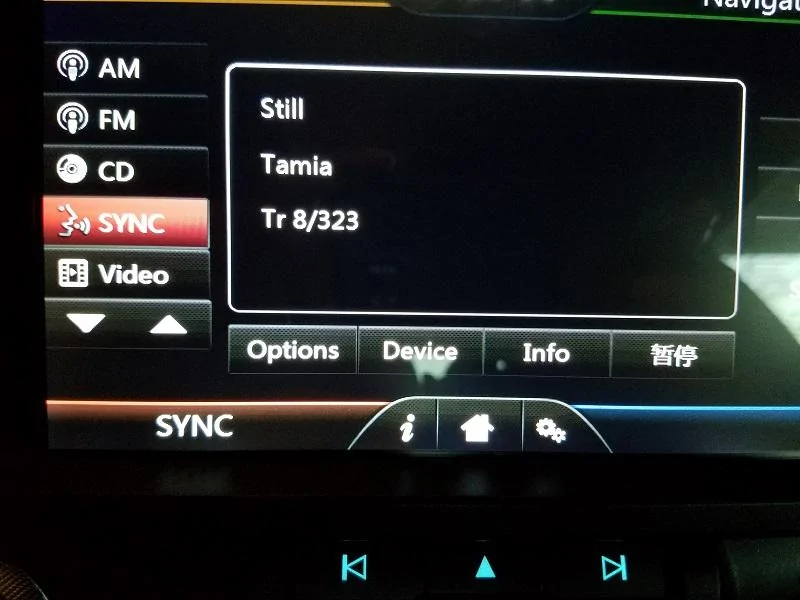
Issue #3 I'm still working on it as well. [MENTION=17118]ranger11x[/MENTION] and I tore down all the files that contained pictures and we didn't find anything for the pause button. It's either "Hard Coded" or I still need to modify the other lang.xml I found... I will look for the T's typo if I can find it I'll modify it. Thanks for your help!:cheers:
 

RedfireV8

Well-Known Member
Joined
Sep 25, 2016
Threads
6
Messages
274
Reaction score
256
Location
Louisiana
First Name
Mike
Vehicle(s)
2019 GT PP1 A10
I'm glad you worked it out! If you ordered your unit from the link I sent you then you should have the latest one already installed. You don't need to re flash your unit.

For the issue #2 I'm still working on it but it seems to be coming from WinCE (Sync app uses a different kinda time/date settings).

Issue #3 I'm still working on it as well. [MENTION=17118]ranger11x[/MENTION] and I tore down all the files that contained pictures and we didn't find anything for the pause button. It's either "Hard Coded" or I still need to modify the other lang.xml I found... I will look for the T's typo if I can find it I'll modify it. Thanks for your help!:cheers:
Ah ok I gotcha man, didn't realize yall were still working on it, no problem. :thumbsup:
 

Sponsored

EcoBoostDan

New Member
Joined
Nov 29, 2016
Threads
0
Messages
3
Reaction score
1
Location
Charlotte, NC
Vehicle(s)
2017 Mustang EcoBoost
Thanks to all who have contributed to this thread! I've read all 18 pages with great interest. Based on all that I've read, I've installed the NextGen Navigation, changed or corrected a bunch of the button names/labels, and uploaded a custom loading screen. I did not do the K2792-1 firmware update, as my unit shows as having come with an April 11, 2016 build. What started as a system that I was very disappointed with and almost returned, has turned into a fun little project that I really like now.


So the only significant complaint I have now is that the Navigation voice is muted. It was muted with the original iGo Navi, and still is with the NextGen. I've tried just about every possible combination of volume options in the navi software and Tomtop I can think of. The RS speakers mute for a few seconds whenever I press a button, or when it would normally give a direction in Navi mode. The LS speakers continue to play music.

Any thoughts as to what I might try to fix this? Thanks again... Keep up the great development work!
 

StangATX

Project Corrupted Cyclone
Joined
Dec 7, 2015
Threads
28
Messages
1,197
Reaction score
309
Location
Austin, TX
Vehicle(s)
2016 S550 White Corrupted Cyclone
Thanks to all who have contributed to this thread! I've read all 18 pages with great interest. Based on all that I've read, I've installed the NextGen Navigation, changed or corrected a bunch of the button names/labels, and uploaded a custom loading screen. I did not do the K2792-1 firmware update, as my unit shows as having come with an April 11, 2016 build. What started as a system that I was very disappointed with and almost returned, has turned into a fun little project that I really like now.


So the only significant complaint I have now is that the Navigation voice is muted. It was muted with the original iGo Navi, and still is with the NextGen. I've tried just about every possible combination of volume options in the navi software and Tomtop I can think of. The RS speakers mute for a few seconds whenever I press a button, or when it would normally give a direction in Navi mode. The LS speakers continue to play music.

Any thoughts as to what I might try to fix this? Thanks again... Keep up the great development work!
I'm glad you decided to keep it!:thumbsup: Tomorrow I'll try to make a video of my settings for the GPS and I'll upload it on the forum and the website. I didn't have my car with me today. I'm on 2 wheels lol. Anyways... I'll try my best to have that video ready tomorrow during the day. Also make sure you got Nextgen ready with the files I uploaded.
 

EcoBoostDan

New Member
Joined
Nov 29, 2016
Threads
0
Messages
3
Reaction score
1
Location
Charlotte, NC
Vehicle(s)
2017 Mustang EcoBoost
I'm glad you decided to keep it!:thumbsup: Tomorrow I'll try to make a video of my settings for the GPS and I'll upload it on the forum and the website. I didn't have my car with me today. I'm on 2 wheels lol. Anyways... I'll try my best to have that video ready tomorrow during the day. Also make sure you got Nextgen ready with the files I uploaded.
So I took it all apart again to see if any wiring was jacked. Turns out, the center plug on the CD player wasn't fully seated. They're tough to get to, so I just missed it when I put it all together. All good now! Thanks for the offer to help though, StangATX!

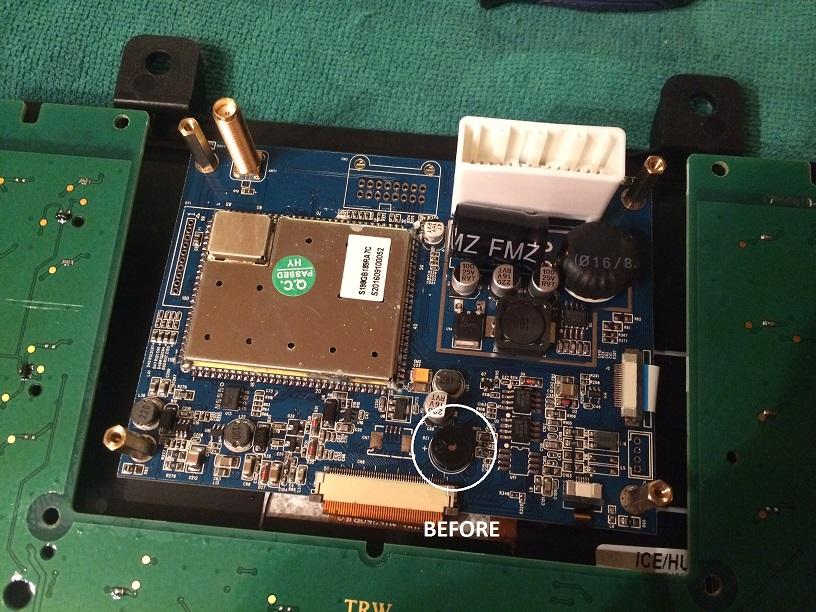
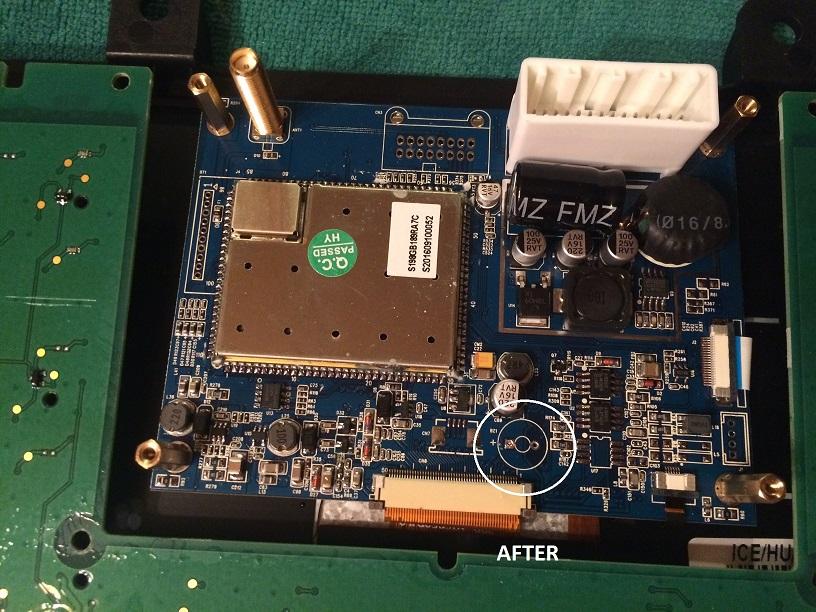
While I had it apart, I decided to yank that annoying beeper right off the circuit board with a pair of pliers. No more beep, and it didn't cause any other issues (at least that I'm aware of). Here's some pics....

2uj5hmo.jpg


ejy1za.jpg
 

HrDrift

Well-Known Member
Joined
May 22, 2015
Threads
17
Messages
82
Reaction score
11
Location
Torrance
Vehicle(s)
2015 mustang gt
I was thinking about doing something like that a long time ago. Thanks for showing us the beep part!
 

RedfireV8

Well-Known Member
Joined
Sep 25, 2016
Threads
6
Messages
274
Reaction score
256
Location
Louisiana
First Name
Mike
Vehicle(s)
2019 GT PP1 A10
Nice and good to know! Hate to take mine apart again but I may if the beep gets more annoying to me. Few questions.

1. Is it possible to have the unit NOT come on when you unlock the car? Maybe the factory screen did this too, don't remember. I noticed (if using the door handle sensors) that if you open the passenger side it doesn't turn on but if you open the drivers side door it does.

2. Is it possible to have a Google Maps type navigation? With the way the unit is currently or maybe with the Sync3 layout (once it comes out :D).
 

Sponsored

Agent_S550

Legend in his own mind
Joined
Jun 30, 2016
Threads
18
Messages
852
Reaction score
340
Location
South Carolina
Vehicle(s)
2016 Magnetic GT PP
Nice and good to know! Hate to take mine apart again but I may if the beep gets more annoying to me. Few questions.

1. Is it possible to have the unit NOT come on when you unlock the car? Maybe the factory screen did this too, don't remember. I noticed (if using the door handle sensors) that if you open the passenger side it doesn't turn on but if you open the drivers side door it does.

2. Is it possible to have a Google Maps type navigation? With the way the unit is currently or maybe with the Sync3 layout (once it comes out :D).
Factory does this. It "Wakes" the unit when you unlock the car.

Down for a google map edition. That'd be much more beneficial.
 

honeygirl278

New Member
Joined
Nov 24, 2016
Threads
0
Messages
2
Reaction score
0
Location
Georgia
Vehicle(s)
2016 V6 Ford Mustang
TomTop Language Fix

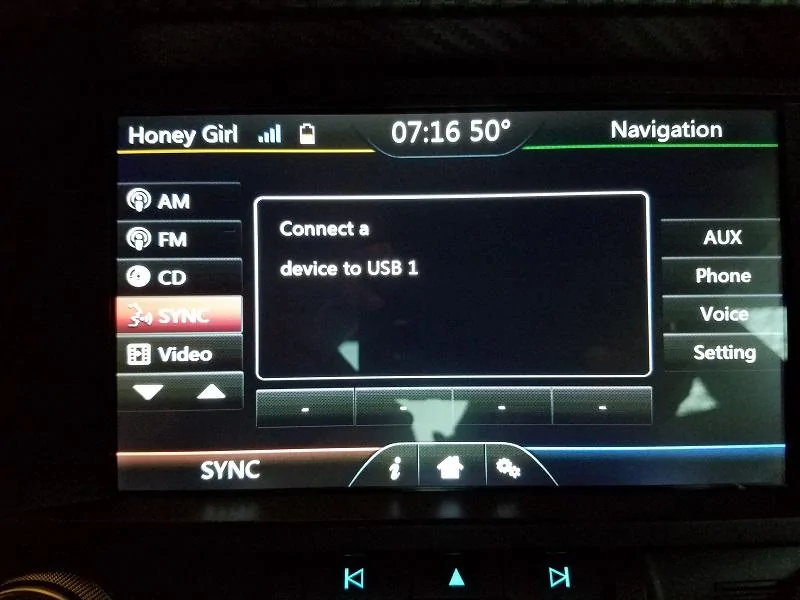
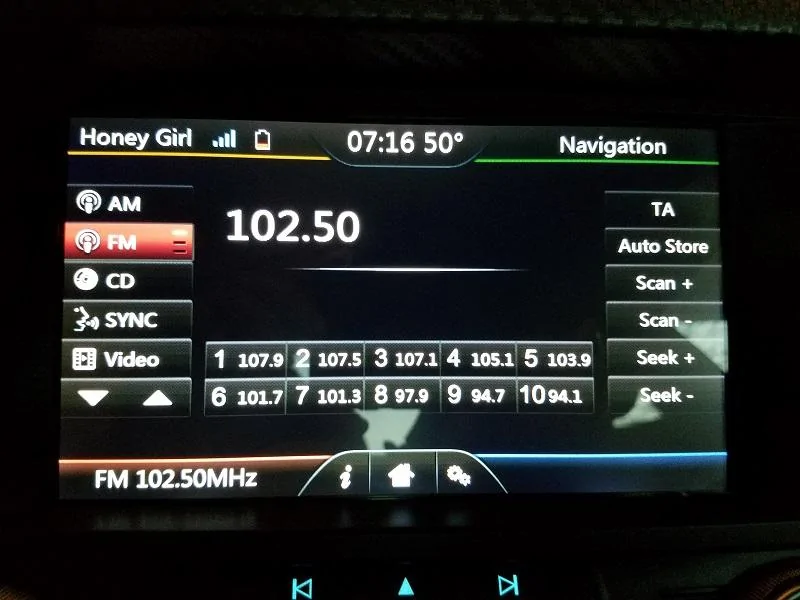
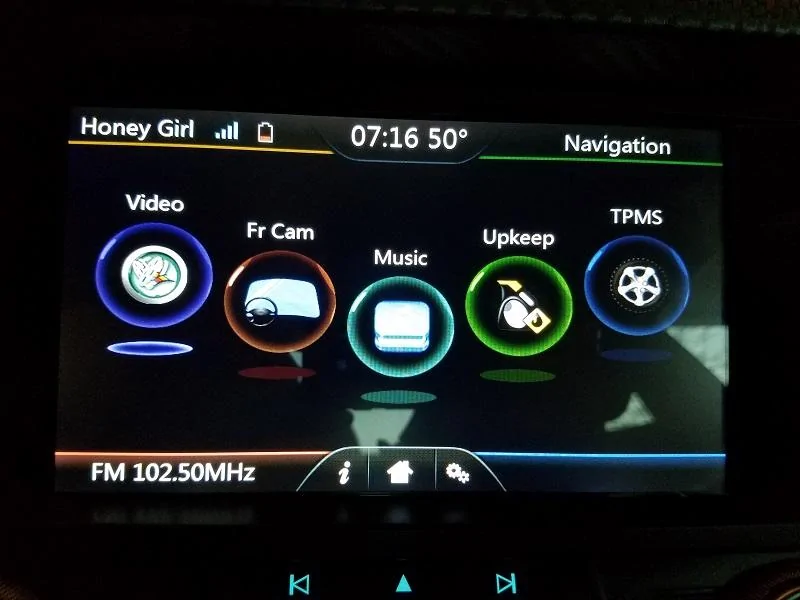
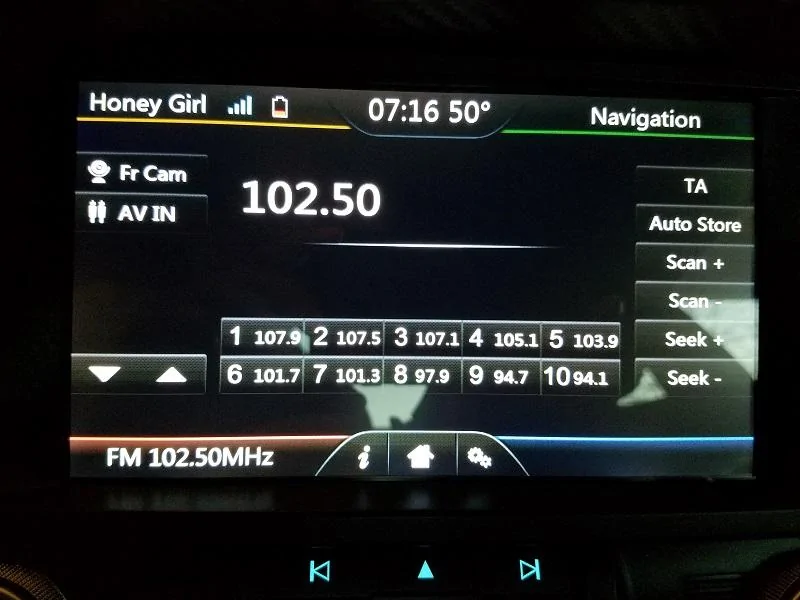
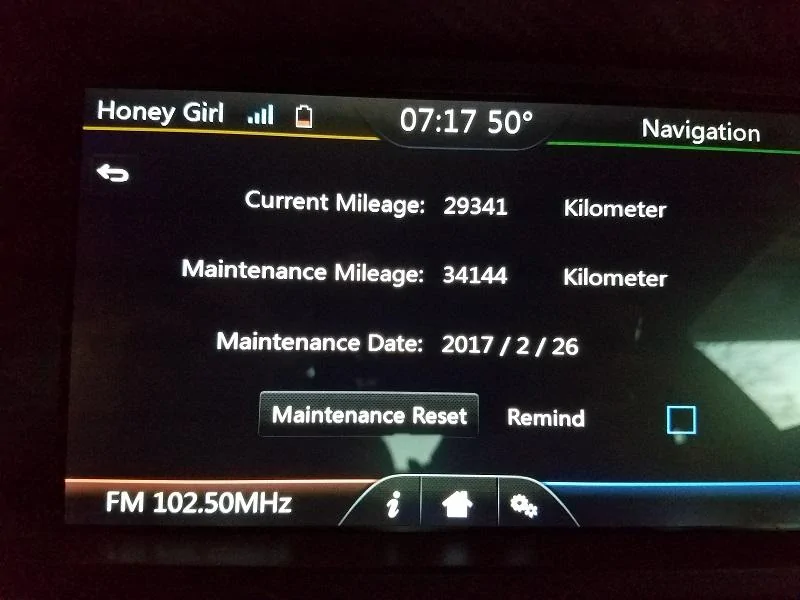
Here are a few button updates I have done myself. Has anyone figured out the Chinese Play/Pause button? :frusty:

20161201_071613.webp


20161201_071623.webp


20161201_071632.webp


20161201_071651.webp


20161201_071711.webp


20161201_072017.webp


Any luck with the GPS talking?
 

Pesti13nce

Well-Known Member
Joined
Mar 2, 2016
Threads
18
Messages
136
Reaction score
15
Location
Apple Valley, CA
Vehicle(s)
2016 EB Base manual
I'm purposely getting a TomTop unit instead of the Raxiom or Modaddiction unit JUST because i love doing these modifications.. I was big time into the phone flash/modding before and i'm looking forward to my unit.
 

Jdenkevitz

Well-Known Member
Joined
May 3, 2016
Threads
22
Messages
411
Reaction score
132
Location
Maryland
Vehicle(s)
2016 Ruby GT PP. Former 2016 Ecoboost owner.
Thanks to all who have contributed to this thread! I've read all 18 pages with great interest. Based on all that I've read, I've installed the NextGen Navigation, changed or corrected a bunch of the button names/labels, and uploaded a custom loading screen. I did not do the K2792-1 firmware update, as my unit shows as having come with an April 11, 2016 build. What started as a system that I was very disappointed with and almost returned, has turned into a fun little project that I really like now.


So the only significant complaint I have now is that the Navigation voice is muted. It was muted with the original iGo Navi, and still is with the NextGen. I've tried just about every possible combination of volume options in the navi software and Tomtop I can think of. The RS speakers mute for a few seconds whenever I press a button, or when it would normally give a direction in Navi mode. The LS speakers continue to play music.

Any thoughts as to what I might try to fix this? Thanks again... Keep up the great development work!
I have gotten the voice to work in nav, but it required a weird step. I use Waze most of the time, so Im sorry I don't recall the exact details. Something about changing the volume in a different menu, THEN going into NAV. It may have conflicted with using another source as well (ie you couldn't have nav voice as well as play mp3's from a usb at the same time).
 

honeygirl278

New Member
Joined
Nov 24, 2016
Threads
0
Messages
2
Reaction score
0
Location
Georgia
Vehicle(s)
2016 V6 Ford Mustang
TomTop Audio Issue

I have gotten the voice to work in nav, but it required a weird step. I use Waze most of the time, so Im sorry I don't recall the exact details. Something about changing the volume in a different menu, THEN going into NAV. It may have conflicted with using another source as well (ie you couldn't have nav voice as well as play mp3's from a usb at the same time).
This isn't a fix but a sort of workaround. (You will need to have an USB drive with a mp4 file on it) Ok so, in order to have audio for navigation: 1. Set system audio to about 8 and navigation sound to 5. 2. Start mp4 video. Enter navigation and you will have sound.

To have audio while navigation is running. Again you must start the mp4 video. Then enter navigation. Leave navigation running and click back to start sync or radio. Open navigation back.

Unfortunately once you turn off your vehicle everything will reset. Hopefully someone can find a fix to this. :eyebulge: It's a lot but it works. Tested on two vehicles multiple times with same results.

Forgot to add: GPS files must be in the second folder on the NaviCard. Example: Whatever GPS you are using *Folder (Primo)>Whatever GPS you are using *Files (Files to run GPS)
Sponsored

 
Last edited:


Top