Sponsored

Tomtop Unit Fixes

StangATX

Project Corrupted Cyclone
Joined
Dec 7, 2015
Threads
28
Messages
1,197
Reaction score
309
Location
Austin, TX
Vehicle(s)
2016 S550 White Corrupted Cyclone
So [MENTION=20219]StangATX[/MENTION] theres several units of these suckers posted on eBay, any recommendations on buying from a specific seller? looking to get this sucker next week! Thanks for all the awesome work you have done!
Hey [MENTION=16535]Drugdealr[/MENTION] I bought this one for myself on Amazon [Click Here] Let me know whenever you receive it. :cheers:

The theme you've made looks closer to SYNC3 than the Moddiction unit I have. That picture looks like you got HD radio to show the station ID information too (like our SYNC2 had). You may convince me to buy a TomTop unit and sell my Moddiction unit if you keep making such awesome progress!

Great job!
I'm using stuff from Moddiction and some other from the real Sync3 this might be why you think it's closer to the real Sync3 than Moddiction lol. I wish I would've have both units and like that I could work on the cheaper one to make it as close as the real Sync3 and everybody could buy a Tomtop which is way more affordable than the Moddiction/Sintegrate... I'm not trying to kill their business I'm just all about open source project... and It'll be awesome to able to do whatever we want with what we buy. (kinda like Android. I root my phone because I should have the right to do whatever it please me to do with it).
Sponsored


HrDrift

Well-Known Member
Joined
May 22, 2015
Threads
17
Messages
82
Reaction score
11
Location
Torrance
Vehicle(s)
2015 mustang gt
so im having problems with the time not saving. Before it worked perfectly fine but after when my battery died on my car. Battery died because i havent driven it for 2 weeks because of the dash cam. So ever since my battery died the device doesnt want to save the time. It go's back to 8:03 everytime i start up the car. I did the update again and still the same thing. I always have to open up the navigation in order to show the right time.
 

StangATX

Project Corrupted Cyclone
Joined
Dec 7, 2015
Threads
28
Messages
1,197
Reaction score
309
Location
Austin, TX
Vehicle(s)
2016 S550 White Corrupted Cyclone
so im having problems with the time not saving. Before it worked perfectly fine but after when my battery died on my car. Battery died because i havent driven it for 2 weeks because of the dash cam. So ever since my battery died the device doesnt want to save the time. It go's back to 8:03 everytime i start up the car. I did the update again and still the same thing. I always have to open up the navigation in order to show the right time.
Here's what you can try:

1*. Try to reset the unit (click on the Info icon and reset)
2*. Try to reset it via the little hole under the SDCard slot
3*. (Painful) swap to your old stereo change the clock and then swap again to put Tomtop.

Let me know.

Anything new yet?

Not really I've been busy lately and now it's the holidays but I'm still here! I'm preparing the SDCard kit and I'm changing the site to create a shopping cart with Paypal.
 

StangATX

Project Corrupted Cyclone
Joined
Dec 7, 2015
Threads
28
Messages
1,197
Reaction score
309
Location
Austin, TX
Vehicle(s)
2016 S550 White Corrupted Cyclone
Here's an update guys!

First let's talk about the backlight. I might have found almost a way to fix the issue. Well, At least I know where it's coming from... I was able to save it (kinda) with the full brightness and after reboot to have it still saved. Here's the issue though... As soon as I'm starting the Sync2 app (what you actually see on your unit) it reset my backlight. The problem isn't hardware/OS related. It's the sync app that's not codded properly. I'll try to find a way to bypass it.

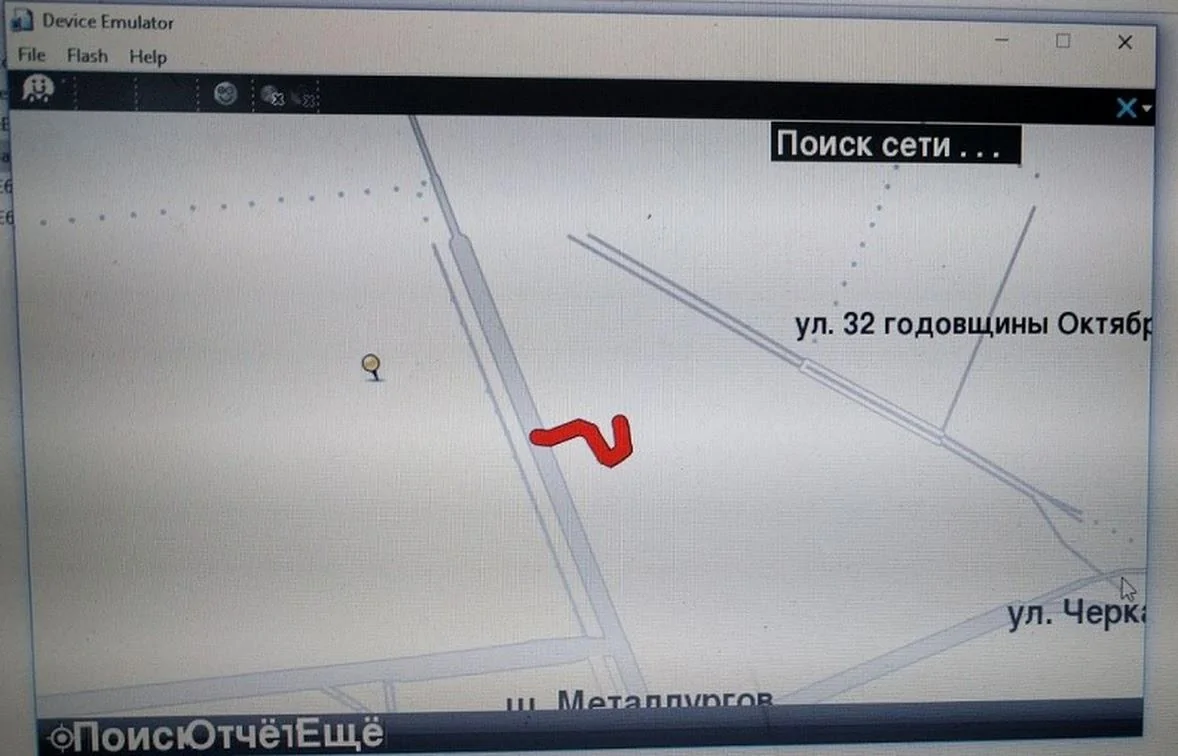
2nd. @ranger11x & I were able to run Waze (From there nothing new... We knew it was possible!) But with the emulator that I built we were able to confirm it'll work with our unit! My emulator just have an internet connection to load the map (That's the only difference from our unit). I'm just trying to figure out a way to get the Wi-Fi on it... I saw it was possible because it was setup in the factory before and then removed. Also, I believe we could use a Bluetooth dongle and share our phone's data and we will be able to get internet and Waze running!

Here's a screenshot of Waze running (I know it's Russian but we have an English Version):

IMG-20161123-WA0010.webp
 

Sponsored

Agent_S550

Legend in his own mind
Joined
Jun 30, 2016
Threads
18
Messages
852
Reaction score
340
Location
South Carolina
Vehicle(s)
2016 Magnetic GT PP
I would love to know what units are compatible on ebay with the software updates your doing. It's not clear what are TomTop unit's and what aren't.
 

StangATX

Project Corrupted Cyclone
Joined
Dec 7, 2015
Threads
28
Messages
1,197
Reaction score
309
Location
Austin, TX
Vehicle(s)
2016 S550 White Corrupted Cyclone

StangATX

Project Corrupted Cyclone
Joined
Dec 7, 2015
Threads
28
Messages
1,197
Reaction score
309
Location
Austin, TX
Vehicle(s)
2016 S550 White Corrupted Cyclone

Sponsored

tebutl02

New Member
Joined
Oct 19, 2015
Threads
0
Messages
2
Reaction score
0
Location
Lexington
Vehicle(s)
2015 Mustang Ecoboost
Hey guy's, thank you for all your help. It has been very beneficial as I update my TomTop. The links for a lot of the updates I am looking for have gone dead since posted. Can anyone post the links for the Celsius to Fahrenheit, the Chinese symbols in the menu, and the "phone connected" label? Are there any tutorials for these posted as well? I want to fix these issues with my TomTop but every link I come across has been dead. Thank you for your time.
 

StangATX

Project Corrupted Cyclone
Joined
Dec 7, 2015
Threads
28
Messages
1,197
Reaction score
309
Location
Austin, TX
Vehicle(s)
2016 S550 White Corrupted Cyclone
Happy Thanksgiving y'all! Here's a little teaser of what I've done today!

[ame]

[ame]

I'm still working on it though... It seems to save but after multiple reboot the unit reset the backlight again... BUT... We're getting there!!
 

HrDrift

Well-Known Member
Joined
May 22, 2015
Threads
17
Messages
82
Reaction score
11
Location
Torrance
Vehicle(s)
2015 mustang gt
Here's what you can try:

1*. Try to reset the unit (click on the Info icon and reset)
2*. Try to reset it via the little hole under the SDCard slot
3*. (Painful) swap to your old stereo change the clock and then swap again to put Tomtop.

Let me know.
Thank you [MENTION=20219]StangATX[/MENTION]! Swapping my old stereo worked! It took a lot of work but it was worth it!

keep up with the good work excited to see the Sync 3 Skin!:headbang:
 

RedfireV8

Well-Known Member
Joined
Sep 25, 2016
Threads
6
Messages
274
Reaction score
256
Location
Louisiana
First Name
Mike
Vehicle(s)
2019 GT PP1 A10
Got mine in over the Thanksgiving holidays and got it installed. Wasn't too bad but spent forever trying to figure out how to get that 12v power plug out and swapped over. Felt dumb when I figured it out and it took all of 45 seconds to get it off and onto the new TomTop panel. Also got a little nervous when the backup camera had just a blue screen but figured it out and got the 2 yellow AV plugs connected and working.

The one I got already had the April 2016 update so that was nice. Also went ahead and got the GPS updated with the new software, changed my boot picture with one of my car and also got the "one Connected" thing fixed. I'm uber excited to see what the TomTop guru's come out with and I'm especially excited for the Sync3 stuff! I'm pretty handy/tech savy so if yall ever need help or need a test subject just let me know.

After the install, I do have a few issues/questions that I was looking for a little help with.

1. When in Navigation the music or sound will turn off when you press a button or while scrolling. Is there a fix for that? I played with it for a minute and it almost seems like there's an option causing that but couldn't figure it out. :shrug:

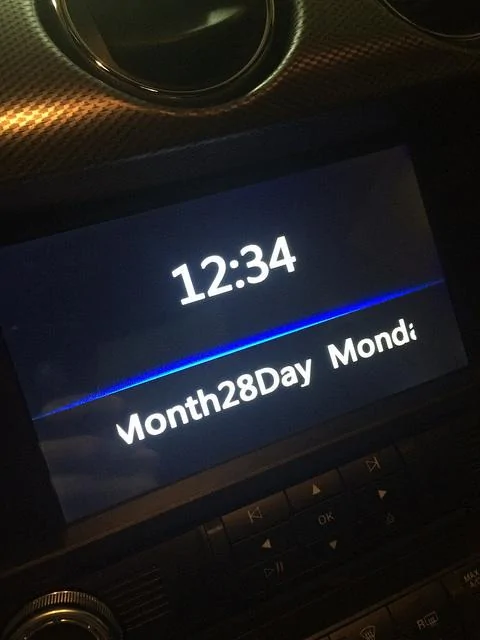
2. If you press the "Vol", power button, and turn the unit off (NOT the car) and you have the screen saver with the date and time, mine is way off and shows this below. Also the date is ahead by 1 day. Is there a fix for this?

31295601165_94b94519e0_z.webp


3. While I was able to fix the "one Connected" with that lang.xml file, the Pause button is still in Chinese. I was able to look in the xml file and see that it is changed in there but for some reason it still shows up Chinese on the screen.
Edit: Just thought of something. This is on the Sync screen. I use an ipod connected to the USB in the center console. I never checked the CD player Pause button. Are they the same or are they 2 different/separate media players? (Hopefully all that made sense)

I'm sure there's a few little things I'm forgetting but any help is appreciated. Is it possible we could update the 1st post or have a section on the website with a tips and tricks section going over all the common issues and fixes to those issues? If there already is, my apologies for missing it. So happy to see others coming together and working on making a decent product better! Keep up all the good and hard work! Thank you!
 
Last edited:

RedfireV8

Well-Known Member
Joined
Sep 25, 2016
Threads
6
Messages
274
Reaction score
256
Location
Louisiana
First Name
Mike
Vehicle(s)
2019 GT PP1 A10
Think I found my answer for 1. Need to turn off GPS voice. Will try that later. Any help with the others is appreciated.
Sponsored


Top