Sponsored

Help uploading pictures

dh3605

Well-Known Member
Joined
Aug 8, 2015
Threads
34
Messages
209
Reaction score
83
Location
Nashville Tn
Vehicle(s)
2019 GT, 301a, Auto, Black, Black accent package
When I try to upload from my desktop, I get a message that the upload failed without any explanation. I could use some help.
Sponsored

 

MaskedRacerX

Driver
Joined
Sep 20, 2015
Threads
73
Messages
5,611
Reaction score
4,688
Location
Vilano Beach, FL
First Name
DT
Vehicle(s)
'21_JWS4XE / '21_TM3P
Maybe there's a size or resolution limitation, I don't recall running into it on a vBulletin based system, but it might be a setting.

Do you have anyway to locally resize them first?

Alternately - and I'd actually recommend this - sign up for an photo archiving site like Flickr, Photobucket, even Google Photos. Then you not only get a way to post and link to your images, but you get a full res backup copy (and neat things like cataloging, slide shows, etc.)

Those sites even have sharing options that automatically generates the required BB code.
 

Enzo

Well-Known Member
Joined
Nov 24, 2015
Threads
61
Messages
597
Reaction score
311
Location
Orlando
First Name
Enzo
Vehicle(s)
2018 Mustang GT PP1
Theres a size limit, i believe its 700kb per photo. you can open paint on windows and save it at lower quality or open Preview app on mac and save it as lower quality. You can also use Flickr or any other photo hosting website.
 
OP
OP

dh3605

Well-Known Member
Joined
Aug 8, 2015
Threads
34
Messages
209
Reaction score
83
Location
Nashville Tn
Vehicle(s)
2019 GT, 301a, Auto, Black, Black accent package
Theres a size limit, i believe its 700kb per photo. you can open paint on windows and save it at lower quality or open Preview app on mac and save it as lower quality. You can also use Flickr or any other photo hosting website.
I am challenged with this sort of thing. I can get the pics to Flickr but can't get them uploaded from there.
 

Enzo

Well-Known Member
Joined
Nov 24, 2015
Threads
61
Messages
597
Reaction score
311
Location
Orlando
First Name
Enzo
Vehicle(s)
2018 Mustang GT PP1
Try doing this <img>put link in here</img> that should pop up the image on the forum.
 

Sponsored

Enzo

Well-Known Member
Joined
Nov 24, 2015
Threads
61
Messages
597
Reaction score
311
Location
Orlando
First Name
Enzo
Vehicle(s)
2018 Mustang GT PP1
nvm scratch that just click the little icon with the yellow back ground and mountain on it and put link in there
 

Enzo

Well-Known Member
Joined
Nov 24, 2015
Threads
61
Messages
597
Reaction score
311
Location
Orlando
First Name
Enzo
Vehicle(s)
2018 Mustang GT PP1
 
OP
OP

dh3605

Well-Known Member
Joined
Aug 8, 2015
Threads
34
Messages
209
Reaction score
83
Location
Nashville Tn
Vehicle(s)
2019 GT, 301a, Auto, Black, Black accent package
nvm scratch that just click the little icon with the yellow back ground and mountain on it and put link in there
Thanks for your help. When I do that, all that is posted is the link.
 

Enzo

Well-Known Member
Joined
Nov 24, 2015
Threads
61
Messages
597
Reaction score
311
Location
Orlando
First Name
Enzo
Vehicle(s)
2018 Mustang GT PP1
Thanks for your help. When I do that, all that is posted is the link.
yeah just the link of the photo. and it will pop up when you post it.
 
OP
OP

dh3605

Well-Known Member
Joined
Aug 8, 2015
Threads
34
Messages
209
Reaction score
83
Location
Nashville Tn
Vehicle(s)
2019 GT, 301a, Auto, Black, Black accent package

Sponsored

Enzo

Well-Known Member
Joined
Nov 24, 2015
Threads
61
Messages
597
Reaction score
311
Location
Orlando
First Name
Enzo
Vehicle(s)
2018 Mustang GT PP1
try this
 

MaskedRacerX

Driver
Joined
Sep 20, 2015
Threads
73
Messages
5,611
Reaction score
4,688
Location
Vilano Beach, FL
First Name
DT
Vehicle(s)
'21_JWS4XE / '21_TM3P
I am challenged with this sort of thing. I can get the pics to Flickr but can't get them uploaded from there.
So when you go to your Flickr account, you see the photos, correct?

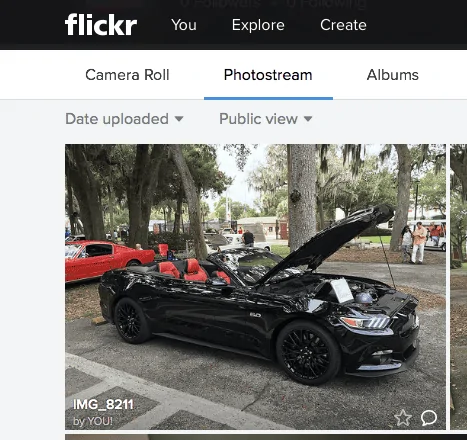
Go to your photo stream (Pic 1) and click on a photo

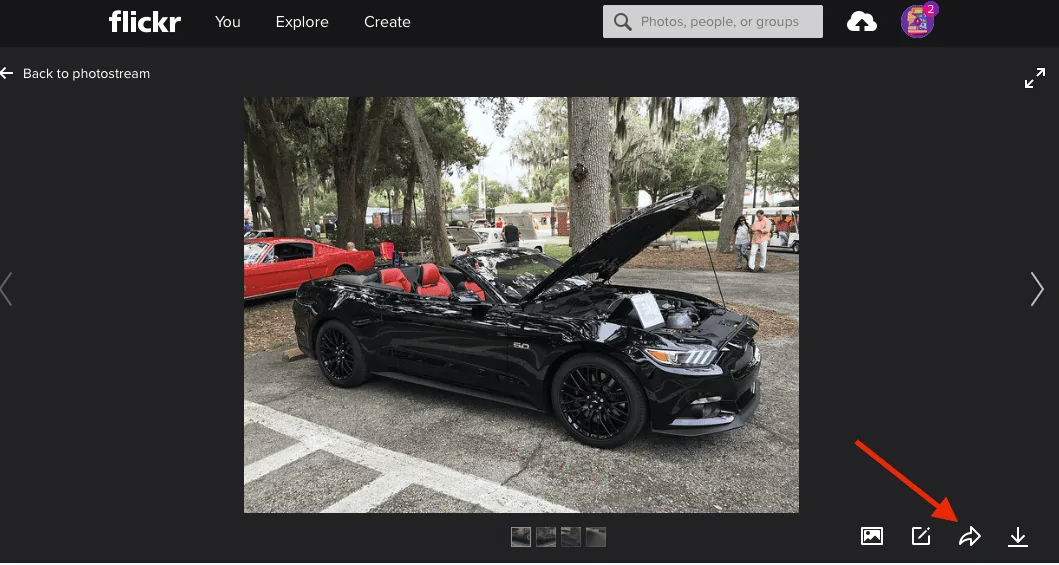
From the photo viewer, click the share button (Pic 2, red arrow)

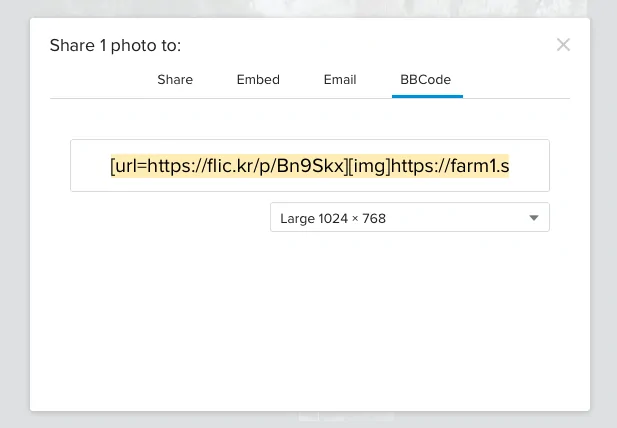
Then you'll see a share sheet, with tabs for different share mechanisms, click over to BBCode (that's the code you use on this bullet board), select a size, and just cut and paste the resulting code right into your post.
Screen Shot 2015-12-09 at 9.05.11 AM.webp
Screen Shot 2015-12-09 at 9.10.36 AM.webp
Screen Shot 2015-12-09 at 9.11.12 AM.webp
 
OP
OP

dh3605

Well-Known Member
Joined
Aug 8, 2015
Threads
34
Messages
209
Reaction score
83
Location
Nashville Tn
Vehicle(s)
2019 GT, 301a, Auto, Black, Black accent package
So when you go to your Flickr account, you see the photos, correct?

Go to your photo stream (Pic 1) and click on a photo

From the photo viewer, click the share button (Pic 2, red arrow)

Then you'll see a share sheet, with tabs for different share mechanisms, click over to BBCode (that's the code you use on this bullet board), select a size, and just cut and paste the resulting code right into your post.

Thanks so much. I finally got it .
Sponsored


Top