
Sponsored

Anyone willing to log CAN from HS3?

DreamMustang

Member
Joined
Jul 17, 2026
Threads
1
Messages
5
Reaction score
6
Location
Iowa
Vehicle(s)
2009 Ford Mustang
I'm working on retrofitting the 2018+ digital cluster in an S197. Any and all CAN data from HS3 with/without digital cluster should be helpful! End goal, entire database of CAN for controlling digital cluster.

I believe you tap in on the OBD port , but not at the port, the connection to the port(GWM). Also if you have forscan, I'd appreciate a profile for an 18+. You'd open Forscan that first page has a Profiles tab, highlight the appropriate profile and click the save icon at the bottom.

Thanks for your time!
Sponsored

 
Last edited:
MuddyPaws

Active Member
Joined
Mar 11, 2020
Threads
2
Messages
35
Reaction score
30
Location
United States
Vehicle(s)
2019 Bullitt
You might want to check out https://github.com/v-ivanyshyn/parse_can_logs

I've been mapping my BMWs using ISTA+ along with SavvyCan. I wonder if I could do the same with Forscan and SavvyCan. It's much easier to send a request (e.g. ISTA+) and see the response through SavvyCan as opposed to intercepting "random" signals and decoding.

Also, do some searching for .dbc files for S550, you may find what you need.
 
OP
OP

DreamMustang

Member
Joined
Jul 17, 2026
Threads
1
Messages
5
Reaction score
6
Location
Iowa
Vehicle(s)
2009 Ford Mustang
You might want to check out https://github.com/v-ivanyshyn/parse_can_logs

I've been mapping my BMWs using ISTA+ along with SavvyCan. I wonder if I could do the same with Forscan and SavvyCan. It's much easier to send a request (e.g. ISTA+) and see the response through SavvyCan as opposed to intercepting "random" signals and decoding.

Also, do some searching for .dbc files for S550, you may find what you need.
I did find those the parse_can_logs, it saved me and allowed me to start bruteforcing(fuzzing every possible CAN ID with a few bits that change across all bytes), that had the ID/messages I needed for digital cluster to boot, I believe some of the ID's were the same too but still a lot missing. It was a wonderful starting point! I think the .dbc search is what lead me to this point? I'll double check.
 
OP
OP

DreamMustang

Member
Joined
Jul 17, 2026
Threads
1
Messages
5
Reaction score
6
Location
Iowa
Vehicle(s)
2009 Ford Mustang
You may already have this too. https://github.com/EricTurner3/s550-canbus/blob/master/database.md It has data from older S550, but I would doubt Ford would change these, espcially within the same model.
That one is what lead to the interest in the retrofit. The S197 CAN info was not readily available. Right now, most of the data is HS1 or not matching up, but I've got a GWM(the obd port is a module that bridges all the busses and acts as a gateway in the S550) coming so I can test the HS1 data and read the outputs on HS3. Which is what the cluster exclusively uses.
 
OP
OP

DreamMustang

Member
Joined
Jul 17, 2026
Threads
1
Messages
5
Reaction score
6
Location
Iowa
Vehicle(s)
2009 Ford Mustang
Looking for HS-CAN3 logs — 2 wires at the gateway module, no cutting, ~10 minutes

Applies to 2018-2023 Mustangs. Analog cluster cars are just as useful as digital ones — more on that below.

What this is

I've been reverse-engineering the S550 instrument cluster on a bench — driving the gauges, telltales, message center and menus from a microcontroller over CAN. A fair bit is mapped already:

  • The frame that wakes the cluster up
  • Tachometer, speedometer, gear/PRNDL, coolant temp, TPMS, boost, intake air temp
  • Oil pressure lamp, several warning messages, ABS/traction telltales
  • The steering-wheel and menu button codes
  • As-Built block layout (the FORScan 720-xx lines)

What a bench can't give me is real traffic. Ford's own service documentation lists gauges the cluster supports that I have never been able to find on the bus, because the modules that send them aren't on my bench:

  • Air/fuel ratio
  • Cylinder head temperature
  • Engine oil temperature
  • Transmission fluid temperature
  • Rear differential fluid temperature

All five originate at the PCM and reach the cluster translated by the Gateway Module. One short log from a running car would very likely pin all of them.

Everything I find goes straight back out to this forum — IDs, byte positions, scaling, the works. Nothing paywalled, nothing held back.

Why analog-cluster cars count too

The traffic I need is what the gateway module puts onto HS-CAN3. The gateway translates messages from the other networks onto that bus regardless of which cluster is fitted, and the PCM broadcasts its data either way. The digital cluster just displays more of it. So a 2019 GT with the analog cluster should carry essentially the same frames — please don't skip on that basis.

Why it can't be done through the OBD port

The cluster listens to exactly one bus: HS-CAN3. Everything from the other networks gets converted onto it by the Gateway Module (GWM). HS-CAN3 is not present on the OBD-II connector — so an OBD dongle physically cannot see this traffic. That's why nobody has these logs already, and why the tap has to be at the gateway, where both wires sit side by side in one connector.

The two wires

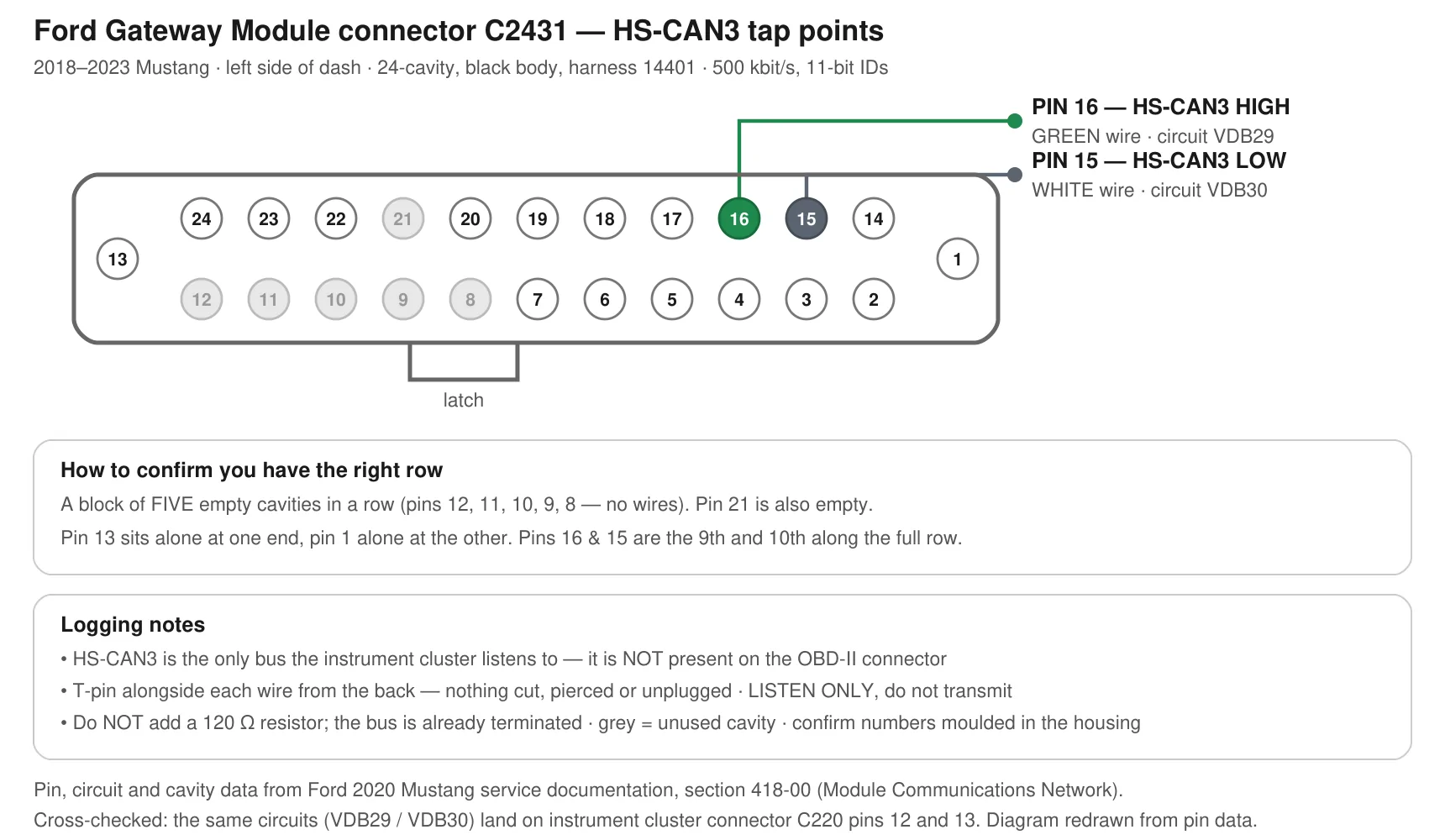
Gateway module connector C2431, left side of the dash. Black, 24 cavities.

PinSignalWire colourFord circuit
16HS-CAN3 HIGHGreenVDB29
15HS-CAN3 LOWWhiteVDB30

500 kbit/s, standard 11-bit IDs.

GWM_C2431_HSCAN3_tap.webp
]​

Five ways to confirm you're in the right spot — you don't have to trust my drawing's orientation:

  1. You're on the top, back side of the OBD connector
  2. A block of five empty cavities in a row (pins 12, 11, 10, 9, 8 — no wires at all)
  3. Pin 1 sits alone at one end of the connector, pin 13 alone at the other
  4. Pins 16 and 15 are the 9th and 10th cavities along the fully-populated row
  5. Green and white, right next to each other

Pin numbers are molded into the connector housing — check against those before you probe. My diagram is a redraw, so treat the molded numbers as the authority.

How to tap it with T-pins (nothing cut, nothing damaged)

Sewing/quilting T-pins are the standard trick. Thin, stiff, and the T-shaped head gives an alligator clip something to bite. A couple of dollars at any fabric or craft shop — get steel, roughly 1.5-2in / 38-50mm.

  1. Leave the connector plugged in. You're going in from the back — the side the wires come out of.
  2. Find the green (pin 16) and white (pin 15) wires at the cavities shown.
  3. Slide a T-pin alongside the wire into the cavity, following the wire in. Go gently and let it find its way — it'll touch the metal terminal after about 1/4-1/2in / 6-12mm. Don't pierce the insulation, and don't force it. If it won't go, back out and try a slightly different angle.
  4. Insulate the two pins from each other. This is the one step worth being fussy about — heatshrink or tape over the exposed shafts, and make sure the two heads can't touch each other, another pin, or chassis metal. Shorting CAN High to CAN Low (or either to ground) will upset the bus and can throw warning lights and DTCs.
  5. Clip your interface's CAN-H lead to the pin in 16 (green), CAN-L to 15 (white). Ground the interface to chassis or battery negative.
  6. Sanity check before logging: with everything off, resistance across the two pins should read roughly 60 ohms (two 120 ohm terminators in parallel). Key on, both lines should idle near 2.5V to ground. Either reading confirms you're on the right pair.
  7. When you're done, pull the T-pins straight out. Nothing to repair.

Please don't add a 120 ohm resistor — the bus is already terminated inside two modules, another one just loads it down.

Listen only. Please don't transmit on a live vehicle.

Interfaces that work

Anything that does raw 500 kbit/s CAN sniffing:

  • CANable / CANable 2.0 — cheap, works as SocketCAN (slcan / gs_usb) or with SavvyCAN
  • Macchina A0 / M2
  • PCAN-USB or Kvaser Leaf — if you already own one
  • Any ESP32 / Teensy / Arduino with an MCP2515 or SN65HVD230 board you've already got

An ELM327 or generic OBD dongle will not work — too slow, they filter, they can't do promiscuous capture, and they're wired to the OBD port which doesn't carry HS-CAN3 anyway.

Software and log formats

Whatever you're comfortable with, If that's copy/paste from arduino serial into text it all helps.

  1. candump (Linux, can-utils) — candump -l can0 writes a .log file. one line per frame, absolute timestamps, nothing dropped.
  2. SavvyCAN (free, open source, Windows/Mac/Linux) — purpose-built for this kind of work. Its CSV export is perfect.
  3. BusMaster (free, Windows) or Kayak (free, Java) — both fine.
  4. Vehicle Spy / CANalyzer — if you have access, native CSV export is fine.

If your tool does something else, a plain CSV works as long as it has:

Code:
timestamp, id (hex), dlc, data bytes (hex)
Two requests: please don't filter anything out — the unknown IDs are the whole point — and please send raw frames, not DBC-decoded output.

What to do during the log (this is the valuable part)[/SIZE/]

Even 60 seconds helps. If you can manage it, do this and jot down rough times:

  1. Key on, engine off — sit about 20 seconds (baseline)
  2. Start, idle about 30 seconds
  3. Rev in Park or Neutral — hold ~2000rpm for a few seconds, then ~3000, then back to idle
  4. If you're willing: a short drive, a few stops and turns, ~2 minutes
  5. Do some Trackapps settings like launch control, linelock, 0-60, 60-0 and so on?

Steps 1-3 on their own would probably crack the temperature and AFR gauges, because those values move in a way I can correlate against a known rpm trace.

Please include with your log

  • Year, model and trim (GT / EcoBoost / GT350 / GT500 — feature sets differ)
  • Analog or digital cluster
  • Rough timestamps of what you did, matched to the log
  • Anything you saw on the cluster while logging (gauge readings, warnings)

Thanks for your time. And if you'd rather not go poking around your own dash, completely understood — even a "2019 GT here, ask me things" reply is helpful.
Sponsored


Top