Sponsored

How to post pics with correct orientation

WhiplashGo

Well-Known Member
Joined
Aug 20, 2015
Threads
18
Messages
117
Reaction score
26
Location
NY
First Name
Jason
Vehicle(s)
2015 Mustang GT
I see people post pics that are rotated or upside down. I tried to save there pic & repost correct way but preview shows it the same way as person posting. How do I change my orientation when posting pics?
Sponsored


 

fionic

spaghettios and cheerios
Joined
Jun 8, 2014
Threads
9
Messages
3,180
Reaction score
618
Location
IL
Vehicle(s)
15 GT PP
I see people post pics that are rotated or upside down. I tried to save there pic & repost correct way but preview shows it the same way as person posting. How do I change my orientation when posting pics?
instead of attaching, upload it to an image host and embed the image. I think it has something to do with the size?
 

MaskedRacerX

Driver
Joined
Sep 20, 2015
Threads
73
Messages
5,611
Reaction score
4,688
Location
Vilano Beach, FL
First Name
DT
Vehicle(s)
'21_JWS4XE / '21_TM3P
It's because the phone camera does have a right-side-up and and upside-down orientation.

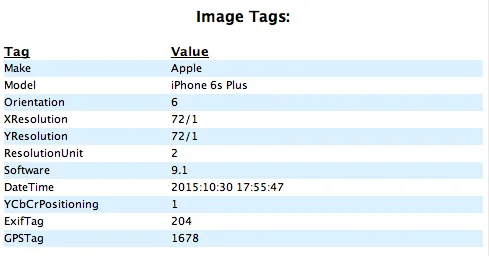
You just don't see it upside down on the device because in the EXIF data (which is extra information stored with a photo, includes things like LAT/LON from your GPS, f-stop, camera/phone manufacturer) it also stores a value that indicates the phone position, so that the image can be rotated when viewing on the device, so that it's "up" relative to how it was taken.

See orientation = 6 below (EXIF data from a photo taken Saturday).

Most export/transfer/photo cataloging apps also read that data and do an "orientation compensation" while copying it from the device.

So now that I've babbled about a bunch of s*** nobody cares about :D

Two solutions: determine "up" on the device and hold it that way if you want to upload direct _or_ export it to your desktop/photo app/photo cataloging website where they do the correction for you. :cheers:
Screen Shot 2015-11-02 at 7.28.01 AM.webp
Sponsored


Top